Calculate perfect delay times, reverb pre-delays, and LFO frequencies synced to your track.
🎛️ Delay Times & LFO Frequencies
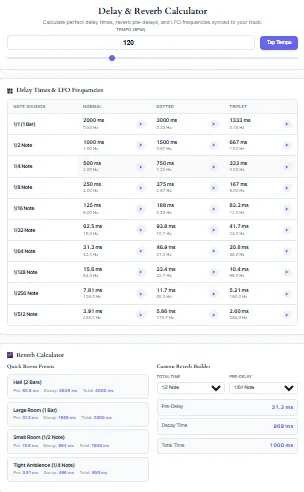
| Note Division | Normal | Dotted | Triplet |
|---|
🌌 Reverb Calculator
Quick Room Presets
Custom Reverb Builder
First and foremost, this delay time calculator is specifically designed to streamline your daily music production workflow. Consequently, you can instantly convert your track’s exact tempo into precise millisecond values. Moreover, our bpm delay time calculator ensures your audio effects stay perfectly locked to the grid.
As a result, you will never have to guess delay settings by ear ever again. In fact, professional mixing engineers rely on these exact mathematical calculations during every single session. Therefore, this tool is an absolutely essential addition to your digital audio workstation toolkit.
Additionally, it works seamlessly across all devices without requiring any complicated software downloads. Furthermore, it fully supports a vast array of musical genres and modern production styles. Ultimately, achieving perfect rhythmic synchronization has never been easier or more accessible for creators.
How a BPM Delay Time Calculator Works
Essentially, a bpm delay time calculator relies on a very simple and elegant mathematical formula. First, it takes your beats per minute and divides it into 60,000 milliseconds. Then, it multiplies that base value by your desired note division multiplier to find the exact time.
For example, a standard quarter note at 120 BPM equals exactly 500 milliseconds. Additionally, the tool automatically calculates dotted and triplet variations for your immediate convenience. As a result, you get a comprehensive chart of every possible rhythmic subdivision in seconds.
Moreover, this completely eliminates the need for manual math during a highly creative mixing session. Therefore, you can focus entirely on your artistic choices rather than tedious arithmetic. Ultimately, this mathematical precision ensures your effects always complement the underlying rhythm perfectly.
Features of Tool
Primarily, our delay time calculator offers a remarkably clean, distraction-free, and highly intuitive interface. First, it features a highly accurate manual BPM input field for entering exact tempos. Second, it includes a smooth, responsive slider for rapid, real-time tempo adjustments.
Third, the tool displays all results in both milliseconds and Hertz simultaneously. Furthermore, it provides a comprehensive table covering divisions from whole notes all the way down to 1/512 notes. Additionally, the interface is fully responsive for mobile, tablet, and desktop users alike.
Consequently, you can easily access your calculations directly from your phone while working in the studio. Moreover, if you need to calculate exact wet/dry mix ratios, our percentage calculator is highly recommended. Ultimately, these core features ensure a remarkably seamless and efficient user experience.
Advanced Features of Tool
Beyond the basics, this reverb and delay time calculator includes incredibly powerful advanced functionalities. Most notably, it features an integrated audio preview button for every single calculation. Specifically, you can simply click to hear a metronome click spaced exactly to that delay time.
Furthermore, the tool includes a dedicated reverb pre-delay calculator section for spatial effects. Additionally, it offers quick room presets for hall, large room, and small ambience settings. Similarly, the custom reverb builder lets you dial in exact decay and pre-delay times effortlessly.
As a result, you can actually audition your settings before ever opening your DAW. Meanwhile, if you need to calculate exact sequence lengths, our note length calculator is a perfect companion. Therefore, these advanced features elevate the tool from a simple converter to a complete production assistant.
How to Use the Tool
To get started, simply enter your track’s exact tempo into the primary BPM input field. Alternatively, you can use the highly convenient tap tempo button to find the beat by ear. Next, scroll down to the delay times table to view all your rhythmic subdivisions.
Then, click the play button next to any value to hear the exact rhythm. After that, note the millisecond value that best fits your creative vision for the track. Subsequently, enter that exact number into your preferred DAW’s delay plugin interface.
Meanwhile, you can also use the reverb section to calculate your pre-delay times. Finally, enjoy a perfectly synchronized mix without any frustrating guesswork. Additionally, to maintain your creative momentum, consider using our flow state assistant during long sessions.
The Importance of Tempo Synchronization
To begin with, tempo synchronization forms the absolute foundation of modern professional music production. Specifically, when your effects align perfectly with the beat, the overall mix sounds incredibly cohesive. Otherwise, unsynchronized delays will create a muddy, distracting, and highly amateurish listening experience.
Furthermore, a reliable delay time calculator online prevents these devastating phase and rhythmic issues entirely. For instance, a perfectly timed slapback delay can make a vocal track sit beautifully in the mix. Similarly, synced reverbs add immense depth without washing out the initial transient of the sound.
Thus, utilizing a dedicated calculator guarantees mathematical perfection every single time you sit down to mix. Consequently, your tracks will maintain a tight, professional groove from the very first beat to the final fade out. Indeed, proper synchronization is the hallmark of a truly professional audio engineer.
Understanding Standard Note Divisions
Fundamentally, standard note divisions dictate the primary rhythmic feel of your chosen delay effect. For instance, a 1/4 note delay creates a classic, steady, and highly predictable echo effect. Similarly, a 1/8 note delay produces a faster, more rhythmic bouncing sound.
Moreover, 1/16 note delays are absolutely perfect for creating rapid, texture-like slapbacks. However, using longer divisions like 1/2 or 1/1 notes creates massive, sweeping echoes. Therefore, choosing the right division depends entirely on the genre and vibe of your track.
Additionally, our bpm to milliseconds converter calculates all these standard divisions instantly. Consequently, you can quickly compare how each division feels against your underlying beat. Ultimately, understanding these divisions is crucial for effective audio production.
Mastering Dotted Note Delay Times
In addition to standard notes, dotted delays are crucial for creating highly syncopated rhythms. Specifically, a dotted 1/8 note delay is exactly 1.5 times longer than a standard 1/8 note. Consequently, this creates the famous cascading echo effect heard on countless classic records.
Furthermore, dotted 1/16 notes add a subtle, swinging bounce to percussion loops and hi-hats. However, dotted notes can easily clash with the grid if your BPM is incorrect. Thus, relying on a precise delay time calculator online is absolutely mandatory for these rhythms.
Moreover, our tool calculates these dotted values with flawless mathematical accuracy every single time. As a result, your syncopated delays will always lock perfectly into the groove. Indeed, mastering dotted notes will instantly elevate the rhythmic complexity of your productions.
Utilizing Triplet Delay Times Effectively
On the other hand, triplet delays divide the beat into three equal, rolling parts. For example, a 1/8 note triplet feels much faster than a standard 1/8 note. Similarly, triplet delays are heavily used in hip-hop, trap, and waltz time signatures.
Additionally, they provide a wonderful sense of forward momentum without speeding up the actual tempo. Nevertheless, calculating triplet milliseconds manually is incredibly frustrating and highly prone to human error. Therefore, our bpm delay time calculator automatically generates the exact triplet values for you.
Consequently, you can seamlessly integrate rolling triplets into your beats and basslines. Meanwhile, if you need to find the exact tempo of an external audio file, our online metronome can help you match the beat perfectly. Ultimately, this ensures your rhythmic variations remain tightly quantized to the grid.
The Role of Reverb Pre-Delay
Shifting focus to spatial effects, reverb pre-delay is just as important as delay time. Essentially, pre-delay is the time between the dry signal and the onset of the reverb tail. Specifically, it prevents the reverb from muddying the initial transient of your sound.
For instance, a 20ms pre-delay keeps a vocal sounding upfront, dry, and punchy. Moreover, syncing your pre-delay to the track’s BPM creates a highly cohesive mix. Therefore, our reverb and delay time calculator includes a dedicated section for this exact purpose.
Additionally, you can select exact note divisions for your pre-delay and total decay time. As a result, your reverbs will breathe in perfect time with the music. Ultimately, proper pre-delay ensures your mix remains incredibly clear and professional.
Reverb and Delay Time Calculator Synergy
Furthermore, combining delay and reverb requires careful, deliberate mathematical planning. First, if your delay times and reverb pre-delays clash, the mix will sound incredibly messy. However, when they share the same rhythmic grid, the spatial effects blend beautifully.
Consequently, using a combined reverb and delay time calculator ensures total harmonic consistency. For example, you might set your vocal delay to a dotted 1/8 note. Subsequently, you would set your vocal reverb pre-delay to a matching 1/16 note.
Thus, the entire spatial processing chain operates as a single, unified rhythmic entity. Additionally, you can reference our tempo marking chart to find standard genre speeds for your track. Ultimately, this level of precision separates amateur mixes from professional, radio-ready masterpieces.
Practical Applications in Electronic Music
In the realm of electronic music, precise timing is absolutely non-negotiable for a professional sound. Specifically, genres like techno and house rely on hypnotic, perfectly synced delay feedback loops. Moreover, producers often use 1/16 note delays to create rolling arpeggiator textures.
Additionally, syncing LFO rates to the BPM requires exact millisecond conversions. Therefore, our tool’s Hertz (Hz) readout is incredibly valuable for electronic producers. Meanwhile, if you are preparing for a live set, our dj beat match calculator ensures smooth transitions.
Consequently, your electronic productions will maintain a relentless, driving groove at all times. Furthermore, understanding these precise timings helps you program drum machines much more effectively. Ultimately, this tool is a secret weapon for dedicated dance music creators.
Delay Techniques in Rock and Pop
Turning to rock and pop music, delay is frequently used to create immense width and depth. For instance, a very short 1/64 note delay can double a vocal without sounding like an obvious echo. Similarly, ping-pong delays panning left and right are a staple in modern pop mixes.
However, these techniques require exact millisecond values to avoid nasty phase cancellation. Thus, a reliable delay time calculator is essential for maintaining mono compatibility. Additionally, pop producers often use precise timings to keep the vocal as the clear focal point.
Consequently, your rock and pop mixes will sound wide, punchy, and professional. Moreover, avoiding phase issues is a hallmark of a truly professional mixing engineer. Ultimately, precise delay times ensure your tracks translate beautifully across all playback systems.
Understanding Phase Cancellation in Delays
Crucially, unsynchronized delays can cause severe phase cancellation in your final mix. Specifically, when a delayed wave overlaps with the dry signal out of phase, frequencies are lost. Consequently, your track will sound thin, hollow, and lacking in low-end power.
Furthermore, this issue is especially problematic when summing your final mix to mono. Therefore, using a precise bpm delay time calculator ensures your echoes align perfectly with the waveform. For instance, proper alignment prevents the comb filtering effect that ruins bass frequencies.
Thus, your mixes will translate beautifully across all playback systems, from club speakers to earbuds. Additionally, experts at Sound on Sound frequently emphasize the importance of phase coherence in mixing. Ultimately, avoiding phase issues will instantly improve the clarity and impact of your mixes.
Using Delay in Hip-Hop and R&B
In hip-hop and R&B, delay is frequently used for rhythmic ad-libs and vocal throws. Specifically, a 1/4 note delay on the last word of a bar creates a classic echo effect. Moreover, triplet delays are heavily utilized in trap music for hi-hat rolls and vocal chops.
Furthermore, R&B producers often use lush, synced reverbs to create a dreamy, atmospheric vibe. Therefore, the custom reverb builder in our tool is perfect for these specific genres. Additionally, you can quickly reference our tap tempo bpm calculator if you are working with an unmetered vocal sample.
As a result, your beats and vocal chains will always sit perfectly in the pocket. Consequently, your tracks will deliver the emotional impact required for modern urban music. Ultimately, precise timing is the key to achieving that signature polished R&B sound.
Syncing LFO Frequencies to Your Track
Beyond standard delays, syncing LFO frequencies is a highly advanced and rewarding mixing technique. Essentially, an LFO (Low-Frequency Oscillator) modulates parameters like filter cutoff or stereo panning. However, if the LFO is not synced to the BPM, the modulation sounds random.
Consequently, our tool provides the exact Hertz (Hz) value for every single note division. For example, a 1/4 note LFO at 120 BPM equals exactly 0.5 Hz. Moreover, if you are designing synth melodies, our music interval calculator can help you find the perfect harmonic pitches.
Thus, your filter sweeps and auto-pans will pulse perfectly in time with the kick drum. Additionally, this technique is widely used in dub techno and ambient music genres. Ultimately, this creates a deeply hypnotic and professionally polished sound.
Tap Tempo Functionality Explained
Occasionally, you might not know the exact BPM of the audio you are working with. In such cases, the tap tempo feature becomes incredibly useful and time-saving. First, simply click the tap button in rhythm with the external audio track.
Second, the tool calculates the average interval between your taps to find the tempo. Third, it instantly updates the BPM field and recalculates the entire delay chart. Moreover, this mimics the hardware tap tempo buttons found on physical delay pedals.
Consequently, you can quickly sync your tools to any external audio source. Furthermore, this feature is invaluable when remixing tracks that lack embedded tempo metadata. Ultimately, this feature guarantees you are never stuck without a reliable tempo reference.
Why Mobile Optimization Matters
In today’s fast-paced world, producers often work from mobile devices and tablets on the go. Therefore, our delay time calculator online is fully optimized for all screen sizes. Specifically, the interface automatically adjusts its layout for smartphones and smaller displays.
Furthermore, the touch-friendly buttons and sliders make mobile usage incredibly intuitive and smooth. Additionally, you can quickly check a delay time while standing up at your studio desk. Moreover, the responsive table scrolls smoothly without breaking the page layout or hiding data.
Consequently, you have professional-grade calculation power right in your pocket at all times. Similarly, if you need to calculate exact practice durations, our time tracking tool is highly useful. Ultimately, this flexibility ensures you are never stuck without your essential production tools.
Integrating with Popular DAWs
When integrating these calculations, you will use them in your favorite digital audio workstation. For instance, in Ableton Live, you simply type the millisecond value into the Simple Delay plugin. Similarly, FL Studio’s Fruity Delay 3 allows you to enter exact time values in milliseconds.
Moreover, Logic Pro’s Delay Designer also accepts precise numerical inputs for ultimate control. Consequently, the numbers generated by our bpm delay time calculator work universally across all platforms. Additionally, you can easily copy the value and paste it directly into your plugin interface.
Therefore, this seamless integration saves you from navigating complex DAW-specific tempo sync menus. Furthermore, according to the Ableton manual, precise millisecond entry is crucial for creative sound design. Ultimately, it streamlines your workflow regardless of which software you prefer.
The History of Delay in Music Production
Historically, delay originated from physical tape machines and analog echo units in vintage studios. Specifically, engineers would loop tape between two reels to create repeating, degraded echoes. However, those vintage units were notoriously difficult to sync to exact tempos.
Consequently, producers had to manually adjust the motor speed entirely by ear. Fortunately, modern digital audio workstations eliminated this frustrating guesswork entirely. Moreover, our bpm delay time calculator replicates that vintage precision with digital accuracy.
Therefore, you can achieve classic analog-style synchronization without the hardware headaches. Additionally, reading about vintage gear on Wikipedia provides great historical context. Ultimately, understanding this history highlights why precise millisecond calculations are so valuable today.
Common Mistakes When Setting Delay Times
Frequently, producers make the mistake of setting delay times completely by ear. Unfortunately, this often leads to subtle rhythmic clashes and nasty phase issues. Furthermore, unsynchronized delays can cause the mix to lose its forward momentum entirely.
Additionally, ignoring the pre-delay time often results in a muddy, indistinct vocal. Thus, relying on a mathematical delay time calculator online prevents these common pitfalls. Moreover, visual confirmation of the millisecond value guarantees your effects are truly locked in.
Consequently, your tracks will maintain a tight, professional polish from start to finish. Furthermore, avoiding these mistakes will instantly improve the clarity and impact of your mixes. Ultimately, precision is the key to achieving a radio-ready sound.
Exploring Feedback and Mix Settings
Beyond the timing, the feedback and mix settings drastically alter the overall delay character. Specifically, feedback controls how many times the echo repeats before fading out into silence. However, if your delay time is slightly off, high feedback will sound terrible.
Therefore, you must establish the perfect millisecond value before increasing the feedback knob. Additionally, our audio preview feature helps you hear how the rhythm feels at different feedback levels. Meanwhile, to maintain your creative momentum while tweaking these settings, try our flow state assistant.
Consequently, you can confidently dial in massive, atmospheric echoes without losing the groove. Furthermore, understanding how feedback interacts with delay time is crucial for sound design. Ultimately, this tool ensures your foundation is solid before you tweak the effects.
Frequently Asked Questions (FAQs)
Basically, a delay time calculator converts musical tempo into exact millisecond values. Consequently, it tells you exactly what number to type into your delay plugin. Therefore, your audio echoes will perfectly match the beat of your song.
To calculate manually, you divide 60,000 by your BPM to get a quarter note. Then, you multiply or divide that number for other note values. However, using our bpm delay time calculator is much faster and prevents math errors.
Fundamentally, the formula is (60,000 / BPM) multiplied by the note multiplier. For example, a quarter note multiplier is 1, while an eighth note is 0.5. Thus, our tool applies this formula instantly for every single subdivision.
Importantly, dotted and triplet delays create syncopation and rhythmic interest. Specifically, a dotted 1/8 delay is essential for famous rock and ambient echo effects. Therefore, having these calculated automatically saves you from complex fractional math.
Absolutely, our reverb and delay time calculator includes a dedicated pre-delay section. Specifically, it helps you set the reverb onset time to match the track’s grid. Consequently, your reverbs will sound tight, clean, and perfectly synchronized.
Yes, the entire delay time calculator online is fully responsive and mobile-friendly. Furthermore, the interface adapts seamlessly to smartphones, tablets, and desktop monitors. Therefore, you can use it anywhere without experiencing layout issues.
Essentially, the Hz (Hertz) value represents the frequency of an LFO cycle. Specifically, it tells you how many times a modulation cycle occurs per second. Consequently, you can use this number to sync filters and auto-pans to your BPM.
Remarkably, the tap tempo feature is highly accurate if you tap consistently. Specifically, it averages the intervals of your last four taps to find the BPM. However, you must tap in steady time to get a reliable result.
Conclusion
In conclusion, achieving perfect rhythmic synchronization is vital for professional music production. Fortunately, our comprehensive delay time calculator makes this process incredibly simple and accurate. Furthermore, the inclusion of reverb calculations and audio previews sets it apart from competitors.
Therefore, you can focus entirely on your creativity rather than doing complex math. Additionally, the fully responsive design ensures you can use it on any device. Ultimately, this tool will undoubtedly elevate the quality and precision of your mixes.
Consequently, we encourage you to bookmark this page for all your future studio sessions. Finally, be sure to explore our entire tool library for more essential production utilities. Ultimately, happy mixing!
Popular Music Tools
To calculate the perfect delay, you first need to know your track’s exact tempo. If you are working with an audio file, use our Tap Tempo BPM Calculator to find the BPM instantly. Once you have your milliseconds, you can fine-tune your DAW settings further by converting those numbers using our BPM to Milliseconds Converter. Finally, to ensure your delayed notes sit perfectly in the pocket of the groove, practice your timing with our Online Metronome.