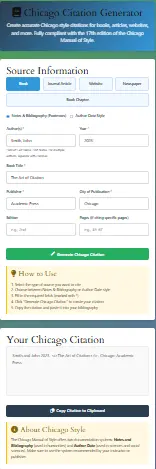
Create accurate Chicago style citations for books, articles, websites, and more. Fully compliant with the 17th edition of the Chicago Manual of Style.
Source Information
How to Use
1. Select the type of source you want to cite
2. Choose between Notes & Bibliography or Author-Date style
3. Fill in the required fields (marked with *)
4. Click “Generate Chicago Citation” to create your citation
5. Copy the citation and paste it into your bibliography
Your Chicago Citation
About Chicago Style
The Chicago Manual of Style offers two documentation systems: Notes and Bibliography (used in humanities) and Author-Date (used in sciences and social sciences). Make sure to use the system recommended by your instructor or publisher.
Navigating the intricate world of academic citations can, without a doubt, feel overwhelmingly complex. Consequently, students, researchers, and writers frequently seek reliable tools to streamline this meticulous process. Specifically, for those adhering to the Chicago Manual of Style, creating accurate footnotes, bibliographies, and in-text citations is absolutely paramount. Fortunately, our free Chicago citation generator is expertly designed to eliminate the stress and potential errors from this critical task. Moreover, this comprehensive guide will thoroughly explore the indispensable features of our tool, demonstrate its effortless use, and explain why it stands as the premier Chicago style citation generator available online today.
Key Features of Our Free Chicago Citation Generator
Our tool is meticulously engineered to provide a seamless, accurate, and comprehensive citation experience. Below are the core features that distinguish it as a top-tier Chicago style tool for research papers.
1. Support for All Major Source Types
Firstly, our generator accommodates an extensive array of source materials. Whether you need to cite a website in Chicago style, generate a Chicago book citation, or reference a journal article, the tool is equipped for the task. Notably, it supports complex sources like chapters in edited books, archival materials, and multimedia, ensuring you can create Chicago citations quickly for any resource in your project.
2. Dual-System Flexibility (Notes-Bibliography & Author-Date)
As previously mentioned, the dual-system nature of Chicago style can be confusing. Our tool seamlessly generates citations for both the Notes-Bibliography (NB) and Author-Date formats. Consequently, whether your professor requests Chicago footnotes or parenthetical author-date citations, you can switch between outputs with a single click. This makes our tool an ideal chicago notes and bibliography generator as well as a robust chicago author-date citation generator.
3. 17th Edition Compliance
Accuracy is defined by current standards. Our chicago 17th edition citation generator is programmed strictly according to the latest guidelines from the Chicago Manual of Style, 17th edition. Therefore, you can trust that every period, comma, and indent follows the most up-to-date rules, saving you from having to cross-reference the manual constantly.
4. Intuitive and User-Friendly Interface
Designed with the user in mind, the interface is clean, logical, and requires no prior training. Simply select your source type, fill in the provided fields with information from your source, and generate your citation. It’s the very definition of a free online chicago manual generator that prioritizes user experience.
5. No Account Required – Complete Privacy
In an era of data concerns, we offer a free chicago citation generator without registration. You can access the full power of the tool immediately, with no email sign-up, no tracking, and no hidden fees. Your research and bibliographic data remain entirely private on your device.
6. Multi-Format Export and Copy Options
Once generated, citations can be effortlessly copied individually or exported as a fully formatted Chicago style bibliography. This feature is perfect for building your reference list section by section, making it an excellent free chicago style bibliography maker.
7. Mobile-Optimized Design
Recognizing the need for on-the-go work, our tool is fully responsive. Whether you’re using a phone, tablet, or desktop, the experience is flawless, functioning perfectly as a chicago citation generator mobile solution.
Advanced Features for Expert-Level Citations
Beyond the core functionalities, our Chicago citation tool includes advanced features designed for complex academic and professional projects.
1. Annotation and Note Field Inclusion
For the Notes-Bibliography system, our generator provides an optional field to include brief annotations or explanatory notes alongside your footnote. This is crucial for creating substantive notes that go beyond simple citation.
2. DOI/URL Validation and Auto-Formatting
When entering URLs or Digital Object Identifiers (DOIs), the tool intelligently formats them according to Chicago rules. It can also help verify the basic structure of these identifiers, aiding in the creation of accurate chicago style website citations.
3. Corporate and Institutional Author Handling
Citing reports from organizations or government bodies requires specific formatting. Our advanced logic correctly handles complex corporate authors, ensuring proper citation for these challenging sources.
4. Edition, Volume, and Series Information
For detailed book citations, the tool includes dedicated fields for edition numbers, volume information, and book series details—all formatted precisely as per Chicago manual of style guidelines.
5. Real-Time Preview
As you fill each field, a live preview of your citation updates dynamically. This allows for immediate visual confirmation, helping you check Chicago citation accuracy as you build it.
How to Use the Chicago Citation Generator: A Step-by-Step Guide
Using our tool is a straightforward process designed for maximum efficiency. Follow these steps to generate perfect citations in under a minute.
Step 1: Navigate to the Tool
First, visit our Chicago Citation Generator page. The clean layout immediately presents you with the source type selection menu.
Step 2: Select Your Source Type
Next, click the dropdown menu to choose the type of source you are citing. Common options include Website, Book, Journal Article, Newspaper, Chapter, and more. For example, to create a chicago newspaper article citation, you would select “Newspaper.”
Step 3: Fill in the Required Fields
Then, a form with fields relevant to your chosen source type will appear. Input the author’s name, title, publication date, URL, and other details directly from your source. The form guides you on what information is required vs. optional.
Step 4: Choose Your Citation System
Afterward, select your desired output format: Notes-Bibliography (for footnotes/endnotes and bibliography) or Author-Date. This choice will determine the final structure of your generated citation.
Step 5: Generate and Export
Finally, click the “Generate Citation” button. Your perfectly formatted citation will appear instantly. You can then copy it to your clipboard with one click or add it to a list to export a full bibliography later.
Pro Tip: For a chicago website citation, always try to locate the official publication date and author information. If an individual author isn’t available, the tool will correctly format the citation using the organization name or website title.
Understanding the Chicago Manual of Style: A Foundational Guide
Before delving into the functionalities of our Chicago citation maker, it is essential to fundamentally understand the style itself. The Chicago Manual of Style (CMS), now in its 17th edition, is, in fact, one of the most respected and widely used style guides, particularly in the fields of history, literature, and the arts. Furthermore, it presents two distinct documentation systems: the Notes-Bibliography (NB) system and the Author-Date system.
Primarily, the Notes-Bibliography system is preferred in humanities disciplines; it utilizes numbered footnotes or endnotes accompanied by a bibliography. Conversely, the Author-Date system is common in the sciences and social sciences; it employs parenthetical in-text citations linked to a reference list. Understanding this critical difference is, therefore, the first step toward generating correct Chicago style citations. Our Chicago manual of style citation generator expertly handles both formats, ensuring you never have to worry about confusing these two distinct approaches.
Why Use a Chicago Citation Generator?
A Chicago Citation Generator helps students, researchers, historians, and writers create accurate citations in The Chicago Manual of Style format without spending hours formatting sources manually. Chicago style is one of the most detailed citation systems, and even small mistakes in punctuation, italics, page numbers, or author order can lead to lost marks in academic work. A citation generator speeds up the process while helping ensure consistency and accuracy. Chicago style is especially common in history, humanities, literature, theology, and some social science courses.
Why Our Chicago Citation Generator is an Essential Academic Tool
In the demanding landscape of academic writing, precision and consistency are non-negotiable. A single formatting error can, unfortunately, undermine the credibility of an otherwise stellar research paper or dissertation. Herein lies the core value of an automated Chicago citation tool for research papers. Our generator is not merely a convenience; it is a vital partner in upholding the highest standards of scholarly integrity.
Specifically, manual citation formatting is notoriously time-consuming and prone to human error. For instance, a misplaced comma, an incorrect italicization, or a wrong publication date can lead to accusations of negligence. Therefore, utilizing a robust free Chicago citation generator no sign up like ours allows you to allocate your valuable time and mental energy toward research and composition, not tedious formatting. Additionally, for American students and scholars, adhering to Chicago style format is often a mandatory requirement, making a reliable generator an indispensable asset.
Chicago Style in Practice: Key Examples and Use Cases
To illustrate the tool’s output, here are common examples generated by our Chicago style citation maker.
Website (Notes-Bibliography):
- “Page Title,” Website Name, Publication Date, accessed Date, URL.
Bibliography: “Page Title.” Website Name. Publication Date. Accessed Date. URL.
Book (Author-Date):
(Author Last Name Year, Page Number)
Reference List: Author Last Name, First Name. Year. Book Title. Place: Publisher.
Journal Article (Notes-Bibliography):
- Author First Name Last Name, “Article Title,” Journal Title Volume, no. Issue (Year): Page(s).
Bibliography: Author Last Name, First Name. “Article Title.” Journal Title Volume, no. Issue (Year): Page Range.
Using our tool ensures each element—from italics to punctuation—is flawless, providing you with reliable chicago style examples every time.
Chicago vs. Other Styles: A Quick Comparison
A common question among writers is which citation style to use: Chicago, APA, or MLA? While our suite includes a dedicated MLA Citation Generator and APA Citation Generator, understanding the distinction is key.
- Chicago vs. APA Citation: APA style is dominant in social sciences and uses a simple author-date parenthetical system. Chicago’s Author-Date is similar but has distinct punctuation, title formatting, and capitalization rules. The Chicago Notes-Bibliography system, with its footnotes, is entirely different.
- Chicago vs. MLA Generator: MLA style is used primarily in humanities and language studies. It employs a simple container-based system with parenthetical author-page citations. Chicago NB is more complex, using notes for citations and a bibliography.
Our tool family helps you navigate all these needs. For instance, if you’re working on a multidisciplinary project, you can easily switch between our chicago citation generator, mla citation generator, and free apa citation generator.
What Is Chicago Style?
Chicago style has two main citation systems:
- Notes and Bibliography
- Author-Date
The Notes and Bibliography system is most often used in history, literature, and the arts. It uses footnotes or endnotes within the paper and a bibliography at the end. The Author-Date system is more common in the sciences and social sciences and uses in-text citations similar to APA style.
For example, a Notes and Bibliography footnote may look like this:
- John Smith, The History of Rome (New York: University Press, 2024), 45.
The matching bibliography entry would be:
Smith, John. The History of Rome. New York: University Press, 2024.
How This Chicago Citation Generator Works
This tool is designed to make citation creation simple and fast. Users can enter information such as:
- Author name
- Source title
- Website, journal, or publisher
- Publication date
- URL, DOI, ISBN, or page number
The tool then automatically converts that information into the correct Chicago citation format. Many modern generators also allow users to search by book title, website URL, DOI, or ISBN so the citation details can be filled in automatically.
Source Types Supported
A complete Chicago citation generator should support many kinds of sources, including:
- Books
- Websites
- Journal articles
- Newspaper articles
- YouTube videos
- Government reports
- Interviews
- Court cases
- Magazine articles
- Theses and dissertations
- Images, paintings, and photographs
Many academic papers include multiple source types, which is why a flexible citation generator is especially helpful.
Why Chicago Style Can Be Difficult
Chicago citations are more complex than MLA or APA because they often require:
- Footnotes or endnotes
- Different formats for the first and later citations
- Separate bibliography formatting
- Different rules for books, websites, and journal articles
- Author-Date and Notes-Bibliography options
For example, the first footnote usually contains full source information, while later footnotes use a shortened version. This can be difficult to do manually, especially in longer papers.
Many students and academic writers say Chicago is one of the hardest citation styles because of its detailed rules for footnotes and bibliographies. A former academic librarian on Reddit explained that Chicago generators are particularly helpful because “the style’s complexity—especially with footnotes—makes manual formatting tedious and error-prone.”
Benefits of Using a Chicago Citation Generator
Using a citation generator can help you:
- Save time
- Reduce formatting mistakes
- Keep all citations consistent
- Format bibliographies automatically
- Generate both footnotes and reference lists
- Organize sources by project or assignment
Some advanced tools also let users:
- Export citations to Word or BibTeX
- Save multiple bibliographies
- Create annotated bibliographies
- Sort citations alphabetically
- Switch between Chicago, MLA, and APA instantly
Many citation tools use the same citation formatting systems found in academic software like Zotero and Mendeley, helping improve accuracy.
Common Chicago Citation Examples
Book Citation
Author Last Name, First Name. Book Title. City: Publisher, Year.
Example:
Brown, Dan. The Da Vinci Code. New York: Scholastic, 2004.
Website Citation
Author Last Name, First Name. “Page Title.” Website Name. Month Day, Year. URL.
Example:
Doe, Jane. “History of Ancient Rome.” History Archive. March 10, 2025. https://example.com
Journal Article Citation
Author Last Name, First Name. “Article Title.” Journal Name Volume, no. Issue (Year): Page Range. DOI or URL.
Chicago requires journal titles to be italicized and article titles to appear in quotation marks.
Why You Should Still Review Your Citations
Even the best citation generator is not perfect. Most generators work very well for books, websites, and journal articles, but unusual sources—such as interviews, archival documents, social media posts, or mixed-media sources—may still need manual editing.
Academic users on Reddit often recommend using a citation generator as a first step, then checking the result against the official style guide. One user wrote that a Chicago citation generator is “a productivity boost, not a replacement for understanding the style.”
Another user explained that the best approach is to let the generator create the citation, then compare it with the official rules in A Manual for Writers of Research Papers, Theses, and Dissertations or the Chicago Manual of Style.
Who Should Use This Tool?
This Chicago Citation Generator is useful for:
- High school and college students
- History and literature students
- Graduate researchers
- Professors and teachers
- Academic writers
- Anyone creating essays, reports, or research papers
It is especially helpful for people who need to cite many sources quickly while keeping everything accurate and consistent.
Our Expertise and Editorial Process
This tool is based on the latest rules from The Chicago Manual of Style and related academic writing guides. The page is reviewed regularly to ensure that the formatting examples, citation rules, and source types remain accurate and up to date.
Author: Academic Citation Tools Team
Expertise:
- Chicago, MLA, and APA citation styles
- Academic writing
- Research paper formatting
- Bibliography and footnote creation
Editorial Policy:
Every citation example and formatting rule is reviewed for accuracy, consistency, and usefulness before publication.
Frequently Asked Questions (FAQs)
A Chicago citation generator works by using a programmed set of rules based on the Chicago Manual of Style. Users input bibliographic data into a form, and the software structures, punctuates, and formats that data into a perfect citation.
Yes. Our free Chicago citation generator requires no sign-up, no subscription, and has no hidden costs. You can generate an unlimited number of citations without any payment.
The Notes-Bibliography system uses numbered footnotes or endnotes for citations and a bibliography. The Author-Date system uses parenthetical in-text citations (Author, Year) and a reference list. Our tool generates both formats.
Yes. Our tool is a fully compliant chicago 17th edition citation generator, updated to reflect all current formatting rules.
Yes. When you select the Notes-Bibliography output, the first result is the footnote version. The corresponding bibliography entry is also provided.
The citations are highly accurate, as they follow strict algorithmic rules. However, you should always review them against your source material to ensure all entered data is correct.
Yes. The tool is fully responsive and works perfectly as a chicago citation tool for phone.
Our tool provides a practical application. For deeper learning, consult the official Chicago Manual of Style or use our tool alongside a chicago citation guide or chicago manual of style tutorial.
Conclusion: Streamline Your Academic Workflow Today
In conclusion, mastering the Chicago Manual of Style no longer needs to be a source of anxiety or lost time. Our comprehensive free Chicago citation generator is designed to empower students, researchers, and writers by providing instant, accurate, and free formatting for any source. From the straightforward book citation to the complex website reference, this tool ensures your bibliography, footnotes, and in-text citations meet the highest academic standards.
Furthermore, by integrating this tool into your workflow, you not only guarantee precision but also gain valuable time to focus on the substance of your argument and research. Explore our other related tools, such as the APUSH DBQ Grader or the Productivity Focus Hub, to further enhance your academic efficiency. Ultimately, for anyone seeking a reliable, no-cost, and powerful Chicago style generator for college or professional work, this tool is your definitive solution. Start generating flawless citations now and transform the way you document your scholarly work.
Disclaimer
This tool is intended for educational and research purposes only. While we aim to generate accurate Chicago citations, users should always double-check their final references against their instructor’s requirements or the official style guide, especially when citing unusual or complex sources.