Paste text or upload a .txt or .docx file, pick a length, and the tool picks sentences from your original text. It works best on articles, essays, and reports of at least 50 words. The text is processed in your browser, and the code does not send it to a server. The output is made of your own sentences, copied and reordered, so read it before you use it.
✨ Summary Studio
✍️ Source Text Editor
✨ Highlighted Original (key sentences from Standard summary)
What this tool does
This is an extractive summarizer. It scores each sentence by how often its words appear across the whole text, then keeps the highest-scoring sentences until it reaches the length you chose, and puts them back in their original order. It does not rewrite anything or understand meaning. That makes it quick and predictable, but it can miss context, and it may keep a long sentence over a shorter, more important one.
How to use it
- Paste your text into the box, or drop in a .txt or .docx file. PDF files are not supported.
- Choose Short (about 20%), Medium (about 40%), Long (about 70%), or a custom word limit.
- Optionally tick Sentence Compression to remove filler phrases such as “in order to” and “as a result of.”
- Click “Generate 3 Versions.” You get Standard (your chosen length), Concise (compressed and about 20%), and Detailed (about 70%).
- Check the highlighted original to see which sentences were selected. Then copy or export the result.
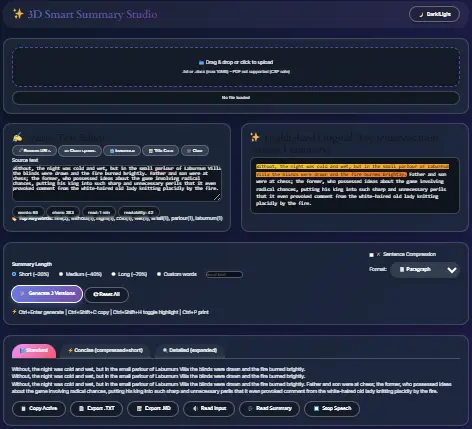
Reading the results
The highlighted sentences show what the tool chose. The readability score is a rough estimate based on sentence and word length, because syllables are counted with a simple method. The top keywords are the most frequent words, excluding common ones. Neither is a quality score.
Limits to know about
- Text under 50 words is rejected.
- Very short targets may still produce sentences that don’t flow together.
- Abbreviations like “Dr.” can split a sentence in the wrong place.
- Title Case can misplace capitals after apostrophes, so check it.
- Keyboard shortcuts: Ctrl+Enter generates, Ctrl+Shift+C copies, Ctrl+Shift+H toggles highlights, and Ctrl+P prints.
Frequently Asked Questions (FAQs)
It is a tool that shortens text. This one does it by selecting existing sentences rather than writing new ones.
Yes. There is no signup.
The text is handled in your browser, and the summarizing code does not send it anywhere. The page itself still loads standard site analytics, which track visits, not what you paste.
The tool keeps sentences that repeat the most common words. That is not the same as keeping the most important points. Compare the summary with the original before relying on it.
.txt and .docx files up to 10 MB, or pasted text.
You can use it to get a rough overview of a long text. For academic work, cite the original source, not the summary, and check the summary against the source.
Related tools
If you’re working on writing, the Reading Time Estimator shows how long a text will take to read, and the Document Analysis Helper can help you break a long text into parts. Confirm both links work before publishing.