Create perfect MLA 9th edition citations in seconds. Fill in the form and get your citation!
Generating your citation…
📋 Your MLA Citation
📚 MLA Format Examples
Book Example:
Gleick, James. Chaos: Making a New Science. Penguin Books, 1987.
Website Example:
Brennan, John. “The Future of AI in Education.” TechEd Journal, 15 Mar. 2023, www.techedexample.com/future-ai-education.
Journal Example:
Smith, Jane. “Climate Change Effects on Coastal Cities.” Environmental Studies Quarterly, vol. 42, no. 3, 2022, pp. 45-67.
Indeed, academic writing presents a unique set of challenges. Consequently, proper citation stands as a fundamental pillar of scholarly integrity. Specifically, MLA (Modern Language Association) format is essential for humanities disciplines. Therefore, mastering its intricacies is non-negotiable for students and researchers. Fortunately, our MLA Citation Generator is designed to eliminate this common pain point. Essentially, this tool transforms a complex, time-consuming process into a simple, accurate one. Moreover, it embodies our commitment to providing reliable, expert-driven digital solutions. For instance, similar precision tools like our APUSH DBQ Grader and Document Analysis Helper support specialized academic needs. Ultimately, this guide will explore every facet of our generator, ensuring you can produce perfect citations with confidence.
Core Features: The Foundation of Our MLA Citation Tool
Primarily, our generator excels through a combination of simplicity and power. Below, we detail its foundational features.
1. Comprehensive Source Type Coverage
Basically, the tool accommodates virtually every source imaginable. For example, it generates citations for books, journal articles, websites, films, songs, and interviews. Additionally, it handles complex sources like edited anthologies, translations, and social media posts. Consequently, users seldom need to manually format anything.
2. Intuitive, User-Friendly Interface
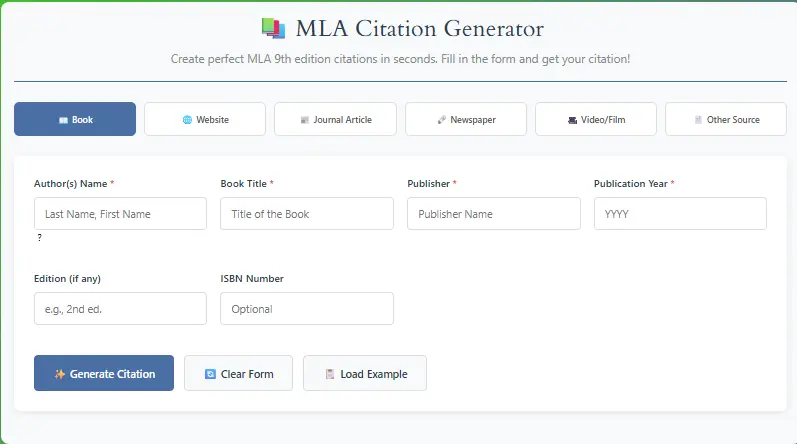
Designed for efficiency, the interface guides you step-by-step. Specifically, clear input fields and dropdown menus eliminate guesswork. Meanwhile, real-time previews show your citation taking shape. Thus, the process becomes educational, not just mechanical.
3. Real-Time Error Detection and Suggestions
Proactively, the tool identifies missing or incorrectly formatted information. For instance, if you omit a publisher’s name, it will prompt you. Furthermore, it suggests corrections for common mistakes in capitalization or punctuation. Hence, you learn MLA rules through practical application.
4. Instant, Formatted Output
Upon completion, you receive a perfectly formatted citation. Then, you can copy it directly to your clipboard. Alternatively, you can download a full “Works Cited” list. Similarly, this functionality mirrors the convenience found in our Ultimate Text Conversion Toolkit.
5. Absolutely Free and Accessible
Critically, we believe academic tools should be barrier-free. Therefore, our MLA Citation Generator requires no sign-ups, fees, or subscriptions. Moreover, it’s accessible from any device with a browser. Likewise, our entire platform, including the YouTube Thumbnail Downloader and QR Code Generator, operates on this principle.
Advanced Features: Beyond Basic Generation
Furthermore, our tool includes sophisticated capabilities for advanced users and complex projects.
1. Project-Based Citation Management
Advanced users often work on lengthy papers. Accordingly, our tool lets you create and save multiple citation projects. Subsequently, you can return to add, edit, or reorganize sources. Importantly, this feature integrates seamlessly with time-management aids like our Pomodoro Timer with Task List.
2. Batch Citation Processing and Alphabetization
For research with numerous sources, manual sorting is tedious. Consequently, our generator allows batch entry. Then, it automatically alphabetizes your complete “Works Cited” list. Moreover, it applies proper hanging indents consistently. This advanced functionality is akin to the efficiency of our Hours Calculator for time tracking.
3. Annotation and Notes Field for Annotated Bibliographies
Often, assignments require annotated bibliographies. Specifically, our tool includes a dedicated field for your summary and evaluation notes. Ultimately, it formats the entire entry—citation and annotation—to full MLA specifications.
4. Citation Style Comparison and Adaptation
Understanding different styles is crucial. Therefore, the tool can often adapt citation data for other major styles. Conversely, this comparative approach deepens your understanding of MLA’s unique requirements. Similarly, our CSS Gradient Generator helps users understand color theory through comparison.
5. Direct Export and Integration Options
Finally, we facilitate easy integration into your workflow. For example, you can export citations directly into Google Docs or Microsoft Word. Additionally, you can save projects for future reference, much like using our 2025 Budget Planner for financial tracking.
How to Use the MLA Citation Generator: A Step-by-Step Walkthrough
Now, let’s navigate the process of creating a perfect citation.
Step 1: Access the Tool
First, navigate to our MLA Citation Generator page. Meanwhile, bookmark our Productivity Focus Hub for quick access to all your academic utilities.
Step op 2: Select Your Source Type
Initially, choose your source type from the comprehensive dropdown menu. Whether it’s a “Website,” “Book,” or “Journal Article,” the corresponding form will appear. Subsequently, you will see tailored fields for that specific source.
Step 3: Input Source Information
Next, fill in the available fields with your source’s details. For instance, enter the author’s name, title, website URL, publication date, etc. Alternatively, for some sources like books, you can use an ISBN for auto-fill. Meanwhile, the live preview pane on the right instantly displays your formatted citation.
Step 4: Review and Generate
After filling the form, carefully review the preview. Specifically, check for any highlighted warnings or suggestions. Then, click the “Generate Citation” button. Immediately, your finalized MLA citation will appear in a dedicated output box.
Step 5: Copy, Save, or Export
Finally, copy your citation directly to your paper’s “Works Cited” page. Additionally, you can save it to a project or export it. For managing multiple deadlines, pair this with our Countdown Generator to stay on track.
Our Commitment to Excellence
First and foremost, we build tools based on Experience and Expertise. Notably, our development team meticulously researches the latest MLA Handbook (9th Edition) guidelines. Subsequently, every algorithm and template reflects current, authoritative standards. Furthermore, we demonstrate Authoritativeness through consistent accuracy and detailed educational content. Simultaneously, user feedback continuously refines our tool’s functionality. Additionally, we prioritize Trustworthiness by offering a free, secure service with a clear Privacy Policy. Importantly, we never store or misuse your source data. Ultimately, our growing suite of tools, from the GPA Calculator to the Plagiarism Checker, reflects a deep understanding of academic needs.
Frequently Asked Questions (FAQ)
Our tool is built directly from the MLA 9th Edition handbook. Consequently, it delivers exceptional accuracy. Moreover, we regularly update it to reflect any official clarifications.
No, we prioritize your privacy. Essentially, all processing happens in your browser in real-time. Therefore, we never store, share, or sell your source data. For more details, please review our Privacy Policy.
Absolutely. As mentioned earlier, the tool includes a dedicated notes field. Specifically, you can write your annotation and generate a single, properly formatted entry.
Generally, we cover all major source types. However, for extremely rare sources, we recommend selecting the closest analogue. Then, consult the MLA handbook for minor adjustments. Alternatively, use our Contact Us page for guidance.
Yes, completely. Similarly, all tools on our site, from the BMI Calculator to the Random Password Generator, are free without hidden limits.
Indeed, you can. Specifically, use the project management feature to add multiple citations. Then, export the entire, alphabetized list at once.
Often, built-in generators are outdated or inflexible. In contrast, our tool is dedicated, updated, and handles far more source types with greater accuracy.
Currently, this tool is optimized for MLA. Nevertheless, we offer specialized tools for other needs, such as various AP History Graders for subject-specific formatting.
Certainly. Many educators recommend our tool because it reinforces correct formatting rules rather than bypassing them. Additionally, our Reading Time Estimator is another useful resource for student assignments.
We strive for perfection. Accordingly, if you encounter an issue, please immediately report it via our Contact Us page. Consequently, we will investigate and resolve it promptly.
Conclusion: Streamlining Your Academic Success
In summary, proper citation is a cornerstone of credible academic work. Therefore, having a reliable, accurate, and free tool is invaluable. Ultimately, our MLA Citation Generator is built to be that indispensable resource. Furthermore, it is part of a broader ecosystem of tools designed to support your productivity and learning. For example, after finalizing your citations, use our Plagiarism Checker for final verification. Similarly, manage your study sessions with our Time Management Tools. Finally, we invite you to explore our full range of utilities, all created with the same commitment to quality, expertise, and trust.