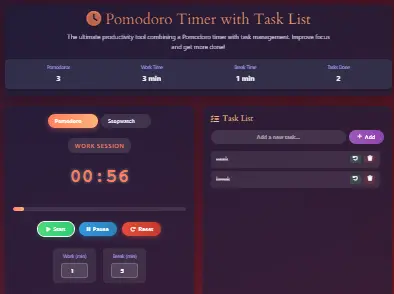
Pomodoro Timer with Task List
The ultimate productivity tool combining a Pomodoro timer with task management. Improve focus and get more done!
Task List
Master the Pomodoro Technique: The Science-Backed Productivity Method
The Pomodoro Technique, developed by Francesco Cirillo in the late 1980s, is more than just a time management method—it’s a complete productivity philosophy. The name “Pomodoro” (Italian for tomato) comes from the tomato-shaped kitchen timer Cirillo used as a university student. This technique has helped millions worldwide overcome procrastination, maintain focus, and accomplish more in less time.
Scientific Backing
Research in cognitive psychology supports the Pomodoro Technique’s effectiveness. Studies show that the human brain naturally works in cycles of high focus followed by brief periods of reduced attention. By aligning work sessions with these natural rhythms, the Pomodoro Technique maximizes cognitive performance while preventing mental fatigue.
Comprehensive Benefits of the Pomodoro Technique
Enhanced Focus
By committing to work without interruptions for 25-minute intervals, you train your brain to maintain deep focus. This practice strengthens your attention muscle over time, making it easier to concentrate even outside Pomodoro sessions.
Reduced Procrastination
The “just 25 minutes” approach makes daunting tasks feel manageable. By breaking work into small, achievable chunks, you overcome the initial resistance that often leads to procrastination.
Better Time Awareness
Regular use of the Pomodoro Technique develops your ability to estimate how long tasks will take. This improved time estimation skill makes project planning more accurate and realistic.
Prevention of Burnout
Mandatory breaks prevent mental exhaustion and maintain consistent energy levels throughout the day. This sustainable approach to work prevents the productivity crashes common with traditional marathon work sessions.
Improved Task Management
The technique encourages breaking complex projects into specific, actionable tasks. This systematic approach to task decomposition makes even the most ambitious projects manageable.
Work-Life Balance
By creating clear boundaries between focused work and genuine breaks, the Pomodoro Technique helps maintain a healthy separation between professional responsibilities and personal time.
The Complete Pomodoro Workflow: Step by Step
Choose Your Task
Select a specific task from your task list. Be precise—instead of “work on project,” choose “draft introduction section” or “create project outline.” The more specific, the better.
Set Your Timer
Set the timer for 25 minutes (the traditional Pomodoro length). Commit to working on your chosen task without interruptions until the timer rings. If you’re using our tool, simply click “Start.”
Work Intently
Focus completely on your task. If distractions arise, note them down for later and return to your work. The key is maintaining uninterrupted focus for the full 25 minutes.
Take a Short Break
When the timer rings, take a 5-minute break. Stand up, stretch, look away from your screen, or get a drink. This break is crucial for maintaining long-term productivity.
Repeat the Cycle
After four Pomodoro sessions, take a longer break of 15-30 minutes. This extended break allows for mental recovery and helps consolidate what you’ve learned.
Advanced Pomodoro Strategies
Custom Interval Strategy
While 25/5 is the standard, experiment with different intervals. Some people thrive with 50/10 cycles, while others prefer 90/20 for deep work sessions. Use our customizable timer to find your optimal rhythm.
Task Batching
Group similar tasks together in consecutive Pomodoros. For example, complete all email-related tasks in one batch, then switch to creative work. This minimizes context switching and improves efficiency.
Interruption Management
Keep a “distraction list” nearby. When interruptions occur during a Pomodoro, quickly note them down and return to your task. Address these items during your breaks or schedule specific Pomodoros for handling interruptions.
Progress Tracking
Use our built-in statistics to track your Pomodoro count and work patterns. Review this data weekly to identify your most productive times and optimize your schedule accordingly.
Complete Productivity Ecosystem: Our Free Tool Suite
Our Pomodoro Timer is part of a comprehensive suite of productivity tools designed to work together seamlessly. Each tool addresses specific productivity challenges, creating a complete system for managing your time, projects, and workflow.
Time Management Tools
Stopwatch & Timer
Precision timing for any task with lap times, countdowns, and custom intervals. Perfect for meetings, workouts, cooking, or any activity requiring precise time tracking.
Use ToolTime Zone Converter
Convert between multiple time zones instantly. Essential for remote teams, international clients, and coordinating across geographical boundaries with daylight saving adjustments.
Use ToolHours Calculator
Calculate total hours worked, including breaks, overtime, and multiple shifts. Generate detailed timesheets and export data for payroll processing.
Use ToolTime Card Calculator
Professional time card management with punch-in/punch-out functionality. Calculate regular hours, overtime, and total pay with customizable rate structures.
Use ToolPlanning & Scheduling Tools
Custom Workday Calculator
Calculate project deadlines and workdays based on your specific schedule. Exclude holidays, weekends, and custom non-working days for accurate planning.
Use ToolDate Calculator
Add or subtract days, weeks, months, or years from any date. Calculate the duration between two dates with business-day and calendar-day options.
Use ToolTime Value Calculator
Determine the monetary value of your time for better decision-making. Calculate whether outsourcing tasks is cost-effective based on your hourly rate.
Use ToolMeeting Duration Calculator
Optimize meeting lengths and calculate total time spent in meetings. Analyze meeting costs based on participant hourly rates and identify optimization opportunities.
Use ToolFinancial Planning Tools
2025 Budget Planner
Comprehensive annual budget planning with category tracking, savings goals, and expense forecasting. Visualize your financial health with interactive charts and reports.
Use ToolTime Calculator
Perform complex time calculations including addition, subtraction, multiplication, and division. Convert between time units and calculate rates and averages.
Use ToolImplementation Guide: Making Pomodoro Work for You
Getting Started: First Week Implementation
Success with the Pomodoro Technique requires proper implementation. Follow this structured approach for your first week:
Day 1: Tool Familiarization
Spend 30 minutes exploring all features of our Pomodoro timer. Create test tasks, experiment with different timer settings, and understand how the statistics tracking works.
Day 2: Task Inventory
Brainstorm and list all pending tasks in our task manager. Categorize them by priority and estimate how many Pomodoros each might require.
Days 3-5: Gradual Implementation
Start with 4-6 Pomodoros per day, focusing on your most important tasks. Use the remaining time for less demanding work to avoid burnout during the adjustment period.
Day 6-7: Review and Adjust
Analyze your statistics. Identify your most productive times, optimal break lengths, and any patterns in your work rhythm. Adjust your approach for the coming week.
Common Challenges and Solutions
Challenge: Frequent Interruptions
Solution: Use the “distraction sheet” method. Keep a notepad nearby to jot down interruptions, then address them during breaks. Communicate your focused work periods to colleagues.
Challenge: Mental Fatigue
Solution: Adjust your Pomodoro length. If 25 minutes is too long, start with 15-minute sessions. Gradually increase as your focus endurance improves.
Challenge: Task Estimation
Solution: Use our time tracking features to build a database of how long different tasks take. This improves your estimation accuracy over time.
Challenge: Digital Distractions
Solution: During Pomodoro sessions, close unnecessary browser tabs, silence notifications, and use website blockers if needed. Treat the timer as a commitment device.
Frequently Asked Questions (FAQs)
What is the optimal Pomodoro length for different types of work?
The traditional 25-minute work session works well for most cognitive tasks. However, creative work might benefit from longer sessions (45-90 minutes), while highly interruptible tasks might work better with shorter sessions (15-20 minutes). The key is experimentation—use our customizable timer to find what works best for your specific work type and personal rhythm.
How do I handle tasks that take longer than one Pomodoro?
Break large tasks into smaller, well-defined subtasks that can be completed within 1-3 Pomodoros. For example, instead of “write report,” create subtasks like “research statistics,” “outline sections,” “draft introduction,” etc. Our task management system is perfect for this approach, allowing you to track progress on complex projects.
Can the Pomodoro Technique help with ADHD or attention challenges?
Yes, many people with attention challenges find the Pomodoro Technique particularly helpful. The clear structure, defined time boundaries, and regular breaks provide the external framework that helps maintain focus. The technique has been successfully used in ADHD coaching and cognitive behavioral therapy for improving executive function.
How should I use breaks effectively?
Effective breaks involve completely disengaging from work. Stand up, stretch, look at something distant to rest your eyes, hydrate, or do brief physical movement. Avoid checking work email or social media during breaks. The goal is mental recovery, not switching to another screen-based activity.
Is the Pomodoro Technique suitable for creative work?
Absolutely. While some worry that timed sessions might stifle creativity, the structure actually enhances it by creating focused periods for ideation and execution. Many writers, designers, and artists use variations of the technique. The key is adjusting session lengths—creative flow states often benefit from longer sessions (45-90 minutes) with correspondingly longer breaks.
How can teams implement the Pomodoro Technique together?
Teams can synchronize Pomodoro sessions for focused collaborative work, followed by coordinated breaks. This reduces interruptions during focused periods and creates natural opportunities for quick check-ins during breaks. Many remote teams use shared Pomodoro timers and communication protocols to respect each other’s focused work time.
What’s the science behind the 25-minute work session?
Research in cognitive psychology suggests that 25 minutes aligns well with the brain’s natural attention cycles. This duration is long enough to achieve meaningful progress but short enough to maintain high focus without mental fatigue. Studies on ultradian rhythms—the 90-120 minute cycles of alertness throughout the day—suggest that breaking these into smaller chunks with brief recovery periods optimizes performance.
How do I track long-term progress with the Pomodoro Technique?
Our built-in statistics provide immediate tracking of Pomodoros completed, total focused time, and tasks accomplished. For long-term analysis, maintain a simple log reviewing weekly patterns, productivity insights, and adjustments needed. Many users find that after 3-4 weeks, they naturally develop a sense of their optimal daily Pomodoro count and can plan their weeks more effectively.
Can I combine Pomodoro with other productivity methods?
Yes, the Pomodoro Technique integrates well with many systems. It works exceptionally well with Getting Things Done (GTD) for task management, with Eisenhower Matrix for prioritization, and with Time Blocking for daily scheduling. The technique provides the execution framework that brings these planning methods to life.
What if I’m in a flow state when the timer rings?
If you’re in a genuine flow state and stopping would disrupt important creative work, it’s reasonable to continue for one additional Pomodoro session. However, be cautious with this exception—the discipline of stopping and taking breaks is what makes the technique sustainable long-term. If you frequently find yourself needing extended sessions, consider adjusting your default Pomodoro length.
Start Your Productivity Transformation Today
Our Pomodoro Timer with Task List represents more than just another productivity app—it’s a complete system built on decades of research and real-world testing. By combining the proven Pomodoro Technique with intuitive task management and comprehensive analytics, we’ve created the ultimate tool for achieving more with less stress.
Remember that productivity isn’t about working longer hours—it’s about working smarter. The Pomodoro Technique helps you accomplish this by aligning your work patterns with your brain’s natural rhythms, preventing burnout while maximizing output.
Explore our complete suite of productivity tools to build a customized system that works for your unique needs and challenges. Whether you’re managing complex projects with our Custom Workday Calculator, coordinating global teams with our Time Zone Converter, or planning your financial future with our 2025 Budget Planner, we provide the tools you need to excel in work and life.
Start Your First Pomodoro Session NowNo registration required • Completely free • Works on all devices