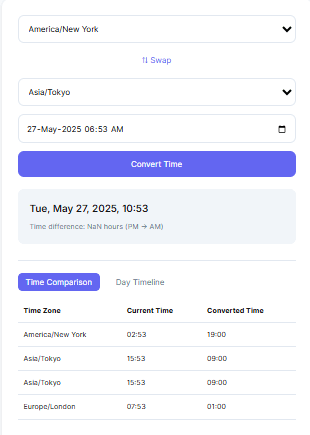
| Time Zone | Current Time | Converted Time |
|---|
Coordinating a single meeting across three continents shouldn’t require a calculator, a world map, and a guess about daylight saving time. Our time zone converter does the math for you — instantly translating any time from one city or country into the exact local time of another, including the seasonal DST adjustments that trip up manual calculations. Type in a time, pick your zones, and see the converted result update live, whether you’re planning a call, booking a flight, or just figuring out if it’s too late to text someone in another part of the world.
Why Use This Free Time Zone Converter?
Time zone math looks simple until daylight saving time, half-hour offsets, or a client in a fourth city enter the picture. This tool removes the guesswork for the people who deal with cross-time-zone scheduling most often:
- Remote workers & digital nomads — avoid double-booked calls or missed standups when your team is spread across three or more countries. Pair it with our meeting duration calculator once you’ve found a slot that works for everyone.
- International businesses & HR teams — schedule interviews and cross-border meetings at a time that’s actually reasonable for every candidate or employee involved.
- Forex and stock traders — line up New York, London, Tokyo, and Sydney market hours to catch the sessions where volume and volatility actually move.
- Teachers, students, and online learners — convert class times, webinar start times, or exam windows hosted from a different country’s server.
- Event planners & travelers — confirm flight arrival times, avoid jet-lag-fueled scheduling mistakes, and know when it’s a reasonable hour to call home. If you’re planning around Pakistan specifically, our Pakistan world clock is a handy companion.
It’s fast, lightweight, and doesn’t rely on external APIs — meaning the core conversion still works even when your connection is spotty, since the time zone rules are built directly into the tool. These rules follow the same standards maintained in the IANA Time Zone Database, the reference source most operating systems and browsers use to track daylight saving changes worldwide.
How It Works
- Select your current time zone. The tool detects it automatically from your device, but you can change it manually at any time.
- Choose the target time zone. Pick any city or country from over 500 supported locations.
- See the converted time instantly. The tool calculates the offset from UTC for both zones — including any active daylight saving adjustment — and displays the correct local time immediately.
- Add more zones for comparison. Stack multiple locations side-by-side in the comparison table, or scan the day timeline to spot where working hours overlap across every zone at once.
Example Use Cases
- Convert EST to IST for a call between a New York office and an India-based team, then log the confirmed slot straight into your daily routine planner.
- Compare PST, GMT, and AEST at once to find a slot that works for a global team call.
- Find the best time to call a friend in Tokyo without waking them up at 3 a.m.
- Check the current time in New York vs. Dubai vs. Sydney before sending a “quick” message.
- Line up a product launch or livestream so every region sees the correct local start time, not a confusing UTC timestamp — our countdown generator is useful for building anticipation once the time is locked in.
- Once a cross-time-zone deadline is set, track it against your workload with the project deadline calculator or the custom workday calculator if you need to factor in working-hour limits.
Popular Time Zone Conversions
These are some of the most frequently searched conversions — the tool handles all of them, and hundreds more, using the same underlying logic:
- PST to EST — a steady 3-hour gap between the US West and East Coasts.
- IST to GMT — commonly needed for coordination between India and the UK.
- UTC to CST — converting the global reference time into US Central Time.
- Time in California vs. India — the real-world framing of a PST-to-IST conversion.
- Time difference between London and New York — one of the most-used business-hours comparisons in global finance.
Because daylight saving time shifts these gaps by an hour during transition periods, it’s worth double-checking conversions in early spring and autumn rather than assuming last month’s offset still applies. You can also cross-reference official time standards through resources like NIST’s Time and Frequency Division or timeanddate.com’s world clock if you need an authoritative second source, or read the Wikipedia overview of UTC for background on how the global standard itself is defined.
Once you’ve confirmed the right conversion, our hours calculator and time calculator make it easy to figure out how many working hours or elapsed hours fall between the converted times — useful for billing, shift planning, or estimating how long a cross-time-zone project will actually take.
Features of the Time Zone Converter Tool
1. Accurate, DST-Aware Conversion
Every conversion accounts for daylight saving time automatically. Based on the actual date you’re checking — not a fixed offset that breaks during transition weeks.
2. Support for 500+ Global Locations
Includes every major city and country. Comparing New York to Tokyo, London to Sydney, or any other pairing takes one search, not a lookup table.
3. Live Time Display
The tool shows the current, accurate time for every selected zone in real time, updating as the clock moves.
4. Mobile-Friendly Responsive Design
The full layout — comparison table, swap controls, and day timeline — adapts cleanly to phones, tablets, and desktops.
5. Compare Multiple Time Zones at Once
Add as many locations as you need to the comparison table, and use the day timeline to visually spot overlapping working hours across every team member’s zone. No manual arithmetic required. If your team already logs hours across zones. The time card calculator and time tracking tool pair naturally with this converter for payroll or productivity reporting.
Frequently Asked Questions (FAQs)
It’s a tool that translates a specific time in one location into the equivalent local time in another. Accounting for both the UTC offset and any active daylight saving time adjustment — not just a flat hour shift.
It uses your browser’s system time together with built-in time zone data. so it works without calling an external API.
You can add as many as you like — the tool supports multi-timezone comparison with no limit.
Yes. It’s 100% free, with no ads, login, or subscription required.
Yes, it’s fully responsive and optimized for mobile browsers.
It works on all modern browsers like Chrome, Firefox, Safari, and Edge.
Yes. It runs entirely in your browser, no data is sent anywhere — it’s private and secure.
Because many countries observe daylight saving time on different dates, the gap between two zones can shrink or grow by an hour during transition periods in spring and autumn — the tool recalculates this automatically based on the date you select.
Yes. Locations like India (UTC+5:30), Nepal (UTC+5:45), and parts of Australia (UTC+9:30) are calculated precisely, not rounded to the nearest hour, following the same regional standards documented in the IANA Time Zone Database.
Conclusion
Time zone conversion looks simple until UTC offsets, daylight saving transitions, and fractional-hour zones enter the picture. Which is exactly why manual math leads to missed meetings and awkward late-night calls. This free time zone converter handles all of that automatically, giving remote teams, traders, students, and travelers one reliable place to check, compare, and plan across any combination of the world’s time zones.
Try it now and get a smarter way to stay synced with the world — no matter how many time zones stand between you and the people you’re working with. And once your schedule crosses zones, tools like the meeting duration calculator, date calculator, and sleep cycle duration calculator can help you plan the rest of your day around it.