Time management plays an important role in daily life because people constantly calculate work hours, study schedules, overtime, travel duration, meeting timing, and project deadlines. However, manual time calculations often become confusing because hours, minutes, and seconds require accurate conversions. Therefore, many users prefer an online Time Calculator to save time and reduce errors.
This free online Time Calculator helps users add time, subtract time, calculate time differences, convert hours and minutes, and estimate durations instantly. Moreover, the tool simplifies complex calculations involving overtime, overnight shifts, break durations, payroll hours, and scheduling tasks. As a result, students, employees, freelancers, teachers, HR managers, and business owners can calculate time more efficiently.
Unlike basic calculators, this advanced Time Calculator includes smart conversion systems, accurate duration tracking, mobile responsiveness, real-time processing, and beginner-friendly controls. Furthermore, the calculator supports both 12-hour and 24-hour formats, which makes it suitable for users worldwide.
Whether you want to calculate working hours, estimate study time, manage productivity, track overtime, or organize schedules, this tool provides a fast and reliable solution.
Key Features of This Time Calculator
This tool includes detailed features designed for students, professionals, businesses, and casual users. Moreover, every feature focuses on speed, accuracy, and user convenience.
1. Add Time Instantly
The calculator allows users to add hours, minutes, and seconds quickly. Therefore, users no longer need manual conversion formulas.
For example:
- 4 hours 20 minutes + 2 hours 45 minutes
- 9:15 AM + 5 hours 30 minutes
- 11:50 PM + 2 hours
The calculator automatically adjusts the final result correctly. Furthermore, overflow minutes convert into hours instantly.
2. Subtract Time Easily
Users can also subtract time durations accurately. Consequently, the tool becomes useful for countdowns, remaining schedules, and shift calculations.
For example, users can calculate:
- Remaining work hours
- Project deadlines
- Study sessions
- Workout timing
- Cooking duration
- Travel schedules
Because the calculator handles borrowing automatically, users avoid calculation errors.
3. Calculate Time Between Two Times
One of the most useful features is elapsed time calculation. Therefore, users can determine the duration between a starting time and an ending time instantly.
Example:
- Start Time: 8:30 AM
- End Time: 5:15 PM
- Result: 8 hours 45 minutes
This feature is especially useful for:
- Employee attendance
- Payroll tracking
- Freelancer billing
- Shift planning
- Study management
Moreover, the calculator displays results instantly.
4. Cross-Midnight Time Calculation
Many calculators fail when calculations pass midnight. However, this tool accurately handles overnight calculations.
Example:
- Start: 10:45 PM
- End: 4:30 AM
- Result: 5 hours 45 minutes
Therefore, the calculator becomes highly useful for:
- Night shifts
- Emergency services
- Sleep tracking
- International travel
- Event management
Additionally, users avoid confusion involving date transitions.
5. 12-Hour and 24-Hour Format Support
This calculator supports both major time systems.
Users can choose:
- 12-hour AM/PM format
- 24-hour military format
For example:
- 2:45 PM
- 14:45
Because international users prefer different systems, this flexibility improves usability worldwide.
6. Real-Time Processing
The calculator generates results instantly after input. Therefore, users can test multiple calculations quickly without page reloads.
This feature improves workflow efficiency for:
- Offices
- Schools
- Businesses
- Scheduling teams
- Freelancers
Furthermore, real-time processing enhances the overall user experience.
7. Mobile-Friendly Design
Since many users calculate time on smartphones, this tool is fully responsive.
The calculator works smoothly on:
- Mobile phones
- Tablets
- Laptops
- Desktop computers
- Chromebooks
As a result, users can access the calculator anywhere.
8. Accurate Minute Overflow Conversion
Manual calculations often fail when minutes exceed 60. However, this calculator converts overflow minutes automatically.
Example:
- 1 hour 50 minutes + 40 minutes
Correct result:
- 2 hours 30 minutes
Therefore, users avoid mathematical mistakes.
9. Beginner-Friendly Interface
The interface remains simple and clean. Consequently, even beginners can calculate time easily.
Users do not need:
- Mathematical expertise
- Conversion formulas
- Technical knowledge
Instead, they simply enter values and view results instantly.
10. Unlimited Free Usage
Unlike premium software, this Time Calculator remains completely free.
Users do not need:
- Registration
- Downloads
- Subscriptions
- Account creation
Therefore, students and professionals can access unlimited calculations anytime.
Advanced Features of This Time Calculator
Besides standard calculations, this tool includes advanced time-management functionality.
Advanced Duration Tracking
The calculator can track:
- Long work sessions
- Multi-hour projects
- Overnight shifts
- Consecutive durations
- Repeated calculations
Therefore, businesses and professionals can manage schedules more efficiently.
Smart Time Conversion System
The smart conversion engine automatically converts:
- Minutes into hours
- Seconds into minutes
- Overflow durations
As a result, users avoid manual conversion formulas entirely.
Overtime Calculation Support
Many employees and HR departments need accurate overtime tracking. Therefore, this calculator helps estimate extra working hours quickly.
Useful for:
- Payroll systems
- Employee attendance
- Freelancer invoices
- Shift management
- Contract work
Additionally, accurate overtime tracking improves payroll reliability.
Shift Planning Features
The calculator helps businesses organize:
- Employee schedules
- Rotational shifts
- Break durations
- Overnight coverage
- Workforce timing
Because scheduling errors affect productivity, accurate calculations become essential.
Productivity and Study Management
Students and professionals can use the calculator for:
- Study schedules
- Productivity sessions
- Pomodoro timing
- Revision planning
- Deep work tracking
Consequently, users can organize daily routines more effectively.
Sleep Duration Calculation
Many users calculate bedtime and wake-up schedules using a Time Calculator.
Examples include:
- Sleep duration
- Nap timing
- Sleep cycle estimation
- Recovery scheduling
Therefore, the calculator also supports personal health planning.
Travel Time Estimation
Travelers frequently calculate:
- Flight durations
- Layover timing
- Driving schedules
- Departure intervals
- Arrival estimates
Because international schedules often involve time complexity, the calculator improves travel planning accuracy.
How to Use This Time Calculator
Using this calculator is extremely simple. Furthermore, beginners can calculate time within seconds.
Method 1: Add Time
Step 1
Enter the starting time.
Example:
- 3:15 PM
Step 2
Enter the duration to add.
Example:
- 2 hours 40 minutes
Step 3
Click the calculate button.
Step 4
View the final result instantly.
Example result:
- 5:55 PM
Method 2: Subtract Time
Step 1
Enter the original time.
Step 2
Enter the duration to subtract.
Step 3
Press calculate.
Step 4
The tool displays the remaining time immediately.
Method 3: Calculate Time Difference
Step 1
Enter the start time.
Step 2
Enter the end time.
Step 3
Click calculate.
Step 4
The calculator shows the total elapsed duration.
Why Use a Time Calculator?
Here’s why people love our tool:
- Accurate Results: It is fast, reliable, and accurate.
- Easy to Use: You need to type in your numbers and click the button with no complicated steps.
- Multiple Functions: Add time, calculate work hours, or figure out time differences.
- Free for Everyone: You can use our hours calculator, time clock calculator, and more without any cost. It is free for everyone.
Time Table Example
Here’s an example of how you can calculate work hours:
| Start Time | End Time | Total Hours | Break Time | Net Hours Worked |
| 9:00 AM | 5:00 PM | 8 hours | 1 hour | 7 hours |
| 10:00 AM | 6:00 PM | 8 hours | 30 minutes | 7.5 hours |
This time calculator work hours are perfect for employees and students who need to find or track their hours.
Common Uses of a Time Calculator
This tool supports many real-world scenarios.
Employee Work Hour Tracking
Employees calculate:
- Total shift duration
- Weekly hours
- Overtime hours
- Break deductions
Therefore, payroll becomes more accurate.
Freelancer Billing
Freelancers often charge hourly rates. Consequently, accurate time tracking becomes essential.
The calculator helps estimate:
- Billable hours
- Client sessions
- Project timing
- Meeting duration
Student Study Planning
Students use time calculators for:
- Homework schedules
- Exam preparation
- Revision timing
- Productivity planning
As a result, students improve study efficiency.
Fitness & Workout Timing
Athletes and fitness enthusiasts calculate:
- Workout sessions
- Rest intervals
- Running duration
- Training schedules
Therefore, workout planning becomes easier.
Cooking & Baking Timing
Cooking tasks require accurate timing because incorrect durations affect food quality.
Examples include:
- Baking time
- Meal preparation
- Cooking intervals
- Recipe timing
Meeting & Appointment Scheduling
Businesses calculate:
- Meeting duration
- Webinar timing
- Appointment schedules
- Conference sessions
Consequently, professional scheduling improves significantly.
Who Uses Time Calculators?
Employees
To calculate work hours and shift durations.
Freelancers
To track billable client hours.
Students
To manage study schedules and project deadlines.
Project Managers
To estimate task completion times and timelines.
Travelers
To calculate travel durations and time-zone differences.
Business Owners
To track employee hours and payroll records.
Common Time Calculation Mistakes
Many users make avoidable mistakes during manual calculations.
1. Incorrect Minute Conversion
Example mistake:
- 45 minutes + 30 minutes = 75 minutes
Correct conversion:
- 1 hour 15 minutes
Fortunately, the calculator handles this automatically.
2. Cross-Midnight Errors
Many users miscalculate overnight durations.
Example:
- 11 PM to 3 AM
Correct result:
- 4 hours
Therefore, automatic midnight handling becomes extremely useful.
3. AM/PM Confusion
Users frequently confuse:
- 12 AM
- 12 PM
However, the calculator formats time correctly.
4. Payroll Miscalculations
Employees sometimes forget:
- Break deductions
- Overtime adjustments
- Extra shift hours
Consequently, payroll mistakes occur.
This calculator improves accuracy significantly.
5. Wrong 24-Hour Format Usage
Military time can create confusion.
Examples:
- 14:00 = 2 PM
- 18:30 = 6:30 PM
Therefore, format support becomes important.
Time Calculator Example
Suppose you worked:
- Start Time: 8:45 AM
- End Time: 5:30 PM
- Lunch Break: 30 Minutes
Total Duration Formula
Net Hours Worked=Total Duration−Break Time
Calculation:
- Total Duration = 8 Hours 45 Minutes
- Minus Break = 30 Minutes
Result:
8 Hours 15 Minutes Worked
This type of calculation is commonly used for payroll and attendance tracking.
Why This Time Calculator Is Better Than Manual Calculation
Manual calculations require constant attention because users must:
- Convert minutes manually
- Handle midnight crossover
- Adjust hour overflow
- Track multiple durations
However, this calculator automates the entire process.
Benefits include:
- Instant results
- Better accuracy
- Reduced stress
- Improved productivity
- Easier scheduling
Therefore, users save both time and effort.
How to Calculate Hours Worked
Many users rely on time calculators for work-hour tracking.
Basic process:
- Enter clock-in time.
- Enter clock-out time.
- Deduct unpaid breaks.
- Calculate total hours worked.
Example:
- Clock In: 9:00 AM
- Clock Out: 6:00 PM
- Break: 1 Hour
Result:
8 Total Working Hours
This method is widely used for payroll and timesheet calculations.
Calculating Overnight Time Shifts
Overnight shifts can be difficult to calculate manually.
Example:
- Start: 10:00 PM
- End: 6:00 AM
Result:
8 Hours
A quality time calculator automatically detects midnight crossover and calculates the duration correctly.
Why Use an Online Time Calculator?
Many people calculate time manually using clocks, calendars, or mental math. However, manual methods often lead to mistakes because converting minutes into hours requires careful attention.
For instance, calculating:
- 2 hours 45 minutes + 1 hour 35 minutes
- Overnight shifts
- Multi-day durations
- Payroll timing
- Break deductions
can quickly become complicated.
Therefore, using an online Time Calculator provides several advantages.
Time Calculator for Payroll and Billing
Time calculations are important for:
- Employee payroll
- Freelancer invoices
- Consultant billing
- Contractor work logs
- Attendance tracking
Accurate hour calculations help prevent payment disputes and reporting errors.
Benefits of Using a Time Calculator
- Faster calculations
- Better accuracy
- Improved scheduling
- Reduced payroll errors
- Easier overtime tracking
- Better productivity management
- Accurate work-hour estimation
- Simplified travel planning
Additionally, the calculator saves time because results appear instantly.
Who Uses Time Calculators?
Employees
To calculate work hours and shift durations.
Freelancers
To track billable client hours.
Students
To manage study schedules and project deadlines.
Project Managers
To estimate task completion times and timelines.
Travelers
To calculate travel durations and time-zone differences.
Business Owners
To track employee hours and payroll records.
Related Time Tools
- Time Zone Converter Tool – Convert meeting time zones for global teams.
- Date Calculator – Find dates between or after meetings.
- Custom Workday Calculator – Plan working days around meetings.
- Our Time Calculator is part of a comprehensive suite of time management utilities. Whether you’re trying to figure out total work hours with our, track specific projects with our, or plan your entire day with the Daily Routine Planner, we have the tools to help you master your schedule.
- Time Card Calculator – Great for employee time tracking.
- Time Value Calculator – Understand how much your time is worth.
- Pomodoro Timer – Breaks work into intervals.
- Meeting Duration Calculator – Perfect for agenda planning.
- Sleep Cycle Calculator – Wake up feeling refreshed.
- Time Management Tools
Frequently Asked Questions (FAQs)
The Time Calculator allows you to add or subtract two-time values in days, hours, minutes, and seconds. It simplifies time-based calculations for scheduling, work hours, and event planning.
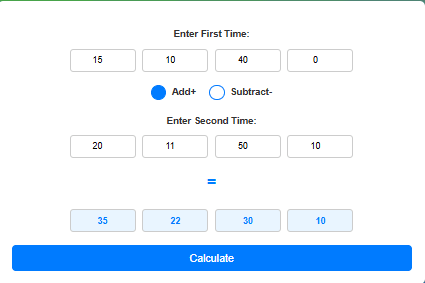
Enter the first-time duration, select whether to add or subtract, then enter the second-time duration. Click the “Calculate” button to get the result.
Yes, blank fields are treated as zero, so you can enter only the necessary values.
If the subtraction results in negative time, the tool will display the correct negative value.
No, this tool operates on standard time units and does not account for variations like daylight savings or leap years.
Absolutely! For multiple shifts and breaks, you might find our specialized Hours Calculator or Time Card Calculator even more efficient.
Once you’ve calculated the duration here, head over to our Time Zone Converter Tool to find a time that works for both of you.
Conclusion
The Time Calculator is a simple yet powerful tool for performing quick time addition and subtraction. Whether you’re managing work hours, event planning, or tracking elapsed time, this tool provides accurate and easy-to-understand results. Its intuitive interface ensures a seamless experience for all users.
Mastering your time is about more than just calculations. It’s about building better habits. Explore our Productivity Focus Hub and Flow State Assistant to take your efficiency to the next level.”
Try it now to simplify your time calculations!
Accuracy & Content Review
This Time Calculator is based on standard time arithmetic principles, including hour-minute-second conversion methods, duration calculations, and commonly used scheduling practices. Content is reviewed periodically to ensure calculation accuracy and educational value for students, professionals, businesses, and general users.
Reviewed by Daily Tool Spot Editorial Team
Last Updated: May 2026