Your all-in-one toolkit for better time management and focus
Task Duration Estimator
Productivity Time Tracker
Today’s Tasks
Today’s Summary
Total time: 0 hours 0 minutes
Tasks completed: 0
Time Blocking Planner
Smart Reminder Scheduler
Active Reminders
Welcome to the Productivity Focus Hub your all-in-one space for improving focus, time management, and daily performance.
Here you’ll find free online tools, interactive charts, and smart trackers that help you measure, analyze, and enhance your productivity levels.
Whether you’re a student, freelancer, or professional — this page is designed to help you stay organized, motivated, and distraction-free.
Features of Productivity & Focus Hub
Productivity & Focus Hub combines four powerful tools that work together to help you plan, track, and optimize your day. Each feature is designed for simplicity, accuracy, and productivity.
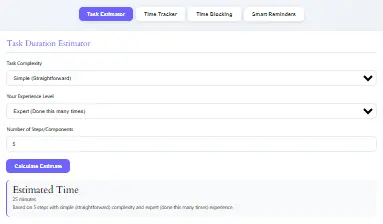
Task Duration Estimator
Task Duration Estimator helps you predict how long tasks will take before you begin. Simply input your step count, average minutes per step, task complexity, and experience level. Then, you’ll instantly see your total estimated duration. Moreover, you can export your estimates in CSV format for record-keeping or analysis. Over time, you can even save past estimates to compare progress and improve accuracy.
Time Tracker
Time Tracker allows you to stay accountable and measure how your time is actually spent. Start by adding tasks and categorizing them. Next, use the start/stop timer to record time spent on each task. Afterward, view your total tracked time for the day and get a detailed breakdown by category. Additionally, you can export your logs to analyze trends or share them with your team. As a result, you’ll gain clear insights into your productivity patterns.
Planner Grid (Time Blocking Planner)
Planner Grid also known as the Time Blocking Planner helps you visualize and structure your day effectively. First, choose your date and add time blocks with specific start times and durations. Then, view a clear grid of your day’s schedule and adjust blocks as needed. Furthermore, you can save your blocks per date for future reference or delete them anytime. Consequently, you’ll plan your days with purpose and prevent overbooking or wasted time.
Reminder Scheduler
Reminder Scheduler ensures you never miss an important task or event. Simply set a reminder title, date, and time and choose how often it repeats (none, daily, weekly, or custom days). Once saved, you’ll see a list of all active reminders and your next upcoming alert. In addition, you can export reminders for backup or productivity tracking. Ultimately, this tool helps you stay consistent, punctual, and fully organized.
All-in-One Advantage
Together, these tools create a unified productivity system helping you estimate time, track progress, plan your schedule, and remember everything important. Instead of using multiple apps, you can rely on one simple, efficient hub that improves your focus, saves time, and keeps you on top of every task.
Advanced Features
You expect basic features, but you get advanced ones too:
Productivity & Focus Hub doesn’t just make planning easier it makes the entire experience smarter, faster, and more enjoyable. In addition to its core tools, you’ll find several advanced features that enhance usability, flexibility, and performance across all devices.
Local Data Storage (Offline Access)
Your progress stays safe, even when you’re offline because built-in local storage saves all your logs, plans, and reminders directly in your browser, without requiring any account or internet connection. As a result, you can continue working anytime, anywhere with full privacy and control.
Smart Export Options
For greater flexibility, every section of the hub offers export functionality. You can easily export your task duration estimates, time tracker logs, and reminders into downloadable CSV files. Consequently, your data stays portable ready for analysis, sharing, or long-term storage.
Custom Reminder Repeats
Custom repeat schedule feature allows you to tailor reminders exactly to your workflow. Whether you prefer daily, weekly, or specific custom days, you can create flexible reminder patterns that fit your routine. This way, you stay consistent without unnecessary alerts.
Responsive Grid Layout
Planner Grid is built with a mobile-friendly responsive design, ensuring your schedule looks great on any screen size. As you switch devices, the grid layout automatically adjusts for optimal readability and ease of use. Therefore, planning your day remains seamless — whether on desktop, tablet, or phone.
Sticky Navigation Bar
A sticky white tab bar keeps all your tools accessible while you scroll. This ensures smooth navigation between the Task Estimator, Time Tracker, Planner, and Reminders without losing context. In turn, you can switch between tools quickly and stay focused on your workflow.
Modern, Minimal Interface
Clean card-style user interface offers a modern, clutter-free experience. Each section uses subtle gray tones for readability, with the active tab highlighted in dark gray. Meanwhile, soft hover effects provide clear visual feedback. Altogether, this design creates a calm, professional environment that enhances focus and usability.
The Result
Altogether, these advanced features turn the Productivity and Focus Hub into more than just a tool it’s your personal productivity system. By combining simplicity, flexibility, and responsive design, it ensures you stay productive, organized, and in control wherever you work.
How to Use the Productivity & Focus Hub
Follow these steps:
- Open the Hub page. See four tabs: Estimator, Tracker, Planner, Reminders. The Estimator shows first.
- Estimate a Task
- Click “Estimator” tab.
- Enter name of task (optional), choose complexity (low/medium/high), select experience you have, define number of steps and average minutes per step.
- Press “Estimate.” You see the total minutes or hours needed; you see a suggestion how to split into blocks.
- Optionally save the estimate, export CSV, or load past saved estimate.
- Track Productivity Time
- Go to “Tracker” tab.
- Enter task name and category.
- Press “Start Tracking.” When you stop, the tool logs duration and shows you category breakdown.
- Use reset or export > CSV if needed.
- Block Your Time
- Move to “Planner” tab.
- Choose a date.
- Set block title, start hour, block length in hours.
- Add block. The grid shows your blocks visually.
- View and delete saved blocks for that date.
- Set Smart Reminders
- Choose “Reminders” tab.
- Enter title, date & time.
- Select repeat option (none/daily/weekly/custom). Custom allows days like “Mon, Wed, Fri”.
- Add reminder. View the next upcoming first, and see list of active reminders.
- When reminder time arrives, an alert appears.
Did You Know?
Research shows that using short, focused work intervals like the Pomodoro technique can increase productivity by up to 40%.
Try combining your Focus Timer with the Weekly Productivity Chart to see measurable results within a week!
What Is the Productivity and Focus Hub?
Productivity & Focus Hub serves four tools:
- Task Duration Estimator: you calculate how long a task takes by defining number of steps, complexity, experience.
- Productivity Time Tracker: you start timers, stop timers, categorize tasks, then view totals.
- Time Blocking Planner: you block your day visually; you assign tasks into time slots.
- Smart Reminder Scheduler: you set reminders, recurring or one-time, you get notifications at due time.
The Productivity Focus Hub is a complete productivity toolkit that combines focus tracking, performance visualization, and goal planning all in one place.
It helps you:
- Measure how long you stay focused daily
- Identify when distractions happen
- Analyze weekly trends with visual graphs
- Improve consistency and efficiency over time
When you track your focus, you take control of your time — not the other way around.
Want to find other tools like the Meeting Duration Calculator, Time Card Calculator, and Date Calculator—all completely free, no ads, and crafted for productivity.
Why Use This Tool
If want to manage tasks, estimate effort, track time, block your schedule, and set reminders, then the Productivity & Focus Hub is exactly what you need. With this all-in-one online tool, you can easily plan your day, stay organized, and stay on track — all from one place. Moreover, every feature is free, simple, and fast, allowing you to focus on what truly matters. As a result, will improve efficiency, reduce distractions, and get more done every day. In the end, it’s not just about working harder — it’s about working smarter, and you deserve a tool that makes that possible.
You can access all these tools from a single, easy-to-use dashboard — no need to switch between pages. In fact, everything works together seamlessly to create a powerful productivity system. First, you estimate your time. Next, you track your progress. Then, you block your schedule and set smart reminders. As a result, you stay organized, focused, and fully in control of your day. Ultimately, this synergy helps you manage your time more efficiently and achieve more with less effort.
You use the Productivity & Focus Hub because it brings everything you need into one place. Instead of juggling multiple apps, this single hub replaces them all — saving you time and reducing digital clutter. Furthermore, it improves the accuracy of your task duration estimates, helping you plan your day with confidence. Through its time-blocking planner, it encourages intentional scheduling, so you start each day with purpose. In addition, built-in reminders ensure you never forget important tasks. Meanwhile, the productivity tracker gives you clear insights into where your time goes — showing you exactly where you can improve. Altogether, that means more output, less stress, and better focus every day.
Weekly Productivity Overview
Track your weekly focus trends using the interactive productivity table and graph below.
You can view your focus duration, number of breaks, and productivity score — and see how your performance changes over the week.
Tip: Click on table headers to sort data by hours or productivity score.
| Day | Task | Focus Duration (hrs) | Breaks | Productivity Score (%) |
|---|---|---|---|---|
| Monday | Content Writing | 3 | 2 | 85 |
| Tuesday | Client Meetings | 2.5 | 1 | 78 |
| Wednesday | Project Planning | 4 | 2 | 92 |
| Thursday | Design Review | 3.5 | 1 | 88 |
| Friday | Team Reports | 3 | 1 | 80 |
Built on Proven Productivity Methods
The most effective productivity tools are based on methods that have been widely used by productivity experts and successful teams. This Productivity Focus Hub is inspired by techniques such as:
- Time blocking
- Pomodoro focus sessions
- Task prioritization
- Habit tracking
- Progress reviews
- Goal-based planning
Time-blocking and focus-timer systems help users work in shorter, distraction-free sessions with planned breaks. These methods improve concentration and reduce mental fatigue over long workdays.
Frequently Asked Questions (FAQs)
The Productivity & Focus Hub is an all-in-one tool that combines estimation, time tracking, schedule blocking, and reminder setting in one dashboard.
The estimator gives a calculation based on your inputs: steps, complexity, and experience. It does not guess; it uses your data to produce realistic estimates.
No. You use the tool online. It runs in your browser. It stores data locally. You don’t need a login.
The Hub allows CSV export for estimates, tracker logs, and reminders. You download easily.
Reminders work only when the page is open in browser; if the browser is closed or device sleeps, the alert may not appear. You may use export to calendar if you need persistent reminders elsewhere.
Yes. The layout responds on mobile devices. Tabs collapse; planner grid adjusts; input fields scale well.
Yes. Get all features without payment. You pay nothing, and use full functionality.
Yes. The Hub stores data only in your browser’s localStorage. You control data. You can clear it any time.
Your data does not sync. If you switch browser or device, the data from previous setup stays there, but not carried over automatically.
Yes. Estimator lets you choose complexity (low, medium, high) and experience (beginner, intermediate, expert) so you get more precise estimates.
Time blocking forces you to allocate segments of your day to specific tasks. That reduces decision fatigue, limits multitasking, increases concentration.
Use the “custom” repeat option in reminders. You specify days by weekday names or numbers (Mon, Wed, Fri etc.).
Take Control of Your Focus Today
Your time is your most valuable resource.
Start using the Productivity Focus Hub today to build habits that last, track progress that matters, and unlock your highest level of focus.
Stay consistent. Stay productive. Your best results start here.
Who Should Use This Productivity Focus Hub?
This tool is ideal for:
- Students preparing for exams or assignments
- Freelancers managing multiple clients
- Remote workers staying organized from home
- Content creators planning projects
- Business owners managing daily priorities
- Teams working on shared goals
For example, remote workers often use productivity hubs to create a clear work schedule, separate work time from personal time, and improve work-life balance.
How to Get Better Results
To get the most value from this tool, productivity experts recommend:
- Plan your tasks at the beginning of the day
- Focus on the most important tasks first
- Use short, distraction-free work sessions
- Review your progress every evening
- Set realistic goals for each day
- Remove unnecessary tasks or distractions
The most successful productivity systems are often the simplest ones. Many experts recommend starting with a few essential habits and adding more features only when needed.
Our Commitment to Accuracy and Trust
We created this Productivity Focus Hub using commonly accepted productivity principles, time-management strategies, and workflow methods. Our recommendations are based on how real productivity tools work in practice, including task management, focus timers, and progress tracking.
We regularly review and update this page so the advice remains accurate, useful, and aligned with modern productivity techniques.
Author & Editorial Information
Author: Productivity & Workflow Tools Team
Expertise:
- Time management
- Productivity systems
- Task organization
- Remote work and focus strategies
- Digital workflow improvement
Editorial Policy:
Every page is reviewed for accuracy, usefulness, and clarity before publication. We update our content regularly to reflect modern productivity methods and user feedback.
Disclaimer
This tool is intended for educational and productivity purposes only. Results may vary depending on personal habits, work environment, and goals. Productivity tools work best when combined with consistent routines and realistic expectations.
Conclusion
Do you need something simple, efficient, and unified to manage your time? Then the Productivity & Focus Hub delivers exactly that. With this all-in-one productivity tool, you can save time calculating task durations, plan your day visually, and track your productivity effortlessly. Furthermore, you’ll never miss an important reminder again. Since all the tools are available free online, require no installation, and save your data locally, you can start using them right away.
In addition, daily use helps you build better habits and understand your workflow more clearly. Over time, you’ll see exactly which tasks cost you the most minutes, identify which parts of your day you manage best, and notice reminders keeping you on schedule. As a result, you’ll develop stronger routines, reduce wasted time, and make focus come naturally. Ultimately, the Productivity & Focus Hub helps you work smarter, stay organized, and reach your goals faster.