| Day | Start Time | End Time | Break (Minutes) | Hours Worked |
|---|
Advanced Time Card Calculator
This free advanced time card calculator is a tool for calculating accurate tracking of work hours, managing overtime, and recording lunch breaks. The time card calculator free is easy to use and can ensures all calculations for payroll management. You can easily track hours, calculate pay, and rationalize payroll processing with the Advanced Time Card Calculator.
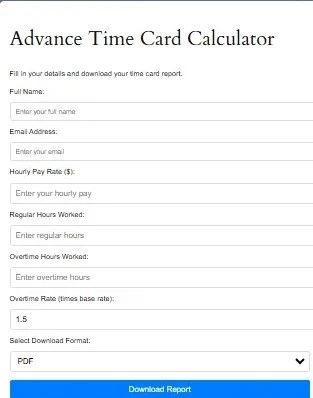
Advance Time Card Calculator
Fill in your details and download your time card report.
Features of the Time Card Calculator
This time card calculator provides users to enter time, then press/enter tab, by pressing tab you quickly move to the next field, which ensures efficiency in data entry.
This tool provides features like daily and weekly calculations, this time card calculator is well-designed to advance payroll efficiency for your businesses.
Advanced Time Card Calculator offers a range of features to meet diverse needs:
- It can easily be calculated by converting hours and minutes into decimal hours. A timesheet calculator provide you to calculate work hours effortlessly, ensuring accuracy for both employees and employers.
2. It can precisely trail work hours by entering the start and stop times for each day.
3. This tool easily fine-tunes for break times to get precise worked hours.
4. This tool also includes overtime calculations with elastic rules for daily or weekly dawns.
5. The timecard calculator modernizes the process of recording shift hours and is quite helpful for calculating pay based on input values in start and end times. It is perfect for tracking hours worked, which include strenuously and lunch breaks, and it ensues to give you precise results.

How to Use the Calculator
Here is a step-by-step guide which ensures continuous use:
- First, you enter the start and end times for each workday.
2. Then input break durations in minutes.
3. Choose what you want to display results in HH:MM format or in decimal hours.
4. If needed you specify the overtime rules, which including thresholds and rates.
Know you can calculate total hours worked, with overtime, and engender payroll-ready results. With all these functionality of the tool, this calculator is quite perfect in creating full timesheets or proving employee hours.

Benefits of Using a Time Card Calculator
This tool is very perfect for shift workers, this shift hour calculator offers a quick and precise way to log hours. The time card calculator geek feature is perfect for those looking to dive deep into time calculations and want to optimize their road map. Work time calculator can be used to certify precise records for your semi-monthly time card calculator.
This tool holds all your time-tracking needs. Nothing matter it is a work hour calculator or an hour calculator. It improves payroll precision with mechanized calculations. It helps you to disregard errors that are related with manual tracking. This tool help you to save valued time by simplifying hour and pay computations. You can enhance payroll production with precise data for employees and employers alike.
Additional Features and Tools

The hours calculator is a multipurpose tool, which is perfect for chasing daily hours, calculating breaks, and preparing time sheets for payroll. This time sheet calculation tool certifies precise results, even when dealing with overtime and breaks.
The mytimecard calculator is also perfectly designed for personal use, allowing individuals to track their work hours and ensure that they are remunerated properly. For businesses that is working on a semi-monthly payroll, this semi-monthly timesheet calculator makes tracking and calculating hours simple.
What Is a Time Card Calculator?
A Time Card Calculator is an online tool that helps employees, freelancers, contractors, and business owners calculate total work hours based on clock-in and clock-out times. It automatically totals daily and weekly hours, deducts break times, and can estimate overtime when applicable.
Instead of manually calculating work hours, users can enter their shift times and instantly see accurate totals.
How Does a Time Card Calculator Work?
A time card calculator uses start times, end times, and break durations to determine total hours worked.
Basic Formula
Hours Worked=(Clock Out−Clock In)−Break Time
Example:
- Clock In: 9:00 AM
- Clock Out: 5:30 PM
- Lunch Break: 30 Minutes
Total Hours Worked:
8 Hours
Most modern calculators automatically handle:
- Break deductions
- Overtime calculations
- Overnight shifts
- Weekly totals
- Decimal hour conversion
Why Use a Time Card Calculator?
Manual time calculations often lead to payroll mistakes and inaccurate work-hour records.
A time card calculator helps users:
- Track daily work hours
- Calculate weekly totals
- Estimate payroll hours
- Monitor overtime
- Reduce payroll errors
- Save time during scheduling and reporting
Who Uses Time Card Calculators?
Employees
To verify paycheck accuracy and monitor work hours.
Freelancers
To track billable client hours.
Contractors
To create accurate invoices and project records.
Small Business Owners
To calculate employee work hours before payroll processing.
HR Managers
To review attendance and overtime records efficiently.
Understanding Regular Hours vs Overtime
Many workplaces use overtime rules after employees exceed a certain number of hours.
Regular Hours
Standard working hours paid at the normal hourly rate.
Overtime Hours
Hours worked beyond the overtime threshold.
Common example:
- Regular Hours: First 40 hours per week
- Overtime: Hours above 40
Overtime Formula
Overtime Hours=max(0,Total Hours−40)
Actual overtime rules may vary depending on local labor laws and employer policies.
Time Card Calculator Example
Suppose an employee works:
| Day | Hours Worked |
|---|---|
| Monday | 8 |
| Tuesday | 8 |
| Wednesday | 9 |
| Thursday | 8 |
| Friday | 9 |
Weekly Total:
42 Hours
Result:
- Regular Hours: 40
- Overtime Hours: 2
The calculator automatically performs these calculations without requiring manual math.
Benefits of Tracking Work Hours Accurately
Better Payroll Accuracy
Accurate time records help reduce paycheck disputes.
Improved Productivity Tracking
Workers can identify trends in their schedules and workloads.
Easier Tax and Accounting Records
Freelancers and contractors often need hour records for invoicing and reporting.
Labor Law Compliance
Businesses may be required to maintain accurate employee time records.
Common Time Tracking Mistakes
Many workers accidentally miscalculate hours because they:
- Forget unpaid breaks
- Misread AM and PM times
- Ignore overnight shifts
- Round time incorrectly
- Forget overtime calculations
Using a calculator helps prevent these errors.
How to Calculate Time Cards for Overnight Shifts
Overnight shifts occur when employees clock out after midnight.
Example:
- Clock In: 10:00 PM
- Clock Out: 6:00 AM
Total Hours Worked:
8 Hours
A quality time card calculator automatically recognizes overnight schedules and calculates hours correctly.
Decimal Hours vs Hours and Minutes
Payroll systems often use decimal hours.
Examples:
| Hours & Minutes | Decimal Hours |
|---|---|
| 8:15 | 8.25 |
| 8:30 | 8.50 |
| 8:45 | 8.75 |
| 9:00 | 9.00 |
Decimal conversion simplifies payroll calculations and hourly pay estimates.
Tips for Accurate Time Tracking
- Record hours daily instead of relying on memory.
- Include all unpaid break periods.
- Verify overtime rules with your employer.
- Double-check overnight shifts.
- Keep copies of timesheets for future reference.
- Review totals before submitting payroll records.
Frequently Asked Uses of a Time Card Calculator
People commonly use time card calculators for:
- Weekly timesheets
- Employee attendance tracking
- Payroll preparation
- Freelancer billing
- Contractor invoices
- Shift scheduling
- Project time management
- Overtime estimation
Why Use Our Time Card Calculator?
Our calculator is designed to provide:
- Instant work-hour calculations
- Automatic break deductions
- Weekly and daily totals
- Overtime estimation
- Mobile-friendly access
- Fast browser-based performance
- No registration required
Whether you’re tracking employee hours, preparing payroll, or managing freelance projects, this tool helps simplify time tracking and improve accuracy.
Related Tools on Our Website
Time Calculator – Add or subtract hours/minutes easily.
Time Zone Converter Tool – Convert meeting time zones for global teams.
Date Calculator – Find dates between or after meetings.
Custom Workday Calculator – Plan working days around meetings.
Hours Calculator – Track total hours spent in meetings or tasks.
Time Value Calculator – Understand how much your time is worth.
Pomodoro Timer – Breaks work into intervals
Frequently Asked Questions (FAQ)
A time card calculator is a tool for computing total work hours, break times, and pay amounts based on the hours worked, hourly rates and ensure accurate payroll productivity.
With the free time card calculator, factor in overtime and lunch breaks which ensures nothing is missed in your timesheet.
Yes, the time card calculator report/ form can be downloaded.
Yes! The time card calculator includes overtime calculations based on your standard hourly rate and overtime rules. Just input your regular and overtime rates, and the tool will handle the rest.
Yes, the time card calculator is 100% free to use with no sign-up or subscription required. You can calculate unlimited work hours directly from your browser.
Absolutely! Our time card calculator is fully mobile-friendly and works on smartphones, tablets, laptops, and desktops, so you can track your hours anywhere, anytime.
Can the time card calculator report/ form be downloaded?
Conclusion
Advanced Time Card Calculator is an necessary tool for refining time tracking and payroll efficacy. Either calculating daily hours, handling overtime, or confirming obedience, this tool has it shielded.
Start using the Advanced Time Card Calculator today and experience the difference it makes in managing hours, pay, and productivity.
Editorial Review & Accuracy
This Time Card Calculator is designed using standard work-hour calculation methods, payroll time-tracking practices, and commonly used overtime formulas. Content is reviewed periodically to ensure accuracy, usability, and alignment with modern workforce time-tracking requirements.
Reviewed by Daily Tool Spot Editorial Team
Last Updated: May 2026