🌈 All-in-One Unicode Text Converter
Making regular text stand out is very difficult, Our Unicode text converter solves this problem! This guide and tool explain how text conversion web apps work, their magic features, and answers FAQs like “What is the difference between text and Unicode text?”
Our text converter runs smoothly on Facebook posts, WhatsApp statusez, X (Twitter) tweets, LinkedIn bios, and 50 plus other platformz! Converts plain ASCII letters (A-Z) into fancy text that pops in any app.
Explore more free online tools, colour contrast analyzer, Text to Graph Converter
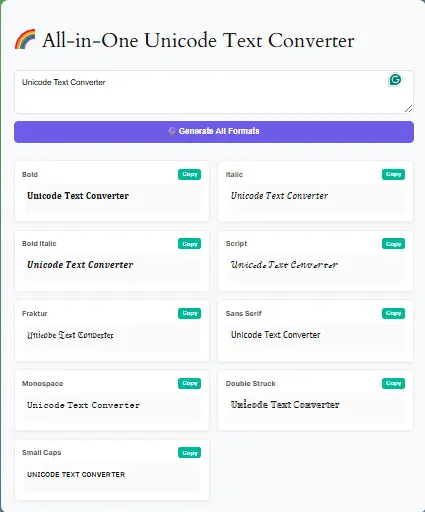
Key Features of Our Unicode Text Converter
Multiple Styles:
Our tool converts to:
- Bold Math
- Italic Sans-Serif
- Double Struck
- Monospace (ideal for coding)
Diacritic Support:
This tool reserves special characters.
Free & Fast:
Use it freely because no signup is required.
Advanced Features of Unicode text converter
Reverse Conversion:
The user can turn Unicode back to plain text.
Cross-Platform Sync:
It works on iOS, Android, and desktops.
How the Unicode text converter Works
- Input: Paste your text (supports 2,000+ characters).
- Mapping: Uses Unicode v15.0 to swap characters.
- Output: Get converted text instantly.
How to Use Unicode text converter (3 Steps)
This text converter solves the problem in three easy steps.
- Paste your text (e.g., “Hello World”)
Type or paste text that you want to convert.
- Choose a style (Bold Math, Fraktur, etc.).
Text conversion web apps give you live different styles from which choose your required style.
- Click “Copy” and paste it anywhere (Instagram, Twitter, Word).
After selecting your style from the text converter, just copy and paste it where you want.
Pro Tip: In order to convert text in Word, just paste the Unicode output directly!
Frequently Asked Questions (FAQs)
A tool that transforms plain text into styled Unicode characters.
Yes, it is 100% free with no hidden costs.
Absolutely! Create eye-catching bios and posts.
Yes, preserves all special characters.
Conclusion
Whether you need a stylish social media bio or technical documents with specialized fonts, our tool handles and provides it all. With diacritic support and batch processing, it’s the ultimate text conversion tool.
Try it now: Transform plain text into creative Unicode magic!