Welcome to the Ultimate Online Scientific Calculator
If you're searching for a reliable online scientific calculator, this powerful tool delivers exactly what you need. Perform trigonometric, logarithmic, and exponential calculations effortlessly with our versatile calculator, designed for everyone—from students studying algebra and calculus to professionals working in engineering, statistics, or physics. You can rely on it for accurate results in all your mathematical computations.
Today, in an era where efficiency and precision are paramount, having instant access to powerful computational tools is essential. Fortunately, with our free online scientific calculator, complex mathematics is now at your fingertips. Consequently, whether you're a student tackling algebra homework, an engineer verifying calculations, or a professional working from a remote location, this tool is designed for you. Specifically, this comprehensive guide will walk you through every feature, demonstrate practical applications, and explain why this browser-based calculator is an indispensable resource for anyone who works with numbers.
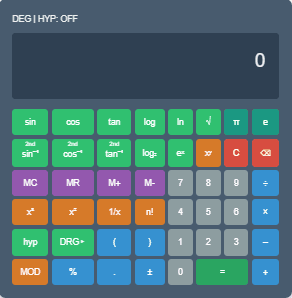
This calculator combines simplicity with powerful functionality, working directly in your browser without any downloads. The clean interface ensures users of all levels can operate it easily, making equation solving faster and more efficient.
For additional mathematical tools, explore our Length Conversion Calculator, Area Conversion Calculator, and Temperature Conversion Calculator for quick conversions.
Why Choose an Online Scientific Calculator?
Firstly, let's address the fundamental question: why use an online tool when physical calculators exist? Primarily, the answer lies in unparalleled accessibility. For instance, you can access our calculator from any device with a web browser—be it a laptop, tablet, or smartphone—without downloads or installations. Additionally, online calculators are frequently updated with new functions, ensuring you always have the latest tools without purchasing new hardware. Moreover, they eliminate the risk of losing a physical device and often provide a cleaner, larger interface that's easier to read and use.
Features of the Scientific Notation Calculator & Converter
Our scientific calculator is packed with features that mirror and often exceed the capabilities of leading physical models. Here’s a detailed look at what you can accomplish.
1. Fundamental Arithmetic and Order of Operations
Naturally, the calculator handles all basic operations: addition, subtraction, multiplication, and division. More importantly, it follows the standard algebraic order of operations (often seen in calculators as AOS or EOS), meaning it correctly processes exponents, multiplication/division, and addition/subtraction in the correct sequence. Therefore, an expression like 2 + 3 × 4 correctly yields 14, not 20. To override this order, you can use parentheses, which the calculator fully supports for grouping parts of your calculation.
2. Advanced Mathematical Functions
Beyond basics, the tool includes a suite of advanced functions essential for science, engineering, and advanced mathematics:
- Trigonometric Functions: Calculate sine (
sin), cosine (cos), and tangent (tan), along with their inverses (sin⁻¹,cos⁻¹,tan⁻¹) for working with angles. You can typically switch between degrees, radians, and gradians based on your needs. - Logarithmic Functions: Compute both the common logarithm (
log, base 10) and the natural logarithm (ln, base *e*). To change to another base, you can use the formula:logᵦ(a) = log(a) / log(b). - Exponents and Roots: Easily raise numbers to any power (
xʸ) and calculate square roots (√) and other roots. Thex⁻¹key is also available for quickly finding the reciprocal of a number. - Constants: Instantly insert mathematical constants like π (Pi) with a single button press.
3. Memory Functions for Complex Workflows
Similar to high-end physical calculators, our tool includes versatile memory options:
- Quick Memory (M+, M-, MR, MC): Store a single value, add to it, subtract from it, recall it, or clear it with dedicated buttons.
- Additional Memory Registers: Some advanced calculators offer multiple storage registers (e.g., 0-9) accessible via
STO(store) andRCL(recall) keys, allowing you to hold several variables simultaneously.
4. User-Friendly Display and Interface
The interface features a clear, two-line display. As a result, you can see your full expression and the current input or result simultaneously, which is crucial for tracking complex calculations. The C (clear) and AC (all clear) keys let you correct mistakes easily—C often deletes the last entry, while AC resets the entire calculation.

Advanced Capabilities and Specialized Functions
For users dealing with statistics, computer science, or higher mathematics, the calculator offers even more.
Statistical Calculations
You can compute permutations P(n,r) and combinations C(n,k) directly, which are vital for probability and statistics problems. The factorial function (!) is also included for combinatorial calculations.
Working with Fractions and Decimals
Easily input fractions and mixed numbers using a dedicated key (often labeled aᵇ⁄c), and seamlessly convert results between fractional and decimal formats. This is incredibly useful for getting exact answers instead of rounded decimals.
Scientific Notation and Engineering Notation
The EXP key lets you enter numbers in scientific notation (like 6.02 × 10²³). Furthermore, many calculators include an ENG key to convert results into engineering notation, where exponents are multiples of three (e.g., 10³, 10⁶, 10⁻⁹).
Number System Conversions
Some scientific calculators offer conversions between binary (BIN), octal (OCT), decimal (DEC), and hexadecimal (HEX) number systems, which is essential for programming and electronics work.
Key Features at a Glance:
- Natural Textbook Display: View your expressions and results exactly as they appear in textbooks, making them easier to read and verify.
- Over 50 Scientific Functions: Access a comprehensive suite of operations, including trigonometric, logarithmic, and exponential functions for all your calculation needs.
- Perform Complex Calculations: Effortlessly handle complex number arithmetic, base conversions, and other advanced mathematical tasks.
- Full Calculation History: Keep track of your work with a built-in history tape, allowing you to review and edit previous calculations with a single click.
- Completely Free & Accessible: Enjoy this fully-featured scientific calculator with no hidden costs, registrations, or software downloads. It works directly in your web browser on any device.
Why Use This Online Scientific Calculator?
This calculator handles everything from basic arithmetic to advanced functions, making it ideal for both quick calculations and professional tasks.It performs addition, subtraction, multiplication, and division with perfect accuracy. Trigonometric operations like sin, cos, and tan can be calculated in both degrees and radians, while also supporting logarithms, exponents, square roots, and percentages.Memory storage functions let you save and recall values effortlessly. Whether you're a student or a scientist, this tool adapts to your needs as a fast, free, and fully browser-based solution requiring no installation.
How to Use This Scientific Calculator?
Using the calculator is intuitive. Here's how to perform common tasks efficiently.
- Accessing the Tool: Simply navigate to the calculator page on our site. The interface loads directly in your browser.
- Performing a Basic Calculation: For example, to calculate
(15 + 7) × 3:- Click
(, then1,5,+,7,). - Then click
×, then3, and finally=. The display will show the correct answer, 66.
- Click
- Using Advanced Functions: To find the sine of 30 degrees:
- First, ensure your angle unit is set to Degrees.
- Type
30, then press thesinkey. The result, 0.5, will appear.
- Utilizing Memory: To sum a series of numbers:
- Calculate the first number and press
M+to store it in memory. - Calculate the second number and press
M+again to add it. - Press
MRto recall the running total.
- Calculate the first number and press
- Correcting Errors: If you make a mistake mid-entry, use the
C(orDEL) key to erase the last digit. To start over completely, pressAC.
For other calculation needs, explore our suite of related tools. For instance, check our Percentage Calculator for quick markup or discount problems, or use our Time Calculator for adding and subtracting hours and minutes.
Pro Tips
Access inverse trigonometric functions using SHIFT. Double-click any result to copy it instantly, or press the UP arrow to revisit previous calculations, helping you work faster and more efficiently.
| Category | Function | Syntax | Example |
|---|---|---|---|
| Basic Math | Arithmetic Operations | + - × ÷ | 5 + 3 × 2 |
| Advanced | Exponents & Roots | ^, sqrt(), root() | root(3,27) |
| Trigonometry | Sine Function | sin() | sin(π/2) |
| Memory | Memory Recall | MR | 5 MS → MR |
| Scientific | Logarithms | log(), ln() | log(100) |
Pro Tips
- Use SHIFT for inverse functions
- Double-click to copy results
- Press UP for previous calculations
Pro Tips
Additionally, you can use SHIFT to access inverse trigonometric functions. Moreover, double-click on any result to copy it instantly. Meanwhile, pressing the UP arrow allows you to revisit previous calculations. As a result, you can work faster and more efficiently.
Frequently Asked Questions (FAQs)
A scientific calculator is a specialized tool for performing complex mathematical operations. Therefore, it’s used for trigonometry, logarithms, exponents, and scientific notation.
Absolutely! This scientific calculator is 100% free and works straight in your browser. You do not need to download anything.
Absolutely! Moreover, it’s optimized for all devices, including smartphones, tablets, and desktops.
Generally, it requires the internet to load initially. However, once loaded, most functions will still operate offline.
Not yet. Nevertheless, complex number functionality will be available in future updates.
Yes! Furthermore, you can paste formulas directly into the calculator input field. Just ensure the syntax follows standard mathematical rules.
Since it doesn't require downloads or account creation and doesn’t store data, many students use it during open-device tests. However, always check your exam rules first.
Best Practices and Troubleshooting
- Start Simple: When learning a new function, test it with a known, simple input to verify you understand the button sequence.
- Use Parentheses Liberally: When in doubt, use parentheses to explicitly define the order of your calculation. This prevents unexpected results.
- Check Your Mode: Always verify the calculator's mode—especially for angle units (Deg/Rad/Grad) and number format (Math vs. Line output)—before starting a complex calculation.
- Clear Memory Between Tasks: To avoid old data interfering with new calculations, get in the habit of pressing
ACandMCat the start of a new problem.
Conclusion
Ultimately, the Online scientific calculator simplifies advanced math for everyone. Whether you’re solving trigonometric functions, converting scientific notation, or calculating logarithmic expressions, this tool covers it all. Moreover, its intuitive interface, accuracy, and smart features make it one of the best scientific calculators online. So, start using it today and make your daily calculations effortless.Try it now and simplify your calculations!
We build these tools with a people-first approach, focusing on creating helpful, reliable content that benefits users directly. Our goal is to demonstrate experience through practical tool design, expertise in mathematical computation, authoritativeness by providing accurate, citable information, and above all, trustworthiness by offering a free, transparent, and effective service.