Discord Countdown / Timestamp Generator
Generate Discord-ready timestamp codes (relative, short, long). Single-file, responsive, easy to drop in WordPress.
Are you tired of manually updating your Discord server about upcoming events? Do you wish there was a simpler way to build excitement for your game launches, streams, or special occasions? Well, you’re in the right place! Our Discord Countdown Generator is exactly what you need to create stunning, animated timers that will wow your community. Honestly, it is probably the easiest way to make your server look more professional without any technical skills required. Our free discord countdown generator makes this super accessible to everyone, regardless of their technical skills or budget.
Features of Discord Countdown Maker
Our discord countdown generator packs a ton of features that make it stand out from other options. Let me break down what you’re getting:
Completely Free and Web-Based
Unlike many other tools that have hidden costs or require subscriptions, our free discord countdown generator is 100% free. There’s no catch! You can create as many countdowns as you want, for as many events as you need, without ever spending a dime. Additionally, since it is web based, you do not need to download anything or worry about updates.
No Bot Required
This is a huge advantage! Many people search for a discord countdown without bot because they either do not have permission to add bots to their server or simply prefer not to. With our tool, you get all the benefits of a countdown timer without any of the complications of bot installation and configuration.
High-Quality Animations
The discord animated countdown generator capabilities mean your timers won’t look static or boring. We offer smooth, professional animations that really make your countdowns pop. Whether it’s a subtle pulse or more dramatic effects, you can choose what works best for your server’s vibe.
Multiple Output Formats
Depending on where you want to use your countdown, you can export it in different formats. Need something for your server’s announcement channel? The image format works perfectly. Want to add it to your website or share it on social media? We have got you covered there too.
Customization Options
From colors to fonts to layout, our custom discord countdown options let you match your server’s branding perfectly. This level of customization is usually only available in premium tools, but we include it for free because we believe everyone should have access to great looking countdowns.
Advanced Features Discord Countdown Generator
Once you’ve mastered the basics, you might want to explore some of the more advanced features that make our discord countdown maker truly powerful.
Dynamic Updating
Some of our countdown options actually update in real time, which means community members can watch the timer count down right there in your server. This is perfect for building excitement in the final hours before a big event!
Integration with Other Tools
Since we have a whole suite of useful tools, our Discord Countdown Generator plays nicely with others. For example, you can use our Time Zone Converter Tool to figure out the perfect time for your international audience, then create your countdown based on that. Similarly, our Date Calculator can help you determine exactly how many days are between now and your event.
Mobile Optimization
Let’s face it – many of your community members will be accessing Discord from their phones. Fortunately, our discord countdown image generator creates timers that look great on both desktop and mobile devices. The text remains readable, and the animations work smoothly across all platforms.
Reusable Templates
If you create countdowns regularly (like for weekly streams), you can save your settings as templates. This means you do not have to reconfigure everything from scratch each time – just load your template, update the date and time, and you’re good to go!
What Exactly Is This Discord Countdown Generator?
Basically, our Discord countdown maker is a free online tool that lets you create beautiful, customizable countdown timers specifically for Discord. Instead of struggling with complicated bots or coding, you can simply enter your event details and generate a countdown image or animated timer that you can post directly in your server. It is perfect for building anticipation and keeping everyone informed about important dates.
Furthermore, this tool works completely in your browser no downloads, no installations, and absolutely no bot required! Whether you’re planning a discord game launch countdown or a discord birthday countdown, this tool has you covered. Personally, I think it’s one of the most useful tools we’ve created, especially for gaming communities and streamers.
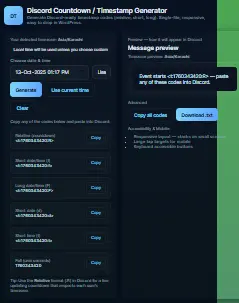
How to Use Discord Countdown Generator
Okay, lets get into the practical stuff. Using our discord countdown maker is incredibly straightforward, but I’ll walk you through every step to make sure you get the most out of it.
1: Access the Tool
First, navigate to our Discord Countdown Generator page. Actually, you’re already here! But if you ever need to find it again, just remember it’s part of our larger collection of free online tools. While you are at it, you might want to check out our Time Tools Hub for other useful utilities like our Time Zone Converter Tool and Date Calculator that can help you plan events across different time zones.
2: Set Your Event Details
This is where the magic starts! You will see several fields to fill out:
- Event Name: Give your countdown a title like “Game Launch” or “Weekly Stream”
- Target Date and Time: Select when your event is happening
- Time Zone: Make sure this is correct for your location
Honally, I sometimes forget to check the time zone, so double check this one! It is embarrassing when your countdown is off by several hours. Speaking from experience here…
3: Customize the Appearance
Now for the fun part! Our custom discord countdown options let you make the timer truly yours:
- Choose from different animation styles
- Select colors that match your server’s theme
- Adjust the size and layout
Moreover, you can preview your changes in real-time, which is super helpful for getting everything just right. The discord animated countdown generator features mean you are not stuck with boring, static timers.
4: Generate and Download
Once you are happy with how everything looks, simply click the “Generate Countdown” button. Within seconds, your custom discord countdown timer will be ready! You can then download it as an image or get the code to embed it, depending on your needs.
5: Add to Your Discord Server
Finally, the moment you’ve been waiting for! Here’s how to add a countdown to discord:
- Upload your countdown image to your desired channel
- Or paste the generated code if you’re using an embed option
- Pin the message so it stays visible to everyone
Seriously, it is that simple! No technical knowledge required, which is why I love this tool so much.
Benefits of Using Our Discord Countdown Generator
Now that you know what the tool can do, let’s talk about why you should actually use it. The benefits go way beyond just having a pretty timer in your server.
Increased Engagement and Excitement
There’s something psychological about watching a timer count down to zero. It builds anticipation in a way that static announcements simply can’t match. When people see that discord stream countdown timer ticking away, they’re more likely to remember your event and actually attend.
Professional Server Appearance
Let’s be honest – a server with well-designed graphics and countdowns just looks more professional. It shows that you care about your community and are willing to put in the effort to create a great experience for them. Our discord countdown creator makes it easy to achieve this polished look without graphic design skills.
Time Zone Management Made Easy
If you have an international community, scheduling events can be a nightmare. But when you use our countdown generator alongside our Time Zone Converter Tool, you can ensure everyone knows exactly when things are happening in their local time. This is especially useful for global game launches or streams with worldwide audiences.
No Technical Headaches
The whole point of our tool is to make your life easier. You do not need to understand how to make a countdown for discord using complicated methods our generator handles all the technical stuff behind the scenes. This means you can focus on what really matters: creating great content and engaging with your community.
Versatility for Different Events
Whether you need a discord new season countdown for your favorite game, a discord release date countdown for an upcoming title, or even a discord holiday countdown for seasonal events, our tool adapts to your needs. The customization options mean it works for literally any type of event you can imagine.
Frequently Asked Questions About Discord Countdowns
Adding a countdown to Discord is super simple with our tool! First, use our Discord Countdown Generator to create your timer. Then, download the image and upload it to your desired Discord channel.
You can use our discord event countdown for literally any type of event! Some popular uses include:
Discord game launch countdown for new game releases
Discord stream countdown timer for your streaming schedule
Discord birthday countdown for community members’ birthdays
Discord new season countdown for game seasons or updates
Discord release date countdown for anticipated products
The possibilities are endless, really!
Yes, 100% free! Our free discord countdown generator doesn’t have any hidden costs or premium tiers. You can create as many countdowns as you want, for as many events as you need.
Yes! Some of our output options create live countdown for discord server displays that actually update in real-time.
The main difference is simplicity and control. With our discord countdown generator, you don’t need to invite another bot to your server or deal with complex setup commands. You create exactly what you want on our site, then simply add it to Discord. It’s much more straightforward for most use cases.
Definitely! Our tool is fully optimized for mobile devices, and the countdowns you create work perfectly in the Discord mobile app. The text remains readable, and any animations will play smoothly on both iOS and Android devices.
Integrating Countdowns with Your Other Server Tools
While our Discord Countdown Generator is powerful on its own, it works even better when combined with other tools in our collection. For instance, if you’re planning a complex event schedule, you might want to use our Hours Calculator to figure out timing, then our Date Calculator to determine the exact date, and finally our countdown generator to build hype.
Similarly, if you’re managing a community with diverse scheduling needs, our Custom Workday Calculator can help you plan around different work schedules, while our Meeting Duration Calculator ensures your events are properly timed. It’s all about creating a seamless experience for both you and your community.
For streamers specifically, combining our countdown generator with tools like our YouTube Thumbnail Downloader can help you create a cohesive branding experience across platforms. And if you’re managing multiple events, our Time Tracking Tool can help you stay organized behind the scenes.
Common Mistakes to Avoid When Using Discord Countdowns
Even with our user-friendly discord countdown timer generator, there are a few pitfalls you’ll want to avoid:
Forgetting Time Zones
This is probably the most common mistake! Always double-check that you’ve set the correct time zone for your countdown. There’s nothing worse than having your entire community show up at the wrong time because of a time zone mix-up.
Overusing Countdowns
While countdowns are exciting, using them for every single minor event can make them lose their impact. Save them for your most important occasions to maintain that special feeling.
Poor Visual Design
Our tool gives you lots of customization options, but that doesn’t mean you should use all of them at once! Stick to colors and fonts that match your server’s theme, and make sure the text remains readable against the background.
Not Pinning Important Countdowns
If you go to the trouble of creating a beautiful discord animated countdown, make sure it stays visible by pinning the message in your channel. Otherwise, it might get buried under other conversations.
Ignoring Mobile Users
Remember that many of your community members will be viewing your countdown on mobile devices. Always preview how it looks on smaller screens to ensure it remains effective and readable.
The Psychology Behind Effective Countdowns
Have you ever wondered why countdown timers are so effective? There’s actual psychology behind it! When people see a discord countdown generator timer ticking away, it creates what psychologists call “anticipatory excitement.” Their brains release dopamine as they look forward to the upcoming event, which makes them more engaged and more likely to actually participate.
Additionally, countdowns create a sense of urgency that static dates don’t. Seeing that there are “only 3 days, 4 hours, and 12 minutes” until an event feels much more immediate than just knowing the date. This is why our discord countdown maker includes the option to display the time remaining in various formats – different approaches work better for different types of events.
Advanced Strategies for Countdown Campaigns
If you really want to maximize the impact of your countdowns, consider these advanced strategies:
The Staged Approach
Instead of just having one countdown, create multiple countdowns that kick in at different intervals. For example, you might start with a “2 weeks until” countdown, then switch to a “3 days until” version, then a “24 hours until” version as the event approaches. Each stage can have its own design and messaging to keep things fresh.
Cross-Platform Integration
Don’t just limit your countdown to Discord! Use our tool to create versions for your Twitter header, YouTube channel, and other platforms. This creates a cohesive experience for your community no matter where they interact with your content.
Community Involvement
Get your community involved in the countdown! You could create special roles that unlock as the countdown progresses, or run contests tied to the timer. The more you can make the countdown an interactive experience, the more engaged your community will be.
Behind-the-Scenes Teasers
Use the period leading up to your event to share behind-the-scenes content and teasers. The countdown builds the framework, but the content you share during that period is what really keeps people excited and engaged.
Comparing Our Tool to Other Options
You might be wondering how our Discord Countdown Generator stacks up against other options. Well, let me break it down for you:
Versus Countdown Bots
While countdown bots can be powerful, they often require technical knowledge to set up and manage. Our tool gives you the same results with a much simpler, more visual interface. Plus, you don’t have to worry about bots going offline or being unavailable.
Versus Manual Methods
Some people try to create countdowns manually using graphic design software. This is incredibly time-consuming and requires design skills. Our discord countdown image generator automates the entire process, giving you professional results in seconds rather than hours.
Versus Other Online Generators
Many other online generators have limitations like watermarks, premium paywalls, or limited customization. Our tool is completely free with no strings attached, and we offer a wide range of customization options that other free tools often reserve for paying customers.
Future Updates and Features
We are constantly working to improve our Discord Countdown Generator based on user feedback. Some features we’re considering for future updates include:
- Even more animation options
- Pre-made templates for common event types
- Integration with calendar apps
- Collaborative features for team use
If you have suggestions for features you’d like to see, don’t hesitate to let us know through our contact page! We’re always looking for ways to make our tools more useful for our community.
Conclusion: Start Creating Amazing Discord Countdowns Today!
Well, there you have it – everything you could possibly want to know about using our Discord Countdown Generator to create stunning, effective countdown timers for your server. Whether you need a discord game launch countdown, a discord stream countdown timer, or anything in between, our tool makes the process simple, fast, and completely free.
Remember, great communities are built on great experiences, and something as simple as a well designed countdown can make a huge difference in how engaged and excited your members feel. So why wait? Start using our discord countdown maker today and take your server to the next level!
And do not forget to explore our other tools while you’re here. From our Time Tools Hub to specialized calculators like our BMI Calculator and Percentage Calculator, we’ve got plenty of resources to make your life easier. Happy countdown creating!