🎵 Metronome Studio Precision Tool
Keeping perfect time is the foundation of any great musical performance. Consequently, every serious musician needs a reliable metronome tool to develop their internal pulse and rhythmic accuracy. Fortunately, our online metronome provides a professional‑grade solution that works instantly in your browser without any download or installation. Moreover, this free metronome offers advanced features like tap tempo, subdivisions, and multiple sound packs, making it suitable for beginners and professionals alike.
As a result, you can practice guitar, piano, drums, or any other instrument with the same precision as a high‑end digital device. Furthermore, this bpm metronome allows you to set any tempo from 30 to 300 BPM, ensuring you never have to rush or drag again. Therefore, whether you need a simple click track for recording or a complex polyrhythm trainer for advanced exercises, our tool has you covered. Ultimately, this page explains every feature, shows you exactly how to use the metronome, and answers the most common questions from musicians worldwide.
Features of the Metronome Tool
Core Tempo Controls for Perfect Timing
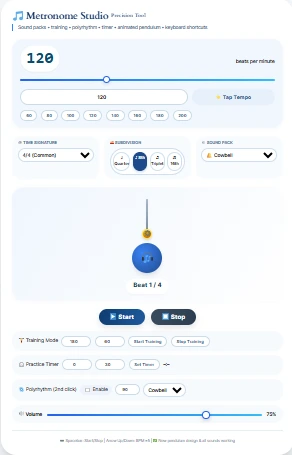
First of all, the tap tempo metronome function lets you quickly set the desired speed by tapping any key or button. Similarly, you can use the BPM slider or directly type a value from 30 to 300 beats per minute. In addition, eight BPM presets metronome buttons (60, 80, 100, 120, 140, 160, 180, and 200) provide one‑click access to common tempos. Consequently, you can switch between slow practice and fast performance without any hassle.
Subdivisions and Time Signatures
Another essential feature is the metronome with subdivisions, which divides each beat into smaller rhythmic units. For instance, you can choose quarter notes, eighth notes, triplets, or sixteenth notes to practice complex patterns. Likewise, the metronome with time signatures supports 2/4, 3/4, 4/4, 6/8, and even 5/4, making it perfect for waltzes, marches, and progressive rock. Therefore, you can internalize odd meters and syncopations with absolute confidence.
Visual and Audible Feedback
Furthermore, the visual metronome with pendulum shows a swinging arm that moves exactly with the beat, providing an intuitive visual cue. At the same time, a large pulsing circle changes color on every click, so you never miss a beat even in noisy environments. Moreover, three distinct metronome with sound packs are available: wood block, cowbell, and a deep drum click. As a result, you can choose the sound that cuts through your instrument’s mix best.
Keyboard Shortcuts for Efficiency
For a smooth workflow, the metronome with keyboard shortcuts allows you to start and stop using the spacebar. Additionally, you can increase or decrease the BPM by five steps using the arrow up and down keys. Consequently, you never have to leave your instrument or mouse around to adjust the tempo. This feature is especially helpful during live practice sessions or when your hands are full.
Advanced Features of the Tool
Training Mode (Gradual BPM Increase)
One of the most powerful additions is the training mode metronome (gradual BPM increase). Specifically, you can set a target tempo and a duration in seconds, and the metronome will smoothly accelerate from the current BPM to the target. For example, start at 80 BPM and reach 120 BPM over 30 seconds to build speed gradually without tension. Consequently, this method is widely used by drummers and guitarists to master fast passages. Therefore, you can avoid injury and develop clean technique at the same time.
Polyrhythm Support
Moreover, the polyrhythm metronome feature allows you to play two different BPMs simultaneously. For instance, practice three against two or four against three by enabling the second click track and setting its own tempo. In addition, you can assign a separate sound pack to the polyrhythm click, so you can easily distinguish between the two layers. As a result, this tool is invaluable for jazz, progressive metal, and world music styles.
Practice Timer with Auto‑Stop
Another advanced function is the practice timer with metronome, which lets you set a countdown in minutes and seconds. After the timer reaches zero, the metronome automatically stops and shows an alert. Consequently, you can design disciplined practice sessions without watching the clock. Furthermore, this feature helps you stick to a structured routine, whether you are warming up or drilling a difficult etude.
Polyrhythm (Second Click Track)
In the same vein, the metronome with two different BPMs simultaneously gives you complete control over complex rhythmic interactions. For example, set the main click to 120 BPM and the polyrhythm click to 90 BPM to practice 4:3 patterns. Additionally, you can change the polyrhythm’s sound independently, so your ears easily separate the two layers. Therefore, this tool is perfect for advanced students and professional composers.
How to Use the Tool
Step 1 – Access the Metronome
First, visit our website and locate the online metronome for PC or any mobile device. Because the tool is fully responsive, it works perfectly on smartphones, tablets, and desktops. Therefore, you can practice anywhere without installing an app. Consequently, this responsive metronome tool is always ready when inspiration strikes.
Step 2 – Set Your Tempo
Next, adjust the BPM using the slider, the number input, or the tap tempo button. For instance, tap along with a song you want to learn, and the tool calculates the exact tempo. Similarly, click any preset button for an instant change. As a result, you can focus on playing instead of fiddling with controls.
Step 3 – Choose Time Signature and Subdivision
After setting the tempo, select your time signature from the dropdown menu. For a standard rock beat, choose 4/4; for a waltz, pick 3/4. Likewise, select a subdivision value – quarter notes are best for simple exercises, while eighth or sixteenth notes help with faster licks. Moreover, the triplet subdivision is ideal for swing and blues phrasing.
Step 4 – Pick Your Sound Pack
Then, decide which sound pack works best for your instrument. The wood block produces a sharp, dry click that cuts through acoustic guitar. The cowbell offers a brighter, more percussive tone for rock and pop. Alternatively, the drum click delivers a deep, punchy sound that drummers and bassists love. Consequently, you can practice for hours without ear fatigue.
Step 5 – Use Advanced Features
If you want to improve speed, activate the training mode and set a target BPM and duration. For polyrhythm practice, enable the second click track and adjust its BPM. Additionally, use the practice timer to limit your session to 10, 20, or 30 minutes. Therefore, you can systematically build your time‑keeping skills.
Step 6 – Start and Stop with Keyboard Shortcuts
Finally, press the Start button or hit the spacebar to begin the metronome. While it runs, use the arrow up/down keys to change the tempo on the fly. To stop, press the spacebar again or click Stop. As a result, you never have to interrupt your playing flow. Consequently, this metronome for complex rhythms becomes a natural extension of your instrument.
Where to Embed the Metronome
Because this is an embeddable metronome, you can add it to any website using a simple HTML block. For example, music teachers can place it on their student portal, or bloggers can include it in a rhythm tutorial. Moreover, it works as a metronome for website without slowing down your page. Therefore, you can share this powerful tool with your entire audience.
Frequently Asked Questions (FAQs)
Yes, completely – it is a free metronome with no hidden costs or premium upgrades. Furthermore, you do not need to create an account or provide any personal information. Consequently, you can use it as often as you like without any restrictions.
No, this is a free metronome no download required. It runs directly in your browser using standard web technologies. Therefore, it works on Windows, Mac, Linux, ChromeOS, and even smartphones.
Once the page loads, you can use it offline because the tool uses local web audio. However, you need an internet connection to load the page initially. As a result, you can practice in a studio without Wi‑Fi after the first visit.
This lag‑free online metronome uses the Web Audio API with a high‑precision scheduler. Therefore, it is as accurate as a dedicated hardware metronome. Moreover, the metronome with performance.now scheduling ensures no drift, even over long sessions.
Absolutely, the metronome with sound packs includes three options: wood block, cowbell, and drum click. Furthermore, you can change the sound while the metronome is running. Consequently, you can always find a tone that suits your instrument.
Yes, just plug in your headphones and adjust the volume slider. The loud metronome click can be turned down or up to match your playing level. Consequently, you can practice silently without disturbing others.
Yes, it is an embeddable metronome that you can add using one line of HTML. Many teachers and music bloggers already use our metronome for website to enhance their lessons. Therefore, feel free to share it with your students or readers.
Conclusion
In summary, our online metronome delivers every feature you could want in a free metronome – from tap tempo and subdivisions to training mode and polyrhythms. Because it runs entirely in your browser without any download, you can start practicing immediately on any device. Furthermore, the modern metronome design with a colorful metronome interface and animated pendulum metronome makes timing practice enjoyable rather than tedious. Therefore, whether you are a beginner learning your first chords or a session drummer preparing for a recording, this professional metronome tool will help you stay perfectly in time.
We strongly believe that a visual swinging pendulum metronome online combined with multiple sound options and keyboard shortcuts represents the future of rhythm training. Consequently, we invite you to bookmark this page and use it daily. Additionally, explore our other free tools below – they are designed to boost your productivity, creativity, and musical growth.
You May Also Like These Tools from Daily Tool Spot
To further improve your practice and time management, check out these related resources (click the links to open):
Pomodoro Timer with Task List – perfect for structuring your practice sessions into focused intervals.Time Management Tools – a collection of timers and planners to organize your daily routine.BPM Calculator – quickly find the tempo of any song by tapping along.Tap Tempo BPM Calculator – another handy tool for detecting beats per minute from live input.BPM to Milliseconds Converter – essential for setting delay and reverb effects in your DAW.Time Tracking Tool – ideal for logging how many hours you spend on each instrument or exercise.Productivity Focus Hub – combine your metronome practice with focus techniques for better results.For any questions or suggestions, please visit our Contact Us page. You can also learn more about our mission on the About Us page. Your privacy is important – see our Privacy Policy and Terms of Use for complete details.To deepen your understanding of rhythm and tempo, we recommend these authoritative sources:Wikipedia – Metronome – a comprehensive history and technical explanation of metronomes.TED‑Ed – How to master your sense of time – an engaging video lesson on rhythmic perception.Music Theory Academy – Understanding time signatures – clear examples of odd and compound meters.All of these resources are trusted by educators worldwide. Consequently, they will complement your use of our metronome tool and help you become a more confident musician.Final note: This tool is built with a no‑API metronome architecture, meaning it is fully self‑contained metronome HTML and JavaScript. Therefore, you can even save the page locally and use it offline forever. Enjoy your practice!Popular Music Tools
Practicing with a steady click is the best way to improve your timing. If you aren’t sure what BPM to set this metronome to, you can look up classical speed terms on our Tempo Marking Chart, or find the exact tempo of a song you are trying to learn using our Tap Tempo BPM Calculator. To take your rhythmic precision to the next level, combine your metronome practice with our Note Length Calculator to understand exactly how long each subdivision should last.