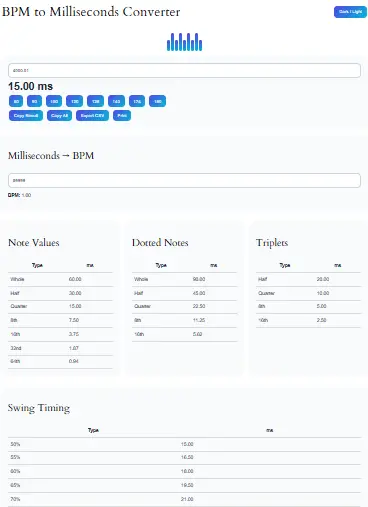
BPM to Milliseconds Converter
Milliseconds → BPM
BPM: 0
Note Values
Dotted Notes
Triplets
Swing Timing
In modern music production, precise timing plays a crucial role because even a small tempo mismatch can completely affect rhythm, groove, and synchronization. Therefore, a BPM to Milliseconds Converter becomes an essential tool for producers, DJs, and audio engineers who want accurate beat timing in milliseconds. Moreover, this converter helps you instantly transform tempo (BPM) into exact milliseconds per beat, which is widely used in delay effects, sound design, DAWs, and beat matching.
Additionally, this tool simplifies complex music theory calculations into a single click process so that both beginners and professionals can use it efficiently. As a result, you can focus more on creativity rather than manual math calculations.
What Is a BPM to Milliseconds Converter?
A BPM to Milliseconds Converter is a digital music calculator that converts beats per minute (BPM) into milliseconds per beat. Furthermore, it helps determine the exact timing of musical notes, delays, and rhythmic patterns in audio production.
In simple terms, BPM tells you how fast a song is, whereas milliseconds tell you how long each beat lasts in real time. Consequently, this conversion is critical in syncing audio effects and creating professional-quality music.
For example:
- 120 BPM = 500 milliseconds per beat
- 60 BPM = 1000 milliseconds per beat
Thus, this conversion is widely used in DAWs like Ableton Live, FL Studio, Logic Pro, and Cubase.
For more understanding of audio processing concepts, you can explore Ableton Live Official Guide.
Features of BPM to Milliseconds Converter Tool
Our advanced tool is designed to provide maximum accuracy and usability. Furthermore, it includes multiple professional-grade features to support music creators.
1. BPM to Milliseconds Conversion
Firstly, the tool instantly converts BPM into milliseconds per beat using a precise formula.
2. Reverse Conversion
Secondly, it allows users to convert milliseconds back into BPM for better flexibility.
3. Preset BPM Buttons
Additionally, it includes quick preset buttons such as 60, 90, 120, 128, 140, and 174 BPM for instant testing.
4. Note Duration Tables
Moreover, it calculates musical note lengths including:
- Whole notes
- Half notes
- Quarter notes
- Eighth notes
- Sixteenth notes
5. Dotted Notes Calculator
Furthermore, dotted note timing is automatically calculated for advanced rhythm design.
6. Triplet Timing Support
In addition, triplet calculations help producers create complex rhythmic patterns.
7. Swing Timing Calculator
Also, swing percentages (50%–70%) help generate human-like groove variations.
8. Dark/Light Mode Toggle
Additionally, users can switch between themes for better usability.
9. Copy & Export Tools
Moreover, users can:
- Copy results instantly
- Export CSV files
- Print timing charts
10. Waveform Animation
Finally, a visual waveform animation improves engagement and user experience.
This tool is built using real-world music production principles and industry-standard formulas. Moreover, it follows widely accepted digital audio timing calculations used in professional DAWs.
Advanced Features of BPM to Milliseconds Tool
Beyond basic conversion, this tool offers advanced music production utilities.
Real-Time Calculation
Because the tool updates instantly, users get immediate feedback without delays.
Local Storage Memory
Additionally, it saves your last BPM value so you can continue where you left off.
Responsive Design
Moreover, the tool works perfectly on mobile, tablet, and desktop devices.
Lightweight Performance
Since no external libraries are used, the tool loads extremely fast.
DJ-Friendly Presets
Furthermore, preset BPM buttons are optimized for genres like:
- House (128 BPM)
- EDM (128 BPM)
- Trap (140–150 BPM)
- Drum & Bass (174 BPM)
For deeper DJ insights, you can also check Serato DJ Pro Guide.
Additionally, the tool is designed based on practical workflow needs of producers and DJs, ensuring accurate and reliable results.
How to Use BPM to Milliseconds Converter
Using this tool is extremely simple, even for beginners. Therefore, anyone can use it without technical knowledge.
Step 1: Enter BPM
First, input the BPM value of your track or project.
Step 2: View Milliseconds
Next, the tool automatically calculates milliseconds per beat.
Step 3: Explore Note Values
After that, you can view all related note durations such as quarter notes, eighth notes, and triplets.
Step 4: Use Presets
Additionally, you can click preset BPM buttons for quick testing.
Step 5: Export or Copy
Finally, copy results or export them for use in your DAW or project.
Furthermore, DailyToolSpot aims to provide high-quality educational and utility-based tools that improve productivity and learning efficiency in digital environments.
Why BPM to Milliseconds Conversion Matters in Music Production
In music production, timing accuracy is extremely important because even a slight delay can distort rhythm perception. Therefore, converting BPM into milliseconds ensures perfect synchronization between beats and effects.
Moreover, producers use this conversion for:
- Delay effects synchronization
- Reverb timing adjustments
- Drum pattern alignment
- Loop creation
- Beat matching in DJ sets
Additionally, DJs rely on this conversion to match tempos between tracks seamlessly during live performances.
As a result, a BPM to milliseconds calculator becomes a core production utility.
BPM to Milliseconds Formula Explained
The conversion formula is simple but powerful:
Milliseconds = 60000 ÷ BPM
Therefore:
- At 120 BPM → 500 ms
- At 100 BPM → 600 ms
- At 140 BPM → 428.57 ms
Moreover, this formula is used in almost all digital audio workstations for timing calculations.
Music Theory Behind BPM and Milliseconds
In music theory, BPM defines tempo, whereas milliseconds define duration. Consequently, both are interconnected in digital production environments.
Additionally, understanding this relationship helps producers:
- Create synchronized loops
- Build delay effects
- Design rhythmic patterns
- Improve timing accuracy
Therefore, mastering this concept significantly improves production quality.
Related Tools You May Find Useful
To enhance your workflow, you can explore other powerful tools on DailyToolSpot:
- Tempo Marking Chart – Understand musical tempo labels
- DJ Beat Match Calculator – Match two songs easily
- Delay Time Calculator – Calculate delay timing precisely
- Note Length Calculator – Convert BPM into musical notes
- Music Interval Calculator – Learn musical intervals
Additionally, you can explore the full collection at Tool Library for more utilities.
For an even more efficient music production workflow, you may also find these tools helpful. Use the Tap Tempo BPM Calculator to find the tempo of any song by tapping along with the rhythm. Additionally, try our BPM Calculator to calculate beats per minute and analyze song tempo before converting BPM into milliseconds for delay timing, note duration, and music production tasks.
Who Should Use This Tool?
This tool is useful for a wide range of users, including:
- Music producers
- DJs and remix artists
- Sound engineers
- Beatmakers
- Students of music theory
- Content creators using audio sync
Therefore, whether you are a beginner or professional, this tool simplifies your workflow significantly.
Popular Music Tools
This tool is incredibly useful for producers setting up delay throws or sampling in a DAW. To get the most out of your millisecond calculations, pair this with our Delay Time Calculator to find the exact settings for 1/4, 1/8, and 1/16 note echoes. If you are manipulating audio samples, you may also need to adjust the quality and speed of your audio files using our Audio Sample Rate Converter. For a broader look at rhythmic timing, don’t forget to check out our Note Length Calculator.
Frequently Asked Questions
It is the process of converting beats per minute into exact beat duration in milliseconds.
Because milliseconds are used in delay effects, timing, and audio synchronization.
The formula is 60000 divided by BPM.
At 120 BPM, one beat equals 500 milliseconds.
Yes, simply divide 60000 by milliseconds.
Yes, DJs use it for beat matching and tempo synchronization.
Yes, it calculates both automatically.
Yes, it helps align delay and rhythm timing accurately.
Yes, it is fully responsive and mobile-friendly.
Yes, it is completely free for all users.
Conclusion
In conclusion, the BPM to Milliseconds Converter is an essential tool for modern music production because it bridges the gap between tempo and precise timing. Moreover, it helps DJs, producers, and musicians achieve perfect synchronization in their projects.
Additionally, with features like note duration calculation, triplets, swing timing, and export options, this tool becomes a complete rhythm timing solution. Therefore, whether you are working in Ableton, FL Studio, or any DAW, this tool significantly improves your workflow.
Finally, DailyToolSpot continues to provide high-quality tools that simplify complex tasks and enhance creativity in music production.