👇 Click the button below to hear the beat 👇
Need to match the tempo of two tracks without guessing? This DJ beat match calculator instantly tells you the exact pitch shift percentage needed to sync any two BPMs. Enter your track tempos, get the math done for you, and mix with confidence.
This calculator was built to simplify the mathematics behind beatmatching by instantly calculating pitch adjustments, phrase timing, and harmonic compatibility. Instead of estimating values manually, you can focus on track selection and creative mixing.
What is a DJ Beat Match Calculator?
Primarily, a DJ beat match calculator online is a digital utility designed to analyze the tempos of two different tracks. It calculates the exact pitch shift required to synchronize them perfectly. Thus, you can achieve seamless transitions without guessing.
This beat match calculator processes the beats per minute (BPM) of your incoming and outgoing tracks. It instantly determines the percentage difference between them. You know exactly how much to adjust your pitch fader.
Historically, DJs had to rely entirely on their ears and vinyl records to match tempos. However, modern digital DJing requires precise mathematical alignment for perfect sync. Using a dj beat match calculator free tool is absolutely essential today.
Manual beatmatching can lead to phase issues if the tempos are slightly off. Consequently, utilizing a bpm match calculator ensures your tracks remain perfectly locked in the grid. This prevents the dreaded “flanging” sound that ruins a good mix.
Core Features of Our DJ Beat Match Calculator
1. Accurate Tap Tempo Function
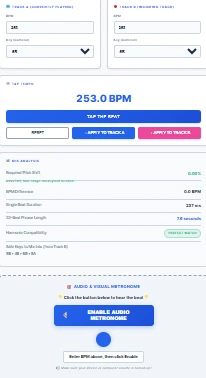
For tracks with unknown BPMs, the built-in tap tempo feature lets you tap along to the beat. The calculator averages your taps and displays the precise tempo, which you can instantly apply to either track slot.
2. Real-Time Audio and Visual Metronome
The interface provides a real-time metronome that lets you hear and see the exact beat duration. This ensures your internal clock stays perfectly aligned with the grid.
3. Precise Pitch Shift Calculation
The tool calculates the exact pitch shift percentage needed for your controller, so you can set your pitch fader with absolute precision. This saves you valuable time during live performances.
4. Harmonic Mixing with the Camelot Wheel
Beyond basic tempo matching, the calculator integrates the Camelot Wheel system to analyze musical keys. The Camelot Wheel turns musical keys into simple DJ codes like 8A and 9B. Compatible keys on the wheel are a perfect fifth above or below the key you begin in. If you’re in 8A, you can safely mix into 7A, 8A, or 9A next. This helps you avoid dissonant key clashes and create harmonically rich sets.
5. Smart Pitch Shift Warnings
The system provides smart warnings if your pitch shift exceeds safe limits. Shifting more than 8% can cause audio distortion without Keylock enabled. The tool advises you to enable master tempo on your equipment to avoid this issue.
6. Mobile-Responsive Design
The interface is fully responsive and works beautifully on mobile devices. You can use it on your phone while browsing for music on the go, optimized for all screen sizes without compromising functionality.
Advanced Features of the Tool
Beyond basic tempo matching, this tool features advanced harmonic mixing capabilities. It integrates the Camelot wheel system to analyze musical keys. You can avoid dissonant key clashes during your sets.
Calculator determines the exact length of a 32-beat phrase in seconds. You can plan your cue points with mathematical precision. This advanced feature is crucial for maintaining the energy flow on the dancefloor.
Additionally, the system provides smart warnings if your pitch shift exceeds safe limits. For instance, shifting more than 8% can cause audio distortion without keylock. Hence, the tool advises you to enable master tempo on your equipment.
Visual metronome features a distinct downbeat indicator. Thus, you can easily identify the first beat of every measure. This helps you align your phrases perfectly when mixing live.
How to Use the DJ Beat Match Calculator
First, enter the original BPM of your currently playing track into Track A. Next, input the BPM of your incoming track into Track B. Then, the tool will instantly calculate the required pitch shift.
Alternatively, you can use the tap tempo feature if you do not know the exact BPM. Simply tap the button in rhythm with the song. The calculator will average your taps and display the precise tempo.
Review the mix analysis panel for detailed insights. Check the harmonic compatibility to ensure the keys will blend well. Use the visual metronome to verify the beat duration before your mix.
Finally, click the “Enable Audio Metronome” button to hear the exact beat. You can confirm the tempo audibly before bringing the track into the mix. Your transitions will be flawless every single time.
If you need a dedicated standalone tool just for tapping, check out our Tap Tempo BPM Calculator. Furthermore, for general music analysis, our main BPM Calculator is also highly recommended. Additionally, you can practice your internal clock with our standalone Online Metronome.
Why You Need a Free DJ Beat Match Calculator Online
Initially, having a reliable beat matching online tool saves you immense amounts of time. It allows you to prepare your sets with mathematical precision before you even arrive at the venue. Thus, your confidence on the dancefloor will skyrocket.
Understanding the exact pitch shift helps you troubleshoot equipment issues. For instance, if a club’s CDJ is miscalibrated, you will know exactly how to compensate. You can deliver a flawless performance regardless of the gear.
Dedicated dj pitch calculator helps you understand the underlying mechanics of your software. You are not just blindly pressing the “Sync” button like an amateur. Instead, you become a true technician of the art of beatmatching dj.
DJ Beat Match Calculator vs. DJ Sync Software
Modern DJ software like Serato, Rekordbox, Traktor, and Virtual DJ all include sync functions that automatically match BPMs and align beatgrids. So why use a beat match calculator?
The Sync Limitation
Sync depends entirely on beatgridding—the software’s ability to detect where beats fall in a track. The best software with the easiest music might get close to 100% accuracy, but more likely, beatgrids are between 65% and 80% accurate. Variable BPM music (tracks with tempo changes) often confuses software like Traktor and Rekordbox.
When sync fails—and it will—you’ll be thankful you know how to do it manually. A DJ limited to only beatmatching with sync has a severe disadvantage over DJs who can do it manually.
The Science and Math Behind Beatmatching
Fundamentally, beatmatching is the process of aligning the rhythmic structures of two distinct audio tracks. This involves matching both the tempo (BPM) and the phase (the exact beat). A dj pitch calculator is vital for understanding the mathematical relationship between tracks.
Human hearing is incredibly sensitive to rhythmic discrepancies. Even a 1% difference in tempo can cause a mix to sound messy. Thus, using a beat matching online tool guarantees mathematical perfection.
If you need to shift tempo significantly (over 8%), enable Keylock/Master Tempo on your equipment. This prevents the ‘chipmunk’ effect and keeps your track in key.
Concept of a 32-beat phrase is rooted in the mathematical structure of Western music. Most electronic dance music is built in blocks of four, eight, or sixteen bars. Understanding this math is crucial for smooth transitions.
If you want to dive deeper into the exact frequency calculations, you can use our Online Scientific Calculator to understand the harmonic ratios. Producers can use the BPM to Milliseconds Converter to set exact delay times in their DAW. Thus, the mathematical foundation of DJing is vast and fascinating.
Equipment Compatibility and Setup
Primarily, this tool is designed to work seamlessly with all modern DJ equipment. Whether you use Pioneer CDJs, Denon Prime, or Native Instruments controllers, the math remains the same. The pitch shift percentage applies universally.
If you are using vinyl, the calculator helps you understand the exact speed adjustment needed. You can apply these percentages to your turntable’s pitch fader. It bridges the gap between digital analysis and analog performance.
Tool’s clean interface ensures it works perfectly on tablets and smartphones. Thus, you can keep it open on your phone while your laptop runs your DJ software. Moreover, it serves as an excellent secondary reference screen.
For those who love classical music terminology, you can refer to the Tempo Marking Chart to understand how BPM translates to traditional terms like Allegro or Presto. Understanding these terms enhances your overall musicality. You become a more well-rounded musician.
The Psychology of the Dancefloor
Fundamentally, beatmatching is not just about math; it is about psychology. A perfectly matched tempo keeps the dancers in a subconscious trance. Any rhythmic disruption can break their focus and ruin the energy.
Harmonic mixing taps into the emotional center of the brain. Transitioning between compatible keys feels like a natural evolution of the mood. Thus, the crowd remains engaged without even realizing why the mix feels so good.
Phrasing aligns with the human expectation of musical resolution. Dropping a new track at the start of a 32-beat phrase provides a sense of satisfaction. Therefore, using our phrase calculator ensures you hit these psychological triggers perfectly.
Common Beatmatching Mistakes to Avoid
Frequently, beginners make the mistake of ignoring the phrasing of their tracks. Specifically, they mix in at the wrong point, causing the energy to drop abruptly. Always use the 32-beat phrase calculator to plan your entry points.
Many DJs forget to check the harmonic compatibility of their tracks. They create jarring transitions that ruin the dancefloor vibe. Our tool highlights these clashes so you can avoid them entirely.
Some producers rely too heavily on the “Sync” button. However, understanding the exact pitch shift percentage makes you a better technician. Thus, our dj pitch calculator ensures you know exactly what the sync button is doing under the hood.
Finally, ignoring the visual metronome can lead to lazy mixing habits. Always verify the beat visually and audibly. Consequently, you will develop a rock-solid internal clock over time.
Popular Music Tools
Beatmatching is the foundation of DJing. To use this tool effectively, you need the exact starting and ending tempos, which you can calculate manually using our BPM Calculator or find quickly with our Free BPM Tools. If you are producing a mashup rather than DJing live, you might need to permanently alter the audio files to match speeds, in which case you should use our Audio Sample Rate Converter to ensure your audio quality remains pristine.
Real-World Beat Matching Example
Imagine you are mixing from a house track playing at 124 BPM into another track that runs at 128 BPM.
To synchronize the tempos, the incoming track must be slowed down slightly.
Calculation:
Pitch Shift (%) = ((124 – 128) ÷ 128) × 100
Result = -3.13%
This means you should reduce the pitch fader of the 128 BPM track by approximately 3.13% to match the currently playing 124 BPM track.
32-Beat Phrase Example
At 124 BPM:
- One beat = 60 ÷ 124 = 0.484 seconds
- 32 beats = 15.48 seconds
This means a standard 32-beat phrase lasts approximately 15.5 seconds. Knowing this timing helps you place cue points and start transitions at the perfect moment.
Harmonic Mixing Example
If the outgoing track is in 8A (A Minor) and the incoming track is also in 8A, the transition will generally sound smooth and natural.
Other compatible Camelot keys include:
- 7A
- 9A
- 8B
Mixing within compatible keys helps prevent clashing melodies and creates more musical transitions.
Pro Tips and Best Practices for Optimal Results
1. Always check phrasing first
Before you even look at the pitch shift, check where you are in the phrase. Dropping a track on the downbeat of a new 32-beat phrase creates the smoothest transitions.
2. Use Keylock for large pitch shifts
If your pitch shift exceeds 8%, enable Master Tempo/Keylock on your equipment. This separates pitch from tempo, so your track stays in key even when sped up or slowed down.
3. Practice your internal clock
The visual metronome isn’t just for show—it helps you develop your internal sense of timing. Use it regularly to train your ear.
4. Plan your sets in advance
Use the calculator during set preparation to map out transitions, cue points, and harmonic progressions before you even arrive at the venue.
5. Know your pitch range
Most DJ controllers and CDJs have pitch ranges of ±8% or ±16%. The calculator helps you stay within these limits. If your required pitch shift exceeds your controller’s range, you need to find a different track.
6. Mix harmonically
The Camelot Wheel isn’t just a gimmick. Mixing in compatible keys makes your sets sound more professional and musically cohesive. Start with same-key mixes (e.g., 8A → 8A), then experiment with relative-key and neighbor-key moves.
Frequently Asked Questions (FAQs)
A DJ beat match calculator is a tool that analyzes two track tempos (BPM) and calculates the exact pitch shift needed to synchronize them. This ensures your mixes are perfectly aligned.
Indeed, this DJ beat match calculator free version is completely accessible to everyone. We do not require any sign-ups or hidden fees. You can use it as often as you need.
Specifically, our tap tempo feature averages your last six taps for maximum precision. Additionally, it automatically resets if you pause for more than two seconds. Thus, it provides highly accurate BPM readings for unknown tracks.
Fundamentally, the Camelot wheel is a simplified system for musical key compatibility. Moreover, it assigns numerical codes to keys to make mixing easier. Our tool uses this system to prevent key clashes.
The warning turns red when the required pitch shift exceeds 8%. Furthermore, shifting beyond this limit can cause audio distortion. We recommend enabling keylock or choosing a different track.
Absolutely, you can use this tool to calculate pitch shifts for vinyl. It tells you exactly how much to adjust your turntable’s pitch fader. It is incredibly useful for beatmatching vinyl records.
Initially, the tool takes your track’s BPM and divides it into the time formula. It multiplies the result by 32 to find the phrase length. You know exactly how many seconds your phrase lasts.
Generally, yes, you should enable keylock if your pitch shift is significant. Keylock preserves the original musical key while changing the speed. Thus, it prevents the “chipmunk” effect on vocals.
Conclusion
Ultimately, mastering the art of beatmatching requires both practice and the right tools. Furthermore, our DJ beat match calculator provides the mathematical precision you need. You can focus on the creative aspects of your DJ sets.
We highly recommend exploring our other music and productivity tools to enhance your workflow. For instance, you can use our Time Calculator to plan your exact set lengths and event schedules. You can use the Percentage Calculator to understand the exact math behind your pitch shifts.
Managing your time effectively is just as important as managing your tracks. Therefore, check out our Pomodoro Timer with Task List to stay focused during your music production sessions. Our Flow State Assistant can help you achieve deep concentration while crate digging.
Finally, keep practicing your transitions and trust your ears above all else. Therefore, use this calculator as a guide rather than a crutch. Ultimately, you will become a master DJ in no time.
Looking for more DJ tools? Check out our Tap Tempo BPM Calculator for standalone BPM detection, our BPM Calculator for general music analysis, or our Online Metronome to practice your internal clock.