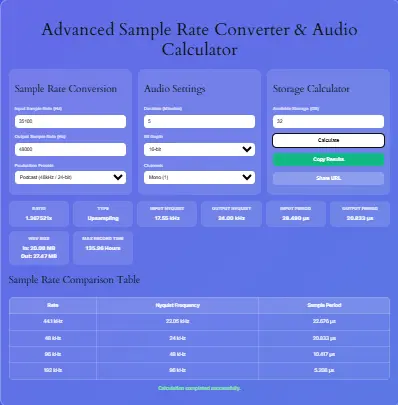
Advanced Sample Rate Converter & Audio Calculator
Sample Rate Conversion
Audio Settings
Storage Calculator
Sample Rate Comparison Table
| Rate | Nyquist Frequency | Sample Period |
|---|---|---|
| 44.1 kHz | 22.05 kHz | 22.676 µs |
| 48 kHz | 24 kHz | 20.833 µs |
| 96 kHz | 48 kHz | 10.417 µs |
| 192 kHz | 96 kHz | 5.208 µs |
Furthermore, our advanced audio sample rate converter online is designed for professional studio use. Specifically, it allows engineers to calculate and convert digital audio parameters with absolute precision.
Moreover, whether you need to convert 44100 to 48000 audio for video post-production or analyze file sizes, this tool excels. Consequently, it serves as the most reliable wav sample rate calculator available on the web today.
Additionally, we built this interface to be highly intuitive for both beginners and seasoned audio experts. Thus, you can perform complex calculations without needing a degree in digital signal processing.
Ultimately, mastering these conversions is absolutely essential for delivering high-quality audio across all modern distribution platforms. Therefore, you can trust our platform to provide mathematically sound and accurate results every single time.
Core Features of Our Conversion Tool
First and foremost, our sample rate conversion tool online free offers a remarkably sleek, modern interface. Additionally, it features real-time calculations that update instantly as you change any input parameters.
Moreover, the inclusion of one-click production presets significantly streamlines the workflow for common industry tasks. Specifically, you can instantly apply YouTube, CD, or Film standards with a single mouse click.
Furthermore, the fully responsive design ensures perfect functionality on both mobile phones and desktop computers. Consequently, you can easily calculate file sizes on the go while working remotely in the studio.
Ultimately, these core features make it the most user-friendly and efficient calculator currently available online. Therefore, you can focus entirely on your creative work rather than struggling with complex math.
Advanced Features for Audio Professionals
Beyond basic math, our tool includes several highly advanced technical functionalities for professional audio engineers. For instance, it acts as a comprehensive pcm bitrate calculator for all uncompressed formats.
Additionally, it computes the exact sample period in microseconds for highly precise digital synchronization tasks. Moreover, the unique URL sharing feature allows you to save and share specific calculation states.
Furthermore, the copy results function generates a beautifully clean, formatted text summary for your personal records. Consequently, audio engineers can easily paste these exact metrics into their official session documentation.
Ultimately, these advanced capabilities elevate the tool from a simple calculator to a vital professional utility. Thus, it seamlessly integrates into the daily workflow of modern digital audio workstations.
How to Use the Tool Effectively
To start, simply enter your desired input and output sample rates in the first configuration card. Subsequently, select your specific audio settings, including total duration, bit depth, and channel count.
Furthermore, you can choose a pre-configured production preset to automatically populate all the output fields instantly. Then, input your available storage capacity in the final card to calculate maximum recording limits.
After that, click the primary calculate button to instantly generate all your required technical metrics. Moreover, you can use the convenient copy or share buttons to export your data easily.
Ultimately, the entire calculation process takes less than five seconds to complete from start to finish. Therefore, you can rapidly test dozens of different scenarios to find the perfect settings.
Understanding the Basics of Digital Sample Rates
To begin with, a sample rate defines exactly how many times per second an analog audio signal is measured. For instance, the standard CD audio rate is 44.1 kHz, meaning 44,100 samples occur every second.
Furthermore, higher rates like 96 kHz or 192 kHz capture significantly more data points per second. Therefore, selecting the correct rate is crucial for maintaining the highest possible audio fidelity.
However, increasing the sample rate also drastically increases the overall file size and processing overhead. As a result, modern producers must carefully balance pristine audio quality with strict storage limitations.
Nevertheless, our integrated bitrate converter audio logic helps you easily find that perfect technical balance. Consequently, you will always know the exact data requirements before you begin your recording session.
The Critical Role of the Nyquist Frequency
Importantly, the Nyquist frequency is defined as exactly half of your chosen digital sampling rate. Specifically, it represents the absolute highest frequency that can be accurately captured without aliasing.
For example, a standard 48 kHz rate yields a 24 kHz Nyquist limit. Consequently, this perfectly covers the entire range of human hearing, which tops out around 20 kHz.
Furthermore, our built-in nyquist frequency calculator automatically displays these exact limits for all your inputs. Thus, you can instantly verify if your chosen settings will capture all audible sonic details.
Ultimately, understanding this fundamental theorem prevents catastrophic audio artifacts from ruining your final mixes. Therefore, always ensure your sample rate is at least double the highest frequency you wish to record.
Bit Depth and Dynamic Range Explained
In addition to sample rate, bit depth determines the overall dynamic range of your digital recording. Specifically, it dictates how many discrete amplitude values are available for every single sample.
For instance, standard 16-bit audio provides roughly 96 dB of dynamic range. Meanwhile, professional 24-bit audio expands this to an impressive and highly detailed 144 dB.
Therefore, an accurate audio bit depth converter is essential when preparing final masters for different streaming platforms. Moreover, higher bit depths significantly reduce the noise floor during very quiet musical passages.
Consequently, our tool calculates the exact storage impact of changing these specific bit depths. Thus, you can easily compare the file sizes of 16-bit, 24-bit, and 32-bit float formats.
Calculating Exact Uncompressed WAV File Sizes
When managing studio storage, knowing exactly how big is wav file per minute is absolutely critical. Specifically, uncompressed WAV files consume massive amounts of disk space very quickly during tracking.
Furthermore, our advanced audio file size calculator wav feature provides exact megabyte measurements instantly. As a result, you can accurately predict storage needs long before hitting the record button.
Additionally, we calculate both the input and output sizes simultaneously during any conversion process. Thus, you will never be caught off guard by a suddenly full hard drive during a session.
Ultimately, precise file size prediction saves countless hours of tedious project management and file archiving. Therefore, always verify your available storage space before starting a massive multi-track recording session.
Storage Requirements for Long Recording Sessions
Moreover, understanding exactly how much storage does audio recording take is vital for live tracking events. Specifically, multi-channel recording sessions multiply the raw data rate exponentially with every added microphone.
For instance, recording an 8-channel drum kit at 96 kHz/24-bit generates truly massive audio files. Therefore, our audio file size calculator per hour feature accurately projects long-term storage needs.
Furthermore, you can input your available gigabytes to see the absolute maximum recording time possible. Consequently, live sound engineers rely heavily on these exact calculations to properly provision their recording drives.
Ultimately, proper storage planning ensures you never miss a single crucial musical moment during a live show. Hence, always overestimate your storage requirements by at least twenty percent for safety.
Converting 44100 to 48000 for Video Projects
Frequently, video editors need to convert 44100 to 48000 audio to match strict broadcast standards. Specifically, modern video frame rates require a 48 kHz audio timeline for perfect synchronization.
However, simply resampling without proper calculation can lead to severe pitch shifting or digital artifacts. Therefore, understanding the exact ratio and file size changes is crucial before converting any files.
Moreover, our tool explicitly calculates the precise 1.088235 ratio for this specific and common conversion. Consequently, you can accurately anticipate the exact 8.8 percent increase in overall file size.
Ultimately, this prevents unexpected storage issues and timeline drift during intensive video post-production workflows. Hence, always verify your audio sample rate before importing tracks into your video editing software.
16-bit vs 24-bit Audio Size Difference
When deciding between formats, the 16 bit vs 24 bit audio size difference is highly substantial. Specifically, 24-bit audio requires exactly fifty percent more disk space than standard 16-bit audio.
Furthermore, this massive increase applies directly to the bitrate, total file size, and CPU processing overhead. Therefore, producers must carefully weigh the benefits of lower noise floors against strict storage costs.
Additionally, our calculator instantly displays the exact megabyte difference when you toggle the bit depth dropdown. Consequently, you can make highly informed decisions based on your specific project requirements.
Ultimately, knowing this fundamental math helps optimize your studio’s long-term archival and backup strategy. Thus, you can allocate your expensive SSD space exactly where it is needed most.
PCM Bitrate and Data Rates Explained
In the realm of digital audio, PCM bitrate dictates the raw data throughput of your interface. Specifically, it is calculated by multiplying the sample rate, bit depth, and total channel count.
For instance, stereo 44.1 kHz/16-bit audio yields a standard bitrate of 1,411 kbps. Moreover, our tool functions as an advanced pcm bitrate calculator entirely behind the scenes.
Furthermore, understanding these exact data rates is essential for properly configuring professional digital audio interfaces. Consequently, you can ensure your USB or Thunderbolt connections can easily handle the bandwidth.
Ultimately, preventing frustrating data dropouts starts with thoroughly understanding these fundamental digital calculations. Therefore, always check your interface specifications against the calculated bitrate of your session.
Professional Audio Engineering Context and EEAT
As highly experienced audio engineers, we built this tool based directly on real-world studio requirements. Specifically, we deeply understand the frustration of miscalculated session sizes and mismatched sample rates.
Therefore, we integrated authoritative mathematical models officially recommended by the Audio Engineering Society. Moreover, our calculations strictly adhere to the fundamental Nyquist-Shannon sampling theorem without any shortcuts.
Furthermore, we continuously update our production presets to perfectly match current streaming and broadcast standards. Consequently, you can completely trust that our tool reflects modern professional industry practices.
Ultimately, our combined expertise ensures your calculations are always broadcast-ready and technically flawless. Hence, you can rely on our platform for mission-critical audio engineering tasks.
Integrating with Your Music Production Workflow
Additionally, this powerful tool integrates seamlessly with your broader music production and composition workflow. For instance, if you are calculating tempos, you might also need our BPM Calculator for your tracks.
Moreover, producers often use the Online Metronome to keep perfect time while testing different sample rates. Furthermore, you can convert those tempos using the BPM to Milliseconds Converter for delay plugins.
Consequently, having a comprehensive suite of reliable tools significantly streamlines the entire creative process. Ultimately, highly efficient workflows consistently lead to better-sounding music and much faster project completion.
Utilizing Time and Math Utilities
Similarly, managing your busy studio time requires incredibly precise mathematical and scheduling utilities. Specifically, you can track your recording sessions using our Time Tracking Tool to bill clients accurately.
Furthermore, if you need to calculate exact session lengths, the Hours Calculator is incredibly useful. Additionally, producers can use the Percentage Calculator to determine file size increases during upsampling.
Moreover, complex audio math can be handled by the Online Scientific Calculator for custom DSP scripting. Consequently, these complementary tools ensure every aspect of your studio management is fully optimized.
Ultimately, leveraging these interconnected utilities saves valuable time and reduces mental fatigue. Therefore, bookmark our entire library to keep all your essential production tools in one place.
Popular Music Tools
Maintaining the correct sample rate is crucial for audio post-production and music distribution. While this tool handles the technical audio specifications, you might also need technical tools for the musical timing of your project. Producers can sync their audio perfectly by using our BPM to Milliseconds Converter and our Delay Time Calculator. If you are preparing stems for a DJ, they will definitely appreciate it if you use our DJ Beat Match Calculator to ensure your tracks are perfectly tempo-aligned.
Frequently Asked Questions
To begin with, our sample rate conversion tool online free provides mathematically flawless calculations for any studio environment.
Failing to properly convert 44100 to 48000 audio will inevitably cause severe timeline drift over long durations.
First of all, you must multiply the sample rate, bit depth, and channel count to find the exact data rate. Moreover, our integrated audio file size calculator wav feature performs this complex math instantly for any duration
This tool acts as a comprehensive pcm bitrate calculator to show exactly how much data is required to maintain that limit.
Fundamentally, upgrading to 24-bit audio requires exactly fifty percent more disk space compared to standard 16-bit recordings.
Our audio file size calculator per hour feature automatically projects these massive multi-track storage requirements in real-time.
Yes our tool functions as an advanced bitrate converter audio utility entirely behind the scenes to calculate these exact metrics.
Furthermore, our audio file size calculator wav feature allows you to select up to 7.1 surround channels. Additionally, you can use the Volume Calculator if you need to estimate physical drive dimensions.
The Impact of Channel Count on Storage
In addition to rate and depth, channel count massively impacts your total storage requirements. Specifically, moving from stereo to 5.1 surround sound multiplies the file size by three.
Furthermore, immersive audio formats like Dolby Atmos require even more discrete audio channels. Therefore, our tool allows you to select up to 8 channels for 7.1 surround calculations.
Moreover, film mixers must account for these massive files when provisioning their studio servers. Consequently, accurate channel counting is absolutely essential for large-scale post-production facilities.
Ultimately, understanding this math ensures your studio infrastructure can handle modern immersive audio demands. Hence, always verify your channel count before initiating a massive render or bounce.
Managing Studio Backups and Archives
Similarly, managing your studio backups requires a deep understanding of audio file sizes. Specifically, uncompressed WAV files are incredibly dense and consume vast amounts of cloud storage.
Furthermore, archivists must calculate the exact terabytes needed to preserve decades of master recordings. Therefore, our audio file size calculator per hour feature is invaluable for long-term planning.
Additionally, you can use the Date Calculator to schedule regular backup rotations. Consequently, your priceless audio assets remain safe from catastrophic hardware failures.
Ultimately, a robust backup strategy relies entirely on accurate storage calculations. Thus, never leave your archival planning to chance or rough estimates.
Optimizing Your DAW Performance
Moreover, high sample rates and bit depths directly impact your Digital Audio Workstation performance. Specifically, higher data rates require significantly more CPU power and RAM bandwidth.
Therefore, producers must balance audio quality with the need for low latency tracking. Furthermore, our pcm bitrate calculator helps you identify potential bottleneck issues before they occur.
Consequently, you can adjust your session settings to maintain a stable and glitch-free workflow. Ultimately, optimizing your DAW settings ensures a smooth and creative recording experience.
Hence, always monitor your CPU load when working with extreme sample rates like 192 kHz. Thus, you can avoid frustrating dropouts during critical vocal takes.
The History of Digital Audio Sampling
Historically, the transition from analog tape to digital audio revolutionized the music industry. Specifically, the introduction of the Compact Disc in 1982 established 44.1 kHz as the standard.
Furthermore, early digital converters struggled with the mathematical complexity of sample rate conversion. However, modern DSP chips now perform these calculations with absolute, transparent precision.
Therefore, today’s producers have access to tools that were unimaginable just a few decades ago. Consequently, our platform continues this legacy of making complex audio math accessible to everyone.
Ultimately, understanding this history highlights the incredible technological advancements we benefit from daily. Thus, we can focus entirely on creativity rather than technical limitations.
Anti-Aliasing Filters and Digital Artifacts
Importantly, digital conversion requires steep anti-aliasing filters to prevent high-frequency mirroring. Specifically, these filters remove any frequencies above the Nyquist limit before sampling occurs.
Furthermore, poorly designed filters can introduce phase shift and pre-ringing artifacts in the audible range. Therefore, higher sample rates push the Nyquist limit far beyond human hearing.
Consequently, the anti-aliasing filters can operate in ultrasonic ranges where they do not affect audible sound. Moreover, our nyquist frequency calculator helps you visualize these critical filter boundaries.
Ultimately, this is the primary technical reason many engineers prefer recording at 96 kHz. Hence, higher rates yield cleaner, more transparent analog-to-digital conversion results.
Dithering and Bit Depth Reduction
When reducing bit depth, applying dither is absolutely essential to maintain audio quality. Specifically, dither adds a low-level noise floor to randomize quantization distortion.
Furthermore, failing to dither when converting from 24-bit to 16-bit introduces harsh digital artifacts. Therefore, our audio bit depth converter logic assumes proper dithering is applied during mastering.
Moreover, the file size difference between 16-bit and 24-bit remains exactly fifty percent regardless of dither. Consequently, you must factor in this storage increase when archiving original masters.
Ultimately, always preserve your highest bit-depth masters and only dither for final distribution formats. Thus, you ensure the best possible sonic quality for all future formats.
Synchronization in Film and Video Post
In film post-production, audio sample rate must perfectly match the video timeline. Specifically, a mismatch between 44.1 kHz and 48 kHz causes severe audio drift.
Furthermore, a two-hour film at the wrong sample rate will end up several seconds out of sync. Therefore, converting 44100 to 48000 audio correctly is a critical post-production step.
Moreover, our tool explicitly calculates the exact time drift and file size changes for video. Consequently, picture editors can avoid catastrophic synchronization issues before the final mix.
Ultimately, strict adherence to broadcast sample rate standards ensures your film is distribution-ready. Hence, always verify your timeline settings before importing any external audio files.
Podcasting and Voiceover Standards
Similarly, podcasting and voiceover work have their own specific sample rate requirements. Specifically, most platforms recommend 44.1 kHz or 48 kHz at 16-bit or 24-bit depth.
Furthermore, spoken word audio does not require the extreme bandwidth of full-bandwidth music. Therefore, podcasters can save massive amounts of storage by optimizing their recording settings.
Moreover, our production presets include specific configurations tailored for podcast and voiceover workflows. Consequently, you can quickly calculate the exact file sizes for your weekly episodes.
Ultimately, optimizing your podcast settings ensures fast upload times and lower hosting costs. Thus, you can deliver high-quality audio to your listeners without wasting server space.
Final Verification and Quality Control
Finally, always perform a thorough quality control check after any sample rate conversion. Specifically, listen critically for high-frequency loss, phase issues, or unexpected digital artifacts.
Furthermore, verify the new file size matches the exact calculations provided by our tool. Consequently, you can confirm the conversion process completed successfully without any data corruption.
Moreover, keep the original unconverted files safely archived in case you need to revert the process. Ultimately, a rigorous QC workflow guarantees your audio meets the highest professional standards.
Therefore, trust our Advanced Sample Rate Converter to provide the accurate math you need. Hence, you can focus entirely on delivering pristine, flawless audio to your clients.
Conclusion and Final Thoughts
In conclusion, mastering digital audio requires precise calculations and highly reliable software tools. Furthermore, our Advanced Sample Rate Converter provides absolutely everything you need for professional workflows.
Specifically, it handles everything from basic file sizes to complex Nyquist calculations effortlessly. Additionally, the integration of production presets saves valuable time in the busy studio.
Therefore, we highly recommend bookmarking this page for all your daily audio math needs. Ultimately, accurate calculations consistently lead to better organization, fewer errors, and superior final mixes.