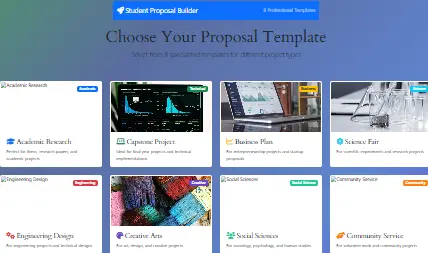
Choose Your Proposal Template
Select from 8 specialized templates for different project types

Academic Research
Perfect for thesis, research papers, and academic projects
Capstone Project
Ideal for final year projects and technical implementations

Business Plan
For entrepreneurship projects and startup proposals

Science Fair
For scientific experiments and research projects

Engineering Design
For engineering projects and technical designs

Creative Arts
For art, design, and creative projects

Social Sciences
For sociology, psychology, and human studies
Community Service
For volunteer work and community projects
Add Sections
Proposal Preview
Drag sections from the left to build your proposal
Start by adding a Title Section
Navigating the world of academic projects can be daunting, for instance, many students struggle to translate a brilliant idea into a structured, formal proposal. Consequently, the initial excitement of a new project often fades when faced with the rigid requirements of an academic proposal. However, a well-structured proposal is fundamentally the cornerstone of any successful student project; therefore, it serves as both a roadmap for your work and a persuasive document for your professors. Fortunately, the Student Project Proposal Builder is specifically designed to eliminate this stress and transform your vague ideas into a compelling, professional-grade document. This article, as a result, will provide a deep dive into this essential tool, exploring its core features, advanced functionalities, and practical application. Ultimately, our goal is to empower you to approach your next academic project with unparalleled confidence and clarity.
Core Features of the Student Project Proposal Builder
Firstly, the tool’s effectiveness stems from its meticulously designed core features, each of which addresses a critical component of a successful proposal.
1. Structured, Step-by-Step Form Interface
The tool, importantly, employs a logical, multi-step form that guides you through the proposal-writing process. Instead of staring at a blank document, you are instead led through a series of focused sections. This structured approach, therefore, ensures that you never overlook essential elements, and it simultaneously breaks down a large, intimidating task into manageable, bite-sized pieces.
2. Comprehensive Project Details Section
At the outset, the Project Details section captures all the foundational information. Here, you will input your project title, your name, your advisor’s name, and your academic institution. Additionally, this section includes fields for the proposed start and end dates, thereby establishing a clear timeframe from the very beginning.
3. Clearly Defined Objectives and Goals
Furthermore, a common pitfall for students is writing vague goals; conversely, this tool forces specificity. The Objectives section encourages you to list your primary and secondary goals. Moreover, it often prompts you to frame these objectives using SMART criteria (Specific, Measurable, Achievable, Relevant, and Time-bound), which consequently enhances the professionalism and feasibility of your proposal.
4. Robust Methodology Selection
Next, the methodology section is crucial for demonstrating your project’s credibility. This tool provides a space to detail your research methods, whether they are qualitative, quantitative, or mixed-methods. Similarly, you can describe your data collection techniques, such as surveys, experiments, or literary analysis, and thus justify your chosen approach.
5. Detailed Timeline and Milestone Planner
A project without a timeline is merely a wish; accordingly, the Builder includes an integrated timeline planner. You can break down your project into key phases and assign estimated completion dates to each. This visual representation of your project schedule, as a result, not only helps you stay on track but also shows your advisor that you have a realistic plan for execution.
6. Thorough Resource and Budget Estimation
Additionally, every project requires resources, and this tool helps you anticipate them. The resource section allows you to list required materials, software, or equipment. Importantly, the budget estimation feature lets you outline anticipated costs, thereby proving that you have considered the practical and financial aspects of your work.
7. Proactive Risk Assessment and Mitigation
Identifying potential problems is a mark of a sophisticated researcher; consequently, the Risk Assessment section is a standout feature. Here, you are prompted to identify potential obstacles, such as technical failures or data collection issues, and then propose concrete mitigation strategies. This proactive approach, therefore, significantly strengthens your proposal’s persuasiveness.
8. Organized References and Bibliography Section
Finally, every academic project builds upon existing knowledge. The tool includes a dedicated section for listing your sources and references. This ensures your academic integrity is maintained, and it also helps you keep your citations organized from the very start.
For students working on history papers, pairing this proposal builder with the Document Analysis Helper can provide a powerful foundation for your primary source research.
Advanced Features for Next-Level Proposals
Beyond the core components, the Student Project Proposal Builder incorporates several advanced features that cater to more complex projects and ambitious students.
Semantic Analysis for Goal Refinement
One of the most powerful features is the underlying semantic analysis that helps refine your project’s objectives. For example, if you input a goal that is too broad, the tool might suggest keywords to make it more specific and actionable. This intelligent feedback, therefore, acts as a virtual advisor, helping you hone your focus before you even meet with your professor.
Export and Sharing Capabilities
Once your proposal is complete, the tool offers robust export options. You can typically generate a clean, formatted PDF or a Word document. Furthermore, this functionality allows for easy sharing with advisors and committee members, and it also provides you with a professional document to add to your academic portfolio.
Template-Driven Flexibility for Different Disciplines
While the structure is universal, the tool is often flexible enough to accommodate proposals from various disciplines. For instance, a computer science project might emphasize methodology and testing, while a literature project might focus on theoretical frameworks. The Builder’s adaptable framework, consequently, allows you to emphasize the sections most relevant to your field.
Integration with Academic Workflows
Advanced usage involves integrating the proposal with other planning tools. For example, after defining your timeline in the proposal builder, you could transfer those milestones into our Daily Routine Planner or Pomodoro Timer with Task List to manage your day-to-day workload effectively.
Data Persistence and Auto-Save
For longer proposal-writing sessions, the auto-save feature is invaluable. Your progress is saved as you go, so you don’t have to worry about losing work due to a browser crash or accidental page refresh. This creates a seamless and stress-free user experience.
How to Use the Student Project Proposal Builder: A Step-by-Step Guide
Using the tool is straightforward; however, following a strategic approach will yield the best results.
Step 1: Initiation and Brainstorming
Before you even open the tool, spend some time brainstorming your core idea. Then, navigate to the Student Project Proposal Builder homepage. Subsequently, click the “Start New Proposal” button or its equivalent to launch the form.
Step 2: Filling Out the Project Foundation
Begin by completing the “Project Details” section. Be precise and use a formal title. Meanwhile, ensure you have your advisor’s correct name and title, as this demonstrates attention to detail.
Step 3: Crafting Your Objectives
Move to the “Objectives and Goals” section. Here, write your main objective first. Then, list 2-3 specific, measurable goals. Remember to use action verbs like “analyze,” “design,” “evaluate,” or “create” to give your goals clarity and impact.
Step 4: Detailing Your Methodology
In the “Methodology” section, describe your research approach thoroughly. If you are conducting surveys, for example, mention the target population and sample size. Alternatively, if it’s a lab experiment, detail the procedures and variables. This section is where you prove your project is methodologically sound.
Step 5: Building a Realistic Timeline
Proceed to the “Timeline” section. Break your project down into phases like “Literature Review,” “Data Collection,” “Analysis,” and “Drafting.” After that, assign a realistic timeframe to each. If you need to calculate specific dates, you can use our Custom Workday Calculator for accuracy.
Step 6: Listing Resources and Budget
List all necessary resources in the designated section. Also, itemize any anticipated costs in the budget area. Be honest and realistic; otherwise, your advisor may question the proposal’s viability.
Step 7: Conducting a Risk Assessment
Think critically about what could go wrong. Identify 2-3 major risks in the “Risk Assessment” section. Following that, for each risk, propose a practical solution. This shows foresight and maturity in your planning.
Step 8: Finalizing and Exporting
Review all entered information carefully. Finally, use the “Generate Proposal” or “Export” function to create your final document. You now have a polished, comprehensive proposal ready for submission.
For subjects like AP US History, this proposal builder can be the first step before using our specialized tools like the DBQ Thesis Generator or the APUSH Evidence Organizer.
Frequently Asked Questions (FAQs)
Yes, absolutely. The tool is completely free, and there are no hidden charges or premium tiers. It was created as an educational resource to support student success.
Your privacy is paramount. Generally, the data you input is processed directly in your browser to generate the document and is not stored on any server permanently.
Definitely. The tool is excellent for group projects. Therefore, team members can collaborate on the content offline and then use the builder to compile and format the final proposal cohesively.
It is versatile enough for a wide range of projects, including science fairs, capstone projects, undergraduate theses, advanced placement (AP) research, and even detailed essay plans. For AP history students, it pairs perfectly with our APUSH DBQ Grader or the AP World History DBQ Grader.
The tool covers the universal elements of nearly all academic rubrics. Ultimately, you can use the generated proposal as a foundation and then tailor it to meet any specific sub-requirements or formatting styles your professor mandates. For rubric-specific practice, see our APUSH Rubric Mastery Tool.
The tool is part of a suite of academic aids developed by an educator dedicated to creating free, accessible resources for students. The depth and specificity of the tools, such as the DBQ/LEQ Outline Generator and the Bill to Law Simulator, demonstrate a strong understanding of pedagogical needs and academic workflows.
Conclusion
In conclusion, the journey from a nascent idea to a fully-fledged academic project is filled with potential challenges. Nevertheless, having the right tools at your disposal can make a profound difference. The Student Project Proposal Builder is more than just a form-filling application; it is a comprehensive guided system that instills discipline, encourages critical thinking, and fosters academic rigor. By leveraging its structured approach, you are not only creating a document but also engaging in a vital planning process that will pay dividends throughout your project’s lifecycle. Therefore, whether you are a high school student tackling your first major research paper or an undergraduate preparing a capstone project, this tool empowers you to present your ideas and professionalism they deserve. So, embrace this resource, explore the wider suite of tools like the Sleep Cycle Duration Calculator to manage your well-being, and take the first step toward academic excellence today.