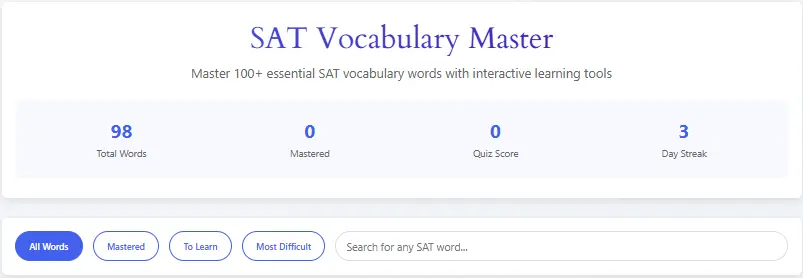
Master 100+ essential SAT vocabulary words with interactive learning tools
Undoubtedly, achieving a high score on the SAT’s Evidence-Based Reading and Writing section requires a robust vocabulary. Consequently, our Free SAT Vocabulary Practice Tool is specifically designed to help students master the high-frequency words essential for success. Moreover, this interactive study aid provides a dynamic learning experience, moving beyond simple memorization to ensure deep retention and practical understanding of contextual vocabulary.
Primarily, this free online resource empowers your test preparation with a comprehensive word list curated from official SAT practice materials. Therefore, by integrating this tool into your study routine, you can systematically build the linguistic foundation needed to boost your confidence and maximize your potential score on exam day.
Understanding the SAT Vocabulary Challenge
Firstly, the SAT famously includes high-utility academic vocabulary found in college-level texts. Subsequently, these words often have nuanced meanings that depend on context. Traditionally, students relied on static lists and rote memorization; however, research shows this method yields poor long-term retention. Conversely, our tool employs contextual learning, where you encounter words within realistic sentences and scenarios. Consequently, this method builds a deeper, more functional understanding. Meanwhile, the psychological barrier of “vocabulary overload” is addressed through the tool’s progress tracking and gamified elements. Hence, learning transforms from a chore into a manageable, even enjoyable, daily habit. Finally, by breaking down the 106 high-frequency words into difficulty tiers, the tool provides a structured, confidence-building pathway to mastery.
For comprehensive preparation, combine our tool with official materials from College Board’s SAT Practice portal.
Core Features: The Foundation of Your Vocabulary Learning
1. The Extensive, Curated Word Database
Primarily, the tool’s foundation is its expertly curated database of 106 high-frequency SAT words. Subsequently, each word is meticulously categorized into Low, Medium, or High difficulty, allowing for tailored study sessions. Moreover, every entry provides a complete linguistic profile: the word, its part of speech, a crystal-clear SAT-relevant definition, and a practical example sentence. Additionally, you gain access to a list of synonyms and antonyms, which is crucial for answering specific question types on the SAT.
2. Interactive, Dynamic Word Cards
Visually, the tool presents information through clean, interactive digital flashcards. Specifically, each card uses color-coded indicators (like blue for medium, pink for high difficulty) for instant visual categorization. Furthermore, hovering over cards triggers subtle animations, creating an engaging tactile experience. Importantly, this design is not merely aesthetic; instead, it promotes better memory association and recall, aligning with cognitive learning principles.
3. Intelligent Search and Filter Ecosystem
Practically, finding specific words or groups of words is effortless with the smart search function. As you type, the tool performs real-time filtering across the word, definition, synonyms, and example sentence fields. Simultaneously, the four filter buttons—”All Words,” “Mastered,” “To Learn,” and “Most Difficult”—allow you to instantly view precisely the set you need to study. Therefore, your review sessions become highly efficient and targeted, much like organizing sources with our APUSH Evidence Organizer.
Advanced Features: The Engine of Engagement and Retention
Beyond the core functionality, our SAT study tool includes advanced capabilities for dedicated learners. Notably, it provides authentic example sentences that demonstrate how each word is used in contextual settings, similar to those found on the actual SAT.
In addition, the tool generates digital flashcards that are perfect for quick review sessions. Meanwhile, the adaptive learning system adjusts the difficulty of your practice sessions based on your performance, ensuring you are always challenged. Finally, for holistic preparation, explore our suite of AP exam tools, such as the APUSH DBQ Grader and the APUSH Score Calculator, to round out your academic prep.
How to Use the SAT Vocabulary Tool: A Step-by-Step Guide
Step 1: Initial Exploration and Familiarization
Begin by simply scrolling through the word cards to appreciate the tool’s scope. Subsequently, notice the color-coded difficulty levels and read a few definitions and example sentences. This initial survey helps build a mental map of the learning terrain ahead, just as you might first explore our Bill-to-Law Simulator to understand the legislative process.
Step 2: Your First Learning Session
Next, start with the “Low” difficulty words via the filter. Read the card for a word like “allocate” or “candidate.” Then, consciously engage with the material: say the word aloud, read the sentence, and consider the synonyms. Afterward, if you feel confident, click “Mark as Learned.” Immediately, observe the dashboard update and the progress bar advance.
Step 3: Integrating Daily Quizzes
After learning 5-10 words, click the “Start Quiz” button. Consequently, you will be tested on words from the entire pool, not just the ones you just learned, which promotes spaced repetition. Use the instant feedback to solidify correct knowledge and correct misunderstandings. Make quiz practice a daily ritual alongside learning new cards. For timing these sessions, integrate our Pomodoro Timer.
Step 4: Strategic Review and Mastery
As your “Mastered” list grows, use the “Mastered” filter to periodically review these words. Alternatively, use the “To Learn” filter to isolate your remaining challenges. For particularly stubborn words, employ the “Practice This Word” button for targeted drilling. This cycle of learn, practice, review, and re-practice is the core of effective vocabulary acquisition, mirroring the iterative process in our DBQ Thesis Generator.
Step 5: Leveraging the Dashboard for Motivation
Regularly, check your progress dashboard and streak counter. Let the increasing percentage and growing streak number motivate your continued effort. Aim for small, consistent wins—mastering 3-5 words per day—which is a sustainable pace leading to significant results over weeks. You can calculate your projected test date readiness with tools like our APUSH Score Calculator to set vocabulary goals.
Comparative Advantage: Why This Tool Stands Out
In comparison to other study methods, this tool offers unique benefits. For example, unlike static PDF lists, it is interactive and responsive. Unlike apps like Quizlet or Kahoot, it requires no sign-up, stores data locally, and is completely free without ads. Moreover, unlike generic vocabulary apps, it is laser-focused on SAT-specific, high-yield words. Therefore, it combines the best aspects of modern edtech—interactivity, personalization, and gamification—with the specific content mandate of SAT prep, all while prioritizing user privacy and accessibility. This focused approach is similar to our specialized AP World History DBQ Grader or AP European History DBQ Grader.
Integrating This Tool into a Broader SAT Strategy
Obviously, vocabulary is one part of SAT prep. For a comprehensive study plan, pair this tool with practice for other sections. For instance, use our >DBQ Thesis Generator or LEQ Grader for AP History essay practice, which also demands strong vocabulary. Similarly, after a vocabulary session, switch to our Pomodoro Timer with Task List to manage your overall study time effectively. Furthermore, tools like the APUSH Score Calculator or APUSH DBQ Grader Feedback Tool can help you benchmark performance in other academic areas. Essentially, creating a suite of dedicated tools, like this vocabulary builder and our Document Analysis Helper, covers multiple study needs efficiently. Don’t forget to plan your essays with the DBQ & LEQ Outline Generator and refine your contextualization skills with the APUSH Contextualization Builder.
Why SAT Vocabulary Practice Matters
The digital SAT no longer focuses on memorizing rare or obscure words. Instead, it tests whether students can understand academic vocabulary in context and choose the word that best fits a sentence or passage. Most vocabulary questions appear in the Reading and Writing section as “Words in Context” questions.
Students who regularly practice SAT vocabulary are often better at:
- Understanding complex reading passages
- Recognizing tone and meaning
- Choosing the correct word in context
- Improving both reading and writing scores
Vocabulary knowledge can also improve test speed because students spend less time guessing unfamiliar words.
Who Should Use This SAT Vocabulary Practice Tool?
This free SAT Vocabulary Practice Tool is useful for:
- High school students preparing for the SAT
- International students improving academic English
- Students aiming for higher Reading and Writing scores
- Teachers and tutors looking for extra practice material
- Parents helping students prepare for college entrance exams
The tool is especially helpful for students who struggle with unfamiliar academic words, context clues, and tone-based answer choices.
How Vocabulary Is Tested on the Digital SAT
On the digital SAT, vocabulary questions usually ask you to choose the word that best completes a sentence or fits the meaning of a passage. The correct answer is not always the most difficult word. Instead, it is the word that best matches the sentence’s logic, tone, and context.
For example, SAT vocabulary questions often require students to:
- Identify the meaning of a word from context
- Distinguish between similar words
- Understand positive, negative, or neutral tone
- Recognize multiple meanings of the same word
All answer choices may look correct at first, but only one fits the sentence exactly.
How to Use This SAT Vocabulary Practice Tool
- Read the sentence or passage carefully.
- Try to predict the missing word before looking at the answer choices.
- Select the word that best matches the meaning and tone.
- Review the explanation after answering.
- Save difficult words and practice them again later.
One of the most effective strategies is to guess the meaning before viewing the choices. If your predicted word is “support,” then an answer like “bolster” may be correct.
Best Ways to Improve SAT Vocabulary
The most effective SAT vocabulary study methods include:
- Practicing words in full sentences
- Reading academic articles and nonfiction
- Studying word roots, prefixes, and suffixes
- Reviewing commonly tested SAT words
- Using flashcards and repeated practice
Experts recommend learning vocabulary in context rather than memorizing long lists of definitions. Reading sources such as science articles, history essays, and quality newspapers can help students see how academic words are used naturally.
Students preparing for the digital SAT should focus on common academic words such as “anomaly,” “empirical,” “nuanced,” and “substantiate” rather than rare vocabulary that is unlikely to appear on the exam.
Common SAT Vocabulary Mistakes to Avoid
Many students lose points because they:
- Choose the most difficult-looking answer
- Ignore the tone of the sentence
- Memorize definitions without context
- Study too many words at once
- Skip reviewing incorrect answers
A common mistake is thinking that the SAT rewards the fanciest word. In reality, the correct answer is the one that logically fits the sentence.
Students should also avoid relying only on memorization. Reddit users and SAT tutors frequently recommend learning word roots and reading academic articles instead of trying to memorize thousands of words.
“learn word roots first. then read articles.”
Why You Can Trust This Tool
This SAT Vocabulary Practice Tool is designed around the latest digital SAT format and focuses on the types of vocabulary questions students actually see on the exam. The practice words and examples are based on modern SAT Reading and Writing question styles, not outdated memorization lists.
The tool is reviewed regularly to make sure it matches current SAT standards and provides realistic practice. It is intended to help students build vocabulary gradually through repeated use, context clues, and explanation-based learning.
To improve trust further, add these elements to your page:
- “Last Updated” date
- Author name and short bio
- Note that the tool follows the latest digital SAT format
- Contact or feedback section
- A short explanation of where the vocabulary words come
Frequently Asked Questions (FAQs)
Yes, the tool is completely free with no hidden costs. It is a public resource designed to make effective SAT prep accessible to everyone, just like our Sleep Cycle Duration Calculator is for wellness.
Your progress saves to the specific browser and device you are using. For consistent tracking, we recommend using the same device for your study sessions, much like you would with a specialized tool like the APUSH Rubric Mastery Tool.
These words were carefully curated from analysis of past SAT exams, focusing on high-frequency academic vocabulary that appears consistently in the Reading and Writing passages. They represent words that are most impactful for test-takers to know, selected with the same precision we apply in our Document Analysis Helper.
Definitely. Teachers can share the link directly with students as a ready-made homework assignment. For example, they can ask students to “master 15 words” in a week and report their quiz scores. It requires no setup from the educator, similar to how our APUSH DBQ Grader Feedback Tool can be instantly deployed in a classroom.
Certainly. Our suite of tools is designed to support different academic needs. For focused study sessions, combine this with the Pomodoro Timer. For broader academic writing skill development, explore tools like the DBQ Complexity Analyzer or the APUSH Contextualization Builder. Plan your overall study trajectory with the Daily Routine Planner.
Conclusion: Empowering Your SAT Journey with Confidence
In summary, mastering SAT vocabulary is a non-negotiable component of achieving a high score, but it no longer needs to be a tedious memorization grind. Our interactive SAT Vocabulary Tool transforms this essential task into an engaging, structured, and effective process. By leveraging features like interactive cards, personalized quizzes, visual progress tracking, and a motivational streak system, you build knowledge in a way that sticks.
Ultimately, this tool empowers you to approach the SAT Reading and Writing sections with confidence, precision, and a commanding understanding of the language. Start your daily streak today, and transform vocabulary from a weakness into your greatest strength. For other specialized study aids, explore our full range of tools, such as the Custom Workday Calculator for time management or the Sleep Cycle Duration Calculator to optimize your rest for better learning. Build your historical analysis skills with our APUSH DBQ Grader Feedback Tool and <a href=”https://dailytoolspot.com/ap-world-history-dbq-grader/” target=”_blank”>AP World History DBQ Grader</a>, ensuring your academic toolkit is complete for any challenge.
For authoritative information on the SAT exam format and scoring, please visit the official College Board SAT website. To deepen your understanding of word origins and usage, Merriam-Webster’s Learner’s Dictionary is an excellent external resource.
Suggested Author Box
“Reviewed by an SAT preparation writer with experience in digital SAT Reading and Writing, vocabulary instruction, and academic test preparation. This page is updated regularly to reflect the latest SAT vocabulary trends and question formats.”
You can also add:
“Last Updated: May 2026”