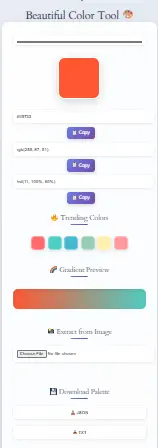
Beautiful Color Tool 🎨
🔥 Trending Colors
🌈 Gradient Preview
📸 Extract from Image
💾 Download Palette
Welcome to our Beautiful Color Tool, a free and super easy-to-use platform that helps you in finding perfect color combinations for all kind of creative projects. To begin with, whether you’re building a website, making a logo, or even designing some cool posters, our online color picker and color palette generator makes everything a lot more simpler. Moreover, we also offers handy tools like the Hex to RGB Converter and CSS Gradient Generator which gives you even more flexibility in your design journey. In addition, if your working with digital or print design, don’t forgot to try our Color Contrast Checker Tool to make sure your work is accessibile. Not only that, besides color tools, our website also have many more helpful utilities like BMI Calculator, GPA Calculator, and Area Conversion Calculator, which all comes very handy. All in all, explore, create, and make your work really stand out with smart, simple tools — all at one place.
First and foremost, Beautiful Color Tool is an online color generator designed for designers, developers, and creatives. Whether you need to pick colors, extract palettes from images, generate smooth gradients, or convert color formats, this tool simplifies the process in just a few clicks!
Explore more free online tools, colour contrast analyzer.
Features of the Beautiful Color Tool
1. Color Picker & Palette Generator
To begin with, you can choose colors using an interactive color picker, which allows you to explore a wide range of hues effortlessly. Moreover, as you fine-tune your selection, the tool responds instantly, giving you full control over every shade.
Next, you can generate complementary, triadic, and monochromatic palettes with just a few clicks. As a result, you’ll be able to create balanced and visually appealing color combinations without any guesswork. In addition, these palettes are ideal for web, graphic, or UI design.
Furthermore, the tool lets you adjust brightness, contrast, and saturation to customize each color exactly the way you want. Consequently, you can ensure every tone aligns with your design goals. Whether you’re fine-tuning a color scheme or starting from scratch, these adjustments make the creative process much smoother.
2. Extract Colors from Images
To begin with, you can upload an image and automatically extract color codes, making it incredibly convenient to identify key hues from visuals.
Moreover, this allows you to find dominant colors for branding, UI/UX design, and more, ensuring your design choices are both strategic and visually appealing.
Finally, you can copy HEX, RGB, or HSL color codes instantly, so you can seamlessly integrate them into your projects without breaking your creative momentum.
3. Live Gradient Generator
First of all, you can create smooth gradients with multiple color transitions, allowing for visually appealing and dynamic designs.
In addition, feel free to customize gradient angles and blending styles to match your creative vision perfectly.
Lastly, you can preview gradients in real-time, which helps you make quick and accurate adjustments without any guesswork.
Try out our CSS Gradient Generator
4. Color Conversion (HEX, RGB, HSL)
To begin with, you can convert HEX to RGB, RGB to HEX, and HSL to HEX effortlessly, making it easier to switch between different formats based on your design needs. In addition, this seamless conversion process helps save time and reduce errors.
Moreover, you can ensure colors are web-safe and accessible, which is especially important for creating user-friendly interfaces. As a result, your designs won’t just look good—they’ll also meet accessibility standards. Therefore, whether you’re designing for the web or print, you can move forward with confidence.
5. Download & Share Your Palette
First of all, you can save your custom color palette in JSON or TXT format, allowing you to reuse or edit it later with ease. In addition, this feature ensures your creative workflow stays organized and accessible.
Furthermore, you can share your color combinations with a single click, making collaboration faster and more efficient. As a result, whether you’re working with a team or presenting to clients, sharing your ideas becomes effortlessly simple.
Additional Features of the Tool
One-Click Copy – Click on any color to copy the HEX code instantly.
Color Contrast Checker – Ensure WCAG color accessibility compliance.
No Sign-Up Required – Use all features completely free.
How to Use the Beautiful Color Tool?
Simply follow these steps
Pick a Color – To get started use the color picker or enter a HEX code.
Generate a Palette – Next get complementary colors instantly.
Extract from an Image – After that upload a photo to get its color scheme.
Create a Gradient– Once completed blend colors with custom angles.
Save or Copy Colors – Finally download or copy the color codes for your project.
Pro Tip: Click on any color to instantly copy its HEX, RGB, or HSL code!
| Color Name | Hex Code | Preview | Use Case |
|---|---|---|---|
| Sunset Orange | #FF6F61 | Branding, Call-to-Action | |
| Ocean Blue | #2E5A88 | Web Design, Backgrounds | |
| Mint Green | #98FF98 | UI Elements, Accents | |
| Classic Black | #000000 | Text, Borders | |
| Pure White | #FFFFFF | Minimalist Designs |
Why Use This Tool?
With just a click, you can instantly generate color palettes tailored for branding and design needs.
Furthermore, extract dominant colors effortlessly from any uploaded image to inspire your palette.
At the same time, preview and customize gradients to achieve seamless and dynamic color transitions.
Moreover, you can copy HEX, RGB, or HSL values instantly with a single click for quick use in your design or code.
Finally, download and save your palettes with ease, ensuring they’re always ready for your future creative projects.
Frequently Asked Questions (FAQS)
A color palette is a collection of colors used together for branding, graphic design, and web design.
Simply upload an image, and the tool will automatically generate the dominant colors along with their HEX, RGB, and HSL codes.
HEX: A six-digit color code (e.g., #FF5733)
RGB: Red, Green, Blue values (e.g., rgb(255, 87, 51))
HSL: Hue, Saturation, Lightness (e.g., hsl(10, 100%, 60%))
Yes! The Beautiful Color Tool is completely free with no sign-up required.
We already have separate tool for that called Color Contrast Checker Tool. It tells if your text color is readable on background color or not.
Absolutely yes! As soon as you click on the color code, it will be copied instantly to your clipboard. From there, you can quickly paste it into your design software, CSS file, or anywhere else you need it. In fact, it works seamlessly with our other tools—especially the Beautiful Gradient Generator. Furthermore, using the copied color in gradients or palettes saves time and keeps your workflow smooth.
Yes, all tools on dailytoolspot.com is totally free. No login or signup needed. We also have other helpful tools like Unicode Text Converter, QR Code Generator and Random Color Tool to make your task easy.
Right now this tool not support direct image upload, but we planning to add it soon. In mean time, you can manually pick colors and create palette or use other tools like CSS Gradient Generator for more visuals.
Conclusion – Start Creating Stunning Color Palettes Today!
The Beautiful Color Tool is truly the ultimate online color generator for designers, developers, and artists alike. To begin with, whether you want to pick a color, extract colors from images, create smooth gradients, or even convert between HEX, RGB, and HSL, this tool covers it all. As a result, your workflow becomes faster and more creative. Moreover, it’s designed to be incredibly easy-to-use, so even beginners can get started right away. In addition, if you’re working on accessibility, you can pair it with our Color Contrast Checker Tool to ensure your palette is visually friendly. Not only that, tools like the Hex to RGB Converter and CSS Gradient Generator are also integrated for even more flexibility. All things considered, it’s a powerful all-in-one tool that makes color design not just easier—but actually fun.
No sign-up required – Use it instantly!
Perfect for web design, UI/UX, and branding projects
Mobile-friendly, fast, and user-friendly interface
Try it Now – Create & Download Your Color Palette for Free!
Find out Other Calculator:
Temperature Conversion Calculator
Scientific Calculator
BMI & Ponderal Index Calculator