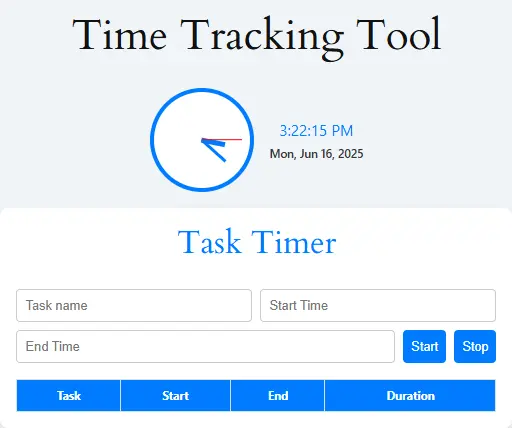
Task Timer
| Task | Start | End | Duration |
|---|
In today’s fast-paced digital world, managing your time wisely is not just helpful—it’s absolutely crucial. In fact, whether you’re a freelancer juggling multiple projects or a manager leading a remote team, the truth is having a reliable, accurate, and user-friendly Free Online Time Tracking Tool can truly make all the difference.
That’s precisely where our Free Online Time Tracking Tool into play. Not only does it require no sign-up, but it also offers instant accessibility across all devices. Moreover, with its suite of intelligent features, it empowers you to take full control of your workday—all without the usual hassle.
If you’re still relying on outdated time cards or clunky spreadsheets, then it’s time to make a smarter move. In fact, these old-school methods often create more confusion than clarity. That’s why our modern time tracking solution is a game-changer. Not only does it streamline your workflow, but it also boosts your productivity and delivers real-time insights into how your valuable hours are truly spent.
Key Features of Our Free Online Time Tracking Tool
Here are the standout features that make our tool worth using:
- To begin with, One-Click Start/Stop lets you track your time instantly with a single click—no delays, no fuss.
- Meanwhile, the Live Counter allows you to watch your work hours add up in real time.
- Best of all, there’s No Sign-Up Required—just open the page and start tracking, it’s truly that simple.
- In addition, our Multiple Sessions feature enables you to pause and resume your work anytime you need a break.
- Moreover, Cross-Device Sync ensures it works seamlessly on mobile, tablet, or desktop—whenever, wherever.
- Lastly, the Break Timer gives you the option to track your breaks for a more accurate view of your daily routine.
Looking for more precision? If so, try our Time Card Calculator or Meeting Duration Calculator to fine-tune your schedule even further.
Advanced Features Of Free Online Time Tracking Tool
Now let’s talk about the advanced capabilities that truly set our tool apart from the rest:
- To start with, you can Export to CSV/PDF, making it easy to save your time logs for billing, reporting, or payroll purposes.
- Next, Task Labeling allows you to categorize entries with names like “Project A,” “Emails,” or “Breaks”—for better organization and tracking.
- Additionally, the Analytics View provides a visual breakdown of your productivity sessions, so you can assess performance at a glance.
- Furthermore, with Dark/Light Mode, you can switch between interfaces based on your personal preference or time of day.
- Most importantly, Secure Local Storage ensures your data stays safely on your device—no cloud syncing or privacy concerns.
Want to visualize how your time is being spent across tasks? In that case, check out our Text to Graph Generator, which turns raw tracking data into clean, easy-to-understand charts.
How to Use This Time Tracker
Using our tool is as easy as 1-2-3:
- First, Open the Tool: Simply visit the Time Tracking Tool.
- Then, Click “Start”: Begin tracking your time with just one click—no delay, no sign-up.
- After that, Label Your Task (Optional): Add a task name like “Client A Work” or “Meeting” for easy reference and organization.
- Next, Pause/Stop as Needed: Taking a break? No worries. You can pause anytime and resume when you’re ready.
- Finally, Export Logs: When your session ends, simply download your logs in your preferred format—CSV or PDF.
Pro Tip: For more complex needs like multi-shift tracking or overtime calculations, pair this tool with our Custom Workday Calculator for greater accuracy and flexibility.
Why Time Tracking Matters
Time tracking is more than simply recording how many hours you worked. It helps individuals, freelancers, remote workers, students, and businesses understand where their time goes, improve productivity, and stay organized.
By tracking time accurately, you can:
- Identify tasks that take longer than expected
- Improve focus and reduce distractions
- Monitor billable and non-billable hours
- Meet project deadlines more easily
- Create accurate timesheets and invoices
- Build better work habits over time
For businesses and teams, time tracking also supports payroll, project management, and reporting.
Who Should Use This Time Tracking Tool?
This free Time Tracking Tool is useful for:
- Freelancers who bill clients by the hour
- Employees who need daily or weekly timesheets
- Remote teams managing multiple projects
- Students tracking study hours
- Business owners monitoring productivity
- Agencies tracking billable client work
- Anyone who wants to improve time management
Whether you work alone or with a team, using a time tracker can help you stay accountable and organized.
Why Use Our Free Time Tracking Tool?
This Time Tracking Tool is designed for freelancers, students, employees, remote workers, business owners, and anyone who wants to manage time more effectively. Instead of guessing how long tasks take, this tool gives you a clear and accurate record of the time spent on each project or activity.
By tracking your time consistently, you can:
- Improve daily productivity
- Stay focused on important tasks
- Reduce wasted time
- Meet deadlines more easily
- Understand how long projects really take
- Improve work-life balance
Studies show that people often lose several hours each workday to distractions or inefficient planning. Time tracking helps identify those hidden time losses and makes it easier to improve your routine.
For Personal ProductivityWho Can Benefit From This Time Tracker?
Freelancers & Consultants
Track billable hours across multiple clients and projects with precision. Never lose track of time spent on client work again.
Students & Academics
Monitor study time, research hours, and assignment work for better time management. Balance multiple subjects and projects effectively.
Remote Workers
Stay accountable and maintain productivity while working from home. Track your focused work time versus breaks and distractions.
Small Business Owners
Understand how your team spends time without expensive software. Get insights into operational efficiency.
Writers & Creatives
Track creative sessions and understand your most productive hours. Schedule your creative work during peak performance times.
Project Managers
Quick time tracking for small projects and team members. Understand task duration for future planning.
Internal Links to Relevant Tools
Since you’re already making the most of your time, why not take it a step further? Explore these related tools that can supercharge your productivity, simplify your workflow, and keep you organized every day:
- To begin with, try our Pomodoro Timer with Task List — perfect for staying focused through structured, timed work sessions.
- Next, use the Hours Calculator to quickly compute total work hours, even when breaks are involved.
- In addition, the Time Calculator helps you add, subtract, and convert time without manual errors.
- Moreover, our Meeting Duration Calculator ensures you plan meetings efficiently with zero overlap.
- Lastly, estimate how long any text will take to read with our Reading Time Estimator — great for writers and professionals alike.
How to Use the Time Tracking Tool
- Open the tool and create a task or project.
- Start the timer when you begin working.
- Pause or stop the timer when you finish.
- Review your total tracked hours.
- Export or save your time entries if needed.
You can also enter hours manually if you forgot to start the timer earlier.
Benefits of Tracking Your Time
Many people underestimate how much time they spend on tasks. A time tracking tool helps you understand your habits and improve them.
Common benefits include:
- Better productivity
- Improved work-life balance
- Fewer missed deadlines
- More accurate client billing
- Easier project planning
- Reduced procrastination
When you can clearly see how your time is spent, it becomes easier to make smarter decisions and stay focused.
Common Time Tracking Mistakes to Avoid
Even with a good tool, there are a few mistakes that can make your records inaccurate:
- Forgetting to stop the timer
- Tracking multiple tasks at the same time
- Not assigning time to the correct project
- Waiting too long to enter missed hours
- Ignoring breaks and interruptions
- Failing to review time reports regularly
To get the most accurate results, make time tracking a daily habit.
Why You Can Trust This Tool
This Time Tracking Tool is created to provide a simple and reliable way to record working hours. The tool is designed for ease of use, accuracy, and privacy.
We regularly review the tool and its features to make sure it works well for modern workflows, including remote work, freelance projects, study sessions, and small business management.
Unlike complicated software that requires downloads or subscriptions, this tool is easy to access and use directly in your browser.
Free Online Time Tracking Tool Frequently Asked Questions (FAQs)
Yes! You can use it anytime, anywhere without any cost.
No registration needed. Just open the page and go.
Absolutely. You can pause, switch tasks, and resume easily.
Yes, it saves locally on your device.
Use the export feature to get a PDF or CSV.
Yes, it’s optimized for mobile and tablets.
Yes, download it and send it via email or upload it to your workspace.
Use our Time Zone Converter Tool for accurate shifts.
Extremely accurate, updating every second in real-time.
No, you need internet access for full functionality.
All data is stored locally; we don’t collect or track usage.
Currently, no. But we’re working on advanced customization options.
Pro Tips for Effective Time Tracking
- Be Consistent – Track all your work sessions, not just the productive ones. The data is most valuable when it’s complete.
- Use Descriptive Task Names – “Client Project X – Design Phase” is much more useful than just “Work” when reviewing your data.
- Review Weekly – Set aside 15 minutes each week to analyze your time data and spot patterns or opportunities for improvement.
- Set Time Goals – Aim for specific time allocations for different types of tasks to maintain balance in your work.
- Track Interruptions – Note when you get distracted or switch tasks to identify productivity killers in your environment.
- Combine with To-Do Lists – Use time tracking alongside your daily task list to understand how long different types of tasks typically take.
Conclusion
All things considered, time is a resource more valuable than money—once it’s gone, there’s no getting it back. That’s why whether you’re leading a distributed team, working as a solo freelancer in a bustling café, or simply looking to stay accountable, our Free Online Time Tracking Tool empowers you to make every second count.
Not only does it come packed with intuitive features, but it also removes all the barriers—no sign-up, no installations, and no steep learning curve. Plus, the ability to export your data, switch tasks seamlessly, and track time on any device makes it a go-to productivity companion.
Meanwhile, don’t forget to explore our other smart tools like the Date Calculator to manage deadlines, the 2025 Budget Planner to stay on top of your finances, or the stylish CSS Gradient Generator to add creative flair to your design tasks.
After all, managing time wisely isn’t just a skill—it’s a superpower. So why wait? Start tracking your time now, and take full control of your productivity journey.
Powered by OnlineTool.Free.NF – Your All-in-One Online Utility Hub.
Author & Editorial Information
Author: Productivity Tools Team
Reviewed by a productivity and workflow content writer with experience in time management, freelance billing, project tracking, and remote work tools.
Last updated: April 2026
For questions or feedback about this tool, please
Experience:
Our team has experience creating online tools related to productivity, project management, academic work, and time organization.
Expertise:
- Time management strategies
- Productivity tools
- Task organization systems
- Digital workflow optimization
Editorial Policy:
This page is reviewed regularly to ensure the information is accurate, clear, and aligned with current productivity practices.
Disclaimer
This tool is provided for educational and productivity purposes only. Results may vary depending on individual work habits and project types. Users should always use their own judgment when planning schedules, budgets, or deadlines.