Design stunning gradients for websites, apps, and branding with css gradient generator or Pro Gradient Studio – the ultimate free css gradient generator tool for web designers crafting modern, glass morphism-style UIs, developers need production-ready CSS code. startups building cohesive brand color schemes.
CSS gradient generator is a simple and easy tool that helps you create gradients with lots of features. Pro gradient is designed to provide advanced functions, and even if you do not have any technology knowledge, it can help you create gradients perfectly.
Try out another tool like Beautiful Color Tool,
Features of css gradient generator
1. Instant CSS code generation
a- Copy-paste linear-gradient or radial-gradient CSS
b- Real-time previews with RGBA transparency and background-blend-mode controls
c- Supports angle adjustments (0°–360°) for precision.
2. Curated Color Palettes
- 10+ professional presets: Sunrise, Ocean, Forest, Royal.
- This tool creates custom palettes using hex/rgba color pickers.
- The gradient generator tool is ideal for brand schemes or UI/UX projects.
3. Advanced Export Options
- The tool allows everyone to download gradients as PNG/SVG files.
- Everyone can apply pattern overlays: stripes, dots, or grids.
- This CSS gradient generator tool has a One-click copy for CSS, Sass, or Tailwind.
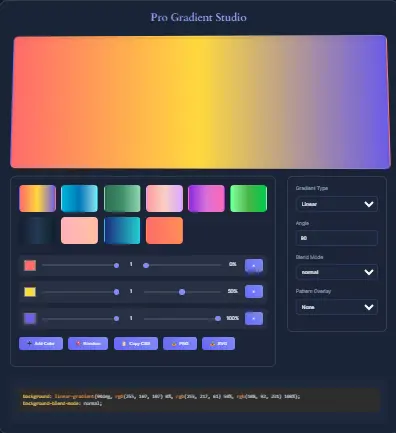
CSS Gradient Generator offers advanced features
1. Core Functionality
Gradient Features
2. Key Features of CSS Gradient Generator
| Category | Feature | Description |
|---|---|---|
| Color Controls | Color Picker | Hex value selection via <input type="color"> |
| Alpha Transparency Sliders | Adjust opacity (0-1) per color stop | |
| Position Sliders | Control color stop positions (0-100%) | |
| Dynamic Color Stops | Add/remove color stops on the fly | |
| Random Color Generator | One-click random gradient creation | |
| Advanced Settings | Gradient Type Toggle | Switch between linear/radial gradients |
| Angle Control | Adjust the gradient angle (0-360°) | |
| Blend Mode Selector | Choose blend modes: normal, multiply, screen, overlay | |
| Pattern Overlay Selector | Apply stripes, dots, grid, or none | |
| Visual Effects | Glassmorphism UI | Blurred backdrop with backdrop-filter |
| Fade-In Transitions | Smooth animations for UI elements | |
| Preset Hover Labels | Tooltips showing preset names on hover | |
| 3D Preview Hover | CSS perspective effect on gradient preview |
How to Create Custom Gradients in Seconds (3 Simple Steps)
1. Choose Gradient Type
Switch between linear or radial gradients in one click.
2. Customize Colors & Transparency
Use sliders to adjust opacity and color-stop positions.
3. Export CSS Code or PNG for Your Project
Download as SVG/PNG or copy CSS for immediate use.
Tips
10 Pro Tips to Master CSS Gradients + Free Generator Tool (2025)
Why Designers Love This CSS Gradient Generator
- Save time: Skip manual coding with ready-to-use CSS
- Pixel-perfect: Export high-resolution PNGs (800×400px)
- Dark-mode ready: Presets optimized for modern designs
Frequently Asked Questions
Yes! All generated gradients are royalty-free.
Unlike basic tools, we offer pattern overlays, transparency controls, and direct Figma-compatible exports.
No sign-up is required! Pro Gradient Studio works 100% in your browser – start designing immediately.
Our CSS gradient generator works on Chrome, Firefox, Safari, and Edge (latest versions).
Use the transparency slider to lower opacity, then pair it with a backdrop-filter CSS property.
Learn More
How to Create Glassmorphism Effects
Export Gradients to Figma: A Step-by-Step Guide
Top 2024 Gradient Design Trends
Conclusion
Unlock Your Design Potential
Pro Gradient Studio tool is not just another gradient generator – it is your shortcut to professional web design. Whether you are crafting a bold hero section, subtle UI elements, or brand assets, our tool gives you:
- Speed: Generate production-ready code in 3 clicks
- Precision: Control every aspect (angles, opacity, patterns)
- Flexibility: Export for code, design apps, or social media
Ready to create something amazing?
Find out Other Calculator:
Temperature Conversion Calculator
Scientific Calculator
BMI & Ponderal Index Calculator