Creating the perfect CSS gradient can make a website look more modern, professional, and visually appealing. This free CSS gradient Tips Generator helps you quickly build beautiful linear and radial gradients, experiment with different color combinations, and instantly generate ready-to-use CSS code. Whether you are designing a hero section, button, background, or card, this tool makes it easy to create smooth, responsive gradients without needing advanced CSS knowledge. Ideal for developers, designers, students, and website owners, it helps save time while improving the overall look and feel of your website.
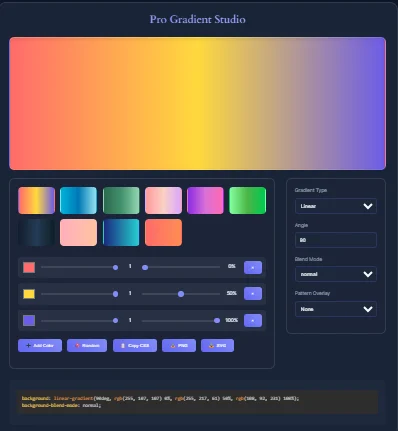
Why CSS Gradients Are a Pain (And How to Fix Them)
Manually coding CSS gradients can feel like solving a Rubik’s Cube blindfolded. You waste hours tweaking color stops, angles, and browser prefixes, only to end up with a bland or broken design.
Common Problems Developers Face:
- Time-Consuming Code: Writing and testing gradient code from scratch.
- Cross-Browser Issues: Gradients looking different on Chrome vs. Firefox.
- Uninspired Designs: Struggling to create modern, smooth transitions.
The Solution: Our free CSS Pro Gradient Generator eliminates these headaches. Let’s explore how to use a free CSS gradient generator like a pro.
How the CSS Pro Gradient Generator Solves Your Problems
| Problem | Solution |
|---|---|
| Manual coding takes hours | Generate ready-to-use CSS code in seconds |
| Browser inconsistencies | Auto-added vendor prefixes (-webkit, -moz) |
| Flat, outdated gradients | 50+ preset templates & advanced customization |
Key Features of the free CSS gradient generator
| Feature | Why It Matters |
|---|---|
| Live Preview | See changes instantly as you adjust sliders |
| Radial/Linear Switch | Create circular or directional gradients |
| PNG Export | Download gradients as images for banners |
| Opacity Control | Layer gradients for glass morphism effects |
10 Actionable Tips to Use the Tool Like a Pro
1. Start with Preset Templates
The tool’s “Ocean Blue” and “Sunset Glow” templates are perfect for beginners. Customize them by dragging color stops.
2. Use Hex/RGBA Codes for Brand Consistency
Paste your brand’s exact Hex codes (e.g., #FF3E4D) into the color picker to maintain consistency.
3. Adjust Stops for Smooth Blends
Drag color stops to 20%, 50%, and 80% positions for seamless transitions.
Example Code:
background: linear-gradient(90deg, #FF0000 20%, #0000FF 80%);
4. Switch to Radial Gradients for Buttons
Radial gradients (circular blends) make buttons and icons pop.
5. Copy-paste cross-browser Code from free CSS gradient generator
Always use the tool’s auto-generated code to avoid Safari/Chrome bugs:
background: -webkit-linear-gradient(90deg, #FF0000, #0000FF);
background: -moz-linear-gradient(90deg, #FF0000, #0000FF);
background: linear-gradient(90deg, #FF0000, #0000FF);
6. Export Gradients as PNG for Backgrounds
Download gradients as high-res images for email headers or website hero sections.
7. Bookmark Custom Gradients
The tool’s URL updates with your settings – bookmark it to save your work!
8. Combine with Text Shadows
Pair gradients with subtle shadows for 3D depth:
text-shadow: 2px 2px 4px rgba(0,0,0,0.2);
9. Test on Dark/Light Backgrounds
Use the live preview panel to check how gradients look on both themes.
10. Share Feedback for Updates
Request features like conic gradients or animated gradients via the tool’s contact form.
CSS Gradient Playground
Experiment with gradient types, colors, and settings. See the CSS code update in real-time!
Gradient Type
Color Stops
Angle & Direction
Gradient Presets
Live Preview
CSS Code
Why Use a CSS Gradient Tips Generator?
CSS gradients allow web designers and developers to create smooth transitions between two or more colors without using image files. Because gradients are generated directly by the browser, they load faster, scale perfectly on all screen sizes, and help modern websites look more polished and professional.
This CSS Gradient Tips Generator is designed to help users create better-looking gradients for websites, buttons, hero sections, cards, text, and backgrounds. Instead of manually writing complicated CSS syntax, users can experiment visually and instantly copy ready-to-use CSS code.
What This gradient generator Tool Helps You Do
Our tool helps users:
- Create linear, radial, and multi-color gradients
- Adjust gradient direction and angle
- Add and position multiple color stops
- Preview changes in real time
- Copy CSS code instantly
- Build gradients that match a brand or design style
Most modern gradient tools are useful because they provide a live preview and generate accurate CSS automatically, saving time and reducing mistakes.
Why CSS Gradients Are Better Than Images
Before CSS gradients existed, designers had to create gradient images in software like Photoshop and upload them to a website. That approach increased page size and slowed down loading times.
CSS gradients are better because they:
- Do not require image files
- Reduce page weight
- Work well on mobile and high-resolution screens
- Scale automatically without losing quality
- Improve website performance
Modern browsers render gradients directly, making them lightweight and ideal for responsive design.
Best Practices for Creating Beautiful CSS Gradients
The best gradients are simple, readable, and match the style of the website. Professional designers often recommend:
- Using only 2–3 colors for a clean look
- Choosing colors that work naturally together
- Keeping large background gradients subtle
- Using stronger contrast only for buttons or calls to action
- Testing text readability on top of the gradient
Too many colors can make a design look messy or distracting. In many cases, a simple two-color gradient looks more professional than a complex rainbow effect.
Developers also recommend matching gradients to the website’s brand colors. For example:
- Technology websites often use blue and purple gradients
- Health websites often use soft green tones
- Finance websites usually use darker blue gradients for trust
- Creative brands often use brighter, more colorful combinations
Using brand-based colors makes a design look more consistent and professional.
Accessibility and Readability Matter
A good gradient should not make text difficult to read. If you place text on top of a gradient background, always make sure there is enough contrast between the text and the colors behind it.
You can improve readability by:
- Using dark text on light gradients
- Using white text on dark gradients
- Adding a subtle overlay behind text
- Testing gradients on mobile and desktop screens
Accessibility is an important part of modern web design and helps ensure that all users can read and interact with your content.
Advanced Gradient Tips for free CSS gradient generator
Experienced designers often improve gradients by:
- Adding intermediate colors between very different shades
- Using multiple color stops to create smoother transitions
- Creating layered or mesh-style gradients for modern hero sections
- Using CSS variables so gradients work in both light and dark mode
When two colors are too different, adding a middle color can make the gradient look smoother and more natural. Designers on web communities often recommend this technique because it prevents “muddy” or gray-looking transitions.
“Choosing colors in between on the color wheel” often creates smoother, more pleasing gradients.
Browser Compatibility of CSS gradient generator
CSS gradients are supported in all modern browsers, including Chrome, Firefox, Safari, Edge, and Opera. For older browsers, many developers still add a solid-color fallback before the gradient CSS.
Example:
background: #667eea;
This ensures that even if a gradient is not supported, users still see a usable background color.
Who Should Use This free CSS gradient generator Tool?
This tool is useful for:
- Front-end developers
- Web designers
- UI and UX designers
- Bloggers and website owners
- Students learning CSS
- Anyone creating modern website backgrounds
Whether you are designing a button, hero section, landing page, or full website, a CSS gradient generator can save time and help you create more attractive designs.
FAQs About the CSS Gradient Generator
Yes! No signups, fees, or limits – use it as often as you like.
Absolutely. The code/images are royalty-free for personal and commercial projects.
Add CSS transitions to the background property:
transition: background 0.5s ease-in-out;
Always use the tool’s vendor prefixes (-webkit, -moz) for full browser support.
Our Expertise and Editorial Process in CSS gradient
Our web design tools are created for developers and designers who need fast, accurate, and easy-to-use utilities. We research current CSS standards, browser support, design trends, and accessibility recommendations before publishing or updating any tool.
Author: Web Design & CSS Tools Team
Expertise:
- CSS and front-end development
- UI/UX design
- Responsive website design
- Color theory and accessibility
Editorial Policy:
Every page is reviewed regularly to ensure the advice remains accurate, useful, and aligned with modern web design best practices.
If you want to learn more about how CSS gradients work behind the scenes, the Mozilla Developer Network guide on using gradients is one of the best resources available. It explains the basics of linear and radial gradients, browser support, and practical examples for real websites.
For developers who want a more technical explanation of gradient syntax and all available options, the official CSS gradient reference from Mozilla Developer Network is very useful. It covers different gradient types, color stops, angles, and advanced CSS features.
You can also check the detailed linear-gradient() documentation from Mozilla Developer Network if you want to understand how to control gradient direction, create multi-color effects, or build more advanced website backgrounds.
Disclaimer
This tool is intended for educational and design purposes only. While we aim to provide accurate CSS code and design guidance, users should test gradients across different browsers, devices, and screen sizes before using them in production websites.
Conclusion: Design Gradients Faster, Not Harder
The CSS Pro Gradient Generator turns a complex coding task into a 10-second visual process. Whether you’re a developer, designer, or blogger, this tool helps you:
- Save time with instant code.
- Stay creative with presets and customization.
- Stay compatible with cross-browser support.
Ready to upgrade your designs? Try the Gradient Generator Now →
Leave a Reply