BPM Tools Hub: Free Tempo, Metronome & Music Calculators

Fundamentally, understanding the intricate concept of musical tempo serves as the absolute foundational pillar for all modern audio production and live performance. Musicians, professional DJs, and audio producers rely heavily on precise beats per minute to maintain perfect rhythmic integrity across their projects.

This comprehensive digital hub provides every essential calculator you need to master your timing effortlessly and without any software downloads. Complex delay times and time-based audio effects depend entirely on accurate tempo calculations to sync perfectly with your digital audio workstation grid.

Therefore, bookmarking this centralized page will significantly streamline your entire creative workflow from the initial composition phase to the final master. Ultimately, you will consistently achieve professional-grade, radio-ready results without ever needing to leave your web browser.

Interactive BPM Widgets for Instant Calculations

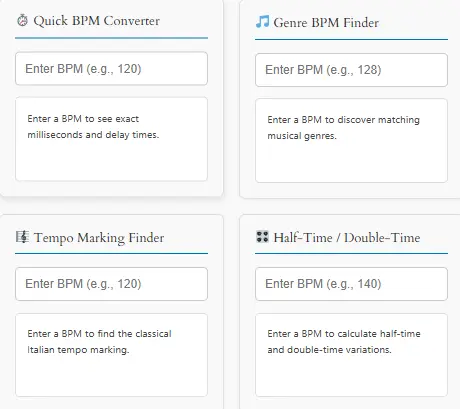
To significantly enhance your user experience, we have integrated four highly interactive widgets directly below. You can now perform instant, on-the-fly calculations without ever leaving this hub page. These dynamic tools drastically reduce your workflow friction and keep you completely focused on your creative process.

Primarily, the Quick BPM Converter instantly translates your tempo into exact mathematical values. It calculates precise millisecond durations for all standard note lengths and delay times. You can immediately copy these exact numbers directly into your digital audio workstation plugins.

Genre BPM Finder automatically matches your inputted speed with the correct musical styles. It instantly reveals which specific genres naturally align with your chosen tempo. Thus, you can quickly identify the perfect stylistic direction for your next beat or track.

The Tempo Marking Finder bridges the gap between modern numbers and classical terminology. Specifically, it translates your exact beats per minute into traditional Italian musical directions. Film composers and classical musicians can instantly verify their desired emotional pacing.

Finally, the Half-Time and Double-Time Calculator is absolutely essential for modern beatmakers and DJs. Undoubtedly, it instantly calculates the exact half-speed and double-speed variations of your original tempo. You can effortlessly create dynamic rhythmic variations and seamless transitions in your sets.

⏱️ Quick BPM Converter

Enter a BPM to see exact milliseconds and delay times.

🎵 Genre BPM Finder

Enter a BPM to discover matching musical genres.

🎼 Tempo Marking Finder

Enter a BPM to find the classical Italian tempo marking.

🎛️ Half-Time / Double-Time

Enter a BPM to calculate half-time and double-time variations.

Featured Tool Grid

Primarily, our hub features nine highly specialized tools designed specifically for modern audio creators and performers. Specifically, each utility targets a unique aspect of tempo, rhythm, and music theory to support your daily workflow.

First, the BPM Calculator instantly detects your track’s exact speed with mathematical precision. Next, the Tap Tempo BPM Calculator allows you to find complex rhythms entirely by ear using your keyboard.

BPM to Milliseconds Converter translates tempo into precise time values for synth programming. The Delay Time Calculator helps you sync complex echoes and reverbs perfectly to the grid.

Online Metronome provides a flawless, customizable click track for daily practice. Likewise, the DJ Beat Match Calculator ensures seamless, beat matched dancefloor transitions.

Tempo Marking Chart bridges classical Italian terms with modern numerical values. Note Length Calculator maps rhythmic subdivisions directly to milliseconds.

Finally, the Music Interval Calculator assists with melody and harmony creation. Ultimately, clicking any tool name above will instantly launch the respective utility in a new tab.

Features of Our BPM Tools

Primarily, every tool in this collection boasts a highly intuitive, user-friendly interface designed for immediate usability. You do not need to download any heavy software plugins or create an account to begin calculating.

All calculators process your inputs instantaneously to provide zero-latency results directly on your screen. Musicians can tap rhythms or adjust values in real-time without experiencing any frustrating computational delays.

These utilities are fully responsive and work flawlessly on mobile devices, tablets, and desktop computers. Thus, DJs and producers can access their essential tempo tools directly from their phones during live gigs or studio sessions.

Advanced Features of the Audio Toolkit

Beyond basic calculations, our toolkit includes highly advanced features specifically tailored for professional audio engineering tasks. Specifically, the delay utilities calculate complex dotted notes, quintuplets, and triplets automatically without requiring manual math.

Note Length Calculator translates intricate rhythmic subdivisions into exact millisecond timeframes required by modular synthesizers. Advanced synth programmers can set their LFOs and sequencers with absolute mathematical precision.

The integrated Online Metronome supports highly complex, customizable time signatures and polyrhythmic accent patterns. Advanced drummers can practice incredibly challenging rhythmic concepts with ease and total confidence.

How to Use the Tool Effectively

Initially, simply select your desired calculator from the featured grid located at the very top of this page. Next, input your track’s known tempo or tap along to the rhythm manually using your spacebar.

Subsequently, the interface will instantly display the exact mathematical values required for your specific production task. You can easily copy these precise numbers directly into your digital audio workstation effect settings.

For example, when using the delay utility, just enter your song’s speed and select a specific note division. Ultimately, applying these generated values guarantees your time-based effects will lock perfectly to the master tempo grid.

What Is BPM?

Fundamentally, beats per minute dictates the fundamental speed, energy, and emotional impact of any musical composition. This universal metric allows musicians across the globe to communicate tempo accurately regardless of their native language. please consult the Wikipedia Tempo Article.

Generally, slower tempos induce deep relaxation and introspection in the listener. Conversely, significantly faster tempos stimulate physical energy and drive the rhythmic groove forward aggressively.

To understand these historical ranges, please consult our comprehensive Tempo Marking Chart. Bridging classical Italian terminology with modern numbers is essential for professional film scoring, as detailed in standardized definitions of tempo.

TempoBPM
Largo40-60
Adagio66-76
Andante76-108
Moderato108-120
Allegro120-156
Presto168-200

Which BPM Tool Should You Use?

With several BPM and tempo tools available, choosing the right one depends on your specific goal. Table below helps musicians, producers, DJs, and students quickly find the most suitable tool for their workflow.

Your GoalRecommended ToolWhy It Helps
Find the BPM of a song by tapping alongTap Tempo BPM CalculatorInstantly detects tempo based on your taps.
Calculate BPM from beats and timeBPM CalculatorConverts beat counts and elapsed time into an accurate BPM value.
Convert BPM to millisecondsBPM to Milliseconds ConverterPerfect for syncing delay, echo, and effects in music production.
Calculate rhythmic delay valuesDelay Time CalculatorGenerates quarter-note, eighth-note, triplet, and dotted note delay times.
Improve timing and rhythm practiceOnline MetronomeProvides a consistent beat for musicians and students.
Match tempos between songsDJ Beat Match CalculatorHelps DJs align track tempos for smooth transitions.
Calculate note durations at different temposNote Length CalculatorConverts BPM into note lengths for MIDI programming and composition.
Understand traditional tempo markingsTempo Marking ChartShows common musical tempo terms and BPM ranges.
Analyze melodic intervalsMusic Interval CalculatorIdentifies intervals between musical notes for theory and composition.

Quick Recommendations by User Type

Different users often need different BPM tools. Selecting the right calculator can save time and improve accuracy during practice, production, or performance.

For Music Producers

If you produce music in a DAW such as Ableton Live, FL Studio, Logic Pro, or Cubase, start with the BPM to Milliseconds Converter and Delay Time Calculator. These tools help synchronize delay effects, automation, and rhythmic processing with your project tempo.

  • Recommended tools:
  • BPM to Milliseconds Converter
  • Delay Time Calculator
  • Note Length Calculator
  • Online Metronome

For DJs

DJs frequently need accurate tempo information to create seamless transitions between tracks. BPM identification and beat-matching tools become essential during preparation and live performances.

Recommended tools:

  1. Tap Tempo BPM Calculator
  2. DJ Beat Match Calculator
  3. BPM Calculator

For Musicians and Students

Whether you play guitar, piano, drums, violin, or another instrument, consistent timing is essential. Practicing with a metronome and understanding tempo markings can dramatically improve rhythm skills.

  • Recommended tools:
  • Online Metronome
  • Tempo Marking Chart
  • BPM Calculator

For Songwriters and Composers

Songwriters often experiment with multiple tempo options before settling on the final arrangement. Tempo calculators and note length tools can simplify the creative process.

Recommended tools:

  • BPM Calculator
  • Note Length Calculator
  • Music Interval Calculator
  • Tempo Marking Chart

Common Workflow Examples

Many users combine several BPM tools during a single project. Understanding common workflows can help you work more efficiently.

Example 1: Finding the Tempo of a Song

  1. Use the Tap Tempo BPM Calculator.
  2. Confirm the result with the BPM Calculator.
  3. Use the Online Metronome to verify timing.

Example 2: Creating a Delay Effect

Enter your song tempo into the BPM to Milliseconds Converter.

Use the Delay Time Calculator to generate dotted and triplet values.

Apply the calculated times inside your DAW.

Example 3: Preparing a DJ Set

Identify track tempos using the BPM Calculator.

Compare tempos with the DJ Beat Match Calculator.

Adjust BPM values for smoother transitions.

The Best BPM Tool Depends on Your Goal

There is no single BPM tool that works best for every situation. Instead, the right choice depends on whether you are producing music, practicing an instrument, composing a song, or performing as a DJ. Therefore, understanding the purpose of each tool allows you to choose the most efficient solution and achieve more accurate results.

Comprehensive BPM Chart for All Genres

Primarily, a detailed BPM chart serves as an indispensable visual guide for producers and DJs. For more details visit Ableton Learning Music. It instantly displays the standard tempo ranges across every major musical genre. You can quickly identify the perfect speed for your next production.

Modern electronic dance music typically dominates the higher end of the spectrum. Conversely, hip-hop and R&B generally occupy the moderate, head-nodding tempo ranges. Understanding these genre-specific zones is absolutely crucial for professional music creation.

Moreover, our comprehensive bpm chart below covers everything from slow ballads to aggressive drum and bass. Additionally, it includes precise sub-genre classifications to help you target specific audiences. This visual reference eliminates all guesswork from your tempo selection process.

Genre CategorySpecific StyleBPM RangeEnergy Level
DowntempoChillout, Ambient60-90Relaxed
Hip-HopBoom Bap, Trap80-115Moderate
PopContemporary, Dance Pop100-130Energetic
HouseDeep House, Tech House118-135High
TechnoMinimal, Industrial125-145Very High
Drum & BassLiquid, Neurofunk160-180Extreme

BPM Conversion Tools

Primarily, converting raw rhythmic data into usable mathematical values is crucial for modern digital production. Our specialized conversion utilities eliminate all guesswork from your technical audio engineering workflow.

First, our flagship BPM Calculator determines exact speeds from total beats and elapsed time. Tap Tempo BPM Calculator lets you find complex rhythms entirely by ear.

Moreover, the BPM to Milliseconds Converter translates these speeds into precise time values. Consequently, you can program synthesizers, arpeggiators, and effects with absolute, mathematical certainty.

Notably, digital audio workstations require exact numerical inputs for all time-based modulation effects. Hence, relying on manual estimation will almost always result in a sloppy, unprofessional, and phasey final mix.

DJ BPM Tools

Undoubtedly, professional DJs rely heavily on highly accurate, real-time tempo matching for seamless, energetic transitions. Specifically, beatmatching ensures that two different tracks play at the exact same speed simultaneously.

Furthermore, our specialized DJ Beat Match Calculator determines the exact pitch shift percentage required. For instance, transitioning from 120 BPM to 124 BPM requires a very specific, calculated adjustment to the pitch fader.

You can blend tracks smoothly without any noticeable, awkward rhythmic clashing or phase issues. This mathematical precision keeps the dancefloor energy continuous and completely uninterrupted all night long.

understanding these calculations helps you maintain harmonic mixing integrity during long, complex DJ sets. Your musical transitions will always sound completely natural, musical, and highly professional to the crowd.

Music Production Tools

Digital audio workstations demand exact, mathematically precise millisecond values for all time-based audio effects. Setting up a ping-pong delay requires calculating exact left and right channel offsets to maintain a wide stereo image.

Our Delay Time Calculator provides the exact numerical data needed for immersive stereo spaces. BPM to Milliseconds Converter ensures your modulation effects stay perfectly synchronized to the rhythm.

Moreover, the Online Metronome helps you record tight, grid-aligned performances on the very first take. Thus, your foundational grooves will always sit perfectly in the pocket of the mix.

Importantly, aligning your effects to the grid prevents phase cancellation issues in the low end. Hence, your final masters will achieve the loudness, clarity, and punch expected by major streaming platforms.

Practice Tools for Musicians

Undeniably, practicing consistently with a steady, reliable click track improves your overall timing immensely.We integrated a fully customizable, zero-latency Online Metronome directly into this comprehensive hub.

You can easily utilize our Tap Tempo BPM Calculator to transcribe complex rhythms entirely by ear. Learning difficult songs becomes significantly faster and much less frustrating for students.

Additionally, referencing our Tempo Marking Chart helps you understand the historical context of your classical practice pieces. Combining these tools creates a highly effective, daily practice routine for serious musicians.

Meanwhile, developing a strong internal clock allows you to perform confidently even without a click track. Thus, these practice utilities build the foundational skills required for live stage performances and studio sessions.

Music Theory and Interval Calculations

Furthermore, in addition to rhythm, melody creation and harmonic progression require a solid, practical grasp of musical distances. Specifically, our highly accurate Music Interval Calculator identifies the exact distance between any two given notes.

Thus, composers can quickly verify their complex harmonies, counterpoint, and chord progressions with absolute mathematical certainty. Moreover, understanding intervals is essential for creating compelling vocal melodies and memorable, singable instrumental hooks.

Emotional quality of a major third differs vastly from the tension of a minor second. This tool helps producers intentionally select the exact emotional color they wish to convey to the listener.

Complete Tempo Chart for Classical and Modern Music

A comprehensive tempo chart bridges the gap between classical Italian terminology and modern digital production. Specifically, it translates historical musical directions into exact, usable beats per minute. Film composers and orchestrators can quickly verify their desired emotional pacing.

Understanding these traditional markings enhances your communication with classically trained musicians. Terms like “Allegro” or “Adagio” carry specific emotional connotations beyond just speed. Our complete tempo chart includes both the numerical values and their expressive meanings.

Moreover, this reference is invaluable when sampling classical recordings or scoring for visual media. Mastering these tempo conventions adds sophistication and professionalism to your compositions.

Italian TermEnglish MeaningBPM RangeCharacter/Mood
LarghissimoExtremely Slow< 24Very Broad, Solemn
GraveSlow and Solemn25-45Serious, Weighty
LargoBroadly40-60Dignified, Wide
LentoSlowly45-60Leisurely, Calm
AdagioSlowly, at Ease66-76Peaceful, Restful
AndanteWalking Pace76-108Flowing, Moderate
ModeratoModerately108-120Balanced, Steady
AllegroFast, Quick120-156Bright, Cheerful
VivaceLively156-176Energetic, Vivid
PrestoVery Fast168-200Rapid, Swift
PrestissimoExtremely Fast> 200As Fast as Possible

The Science Behind Rhythm and Perception

Scientifically, the human brain naturally entrains to rhythmic pulses, making tempo a powerful psychological tool. Indeed, research in music cognition shows that faster tempos literally increase the listener’s heart rate and adrenaline levels.

Producers intentionally manipulate beats per minute to guide the audience through a specific emotional journey , selecting the correct speed is just as important as choosing the right musical key or scale.

Mastering these tempo utilities allows you to exert maximum psychological impact with your audio productions. You will create deeply engaging experiences that resonate profoundly with your target audience on a subconscious level.

Frequently Used BPM Values by Genre

Historically, different musical genres have evolved to rely on highly specific, standardized tempo ranges over the decades. Selecting the correct speed immediately establishes the proper stylistic context for your production.

Understanding these genre-specific ranges helps producers meet the expectations of their target audience. A hip-hop beat at 140 BPM would sound entirely incorrect and confusing to most listeners.

We have compiled the most common industry standards into the reference table below. You can use this chart to quickly set your digital audio workstation to the correct genre speed.

BPMCommon Usage
60Ballads
70Slow Pop
80Hip Hop
90Boom Bap
100Pop
120EDM
128House Music
140Dubstep
174Drum & Bass

Troubleshooting Common Tempo Issues

Frequently, producers encounter frustrating timing issues when importing older, unmapped audio loops into a modern session. However, by using our Tap Tempo BPM Calculator, you can quickly identify the original speed of the sample by ear.

You can then warp or time-stretch the audio perfectly to match your current project settings. Therefore, you can confidently slice, rearrange, and enhance live performances without introducing bizarre, rhythmic artifacts.

If your synthesized delays are sounding chaotic, it is almost always due to an incorrect millisecond value. Thankfully, simply re-entering your exact project tempo into our Delay Time Calculator will instantly solve this frustrating problem.

Optimizing Your Overall Studio Workflow

Organizing your digital tools and resources leads to a much more efficient, stress-free creative process. Beyond music tools, you might also want to check out our general Time Management Tools to schedule your studio sessions effectively.

Taking regular, timed breaks using techniques like the Pomodoro method prevents ear fatigue and burnout. Fresh ears are absolutely essential for making objective, critical mixing and mastering decisions late into the night.

Keeping all your favorite calculators bookmarked in a single, dedicated browser folder saves immense time. As a result, you spend less time searching for utilities and more time actually creating, mixing, and producing music.

How Music Producers Use BPM in Real Projects

While BPM is often explained as a simple measurement of beats per minute, experienced producers know that tempo directly influences a song’s energy, groove, and emotional impact. Therefore, choosing the right BPM is one of the first decisions made during music production.

Different music genres tend to use specific BPM ranges because listeners associate certain tempos with particular feelings and styles. As a result, understanding these common ranges helps producers create tracks that fit audience expectations while maintaining creative flexibility.

House Music (124–128 BPM)

House music typically falls between 124 and 128 BPM because this range creates a steady and danceable groove. The tempo is fast enough to keep energy high on the dance floor while remaining comfortable for long DJ sets.

Many producers choose 126 BPM as a starting point because it provides a balanced tempo for drums, basslines, and rhythmic effects. Delay and reverb effects often sync naturally within this BPM range, making it easier to create professional-sounding mixes.

Tech House (126–130 BPM)

Tech House generally uses slightly faster tempos ranging from 126 to 130 BPM. Tracks feel more energetic and driving than traditional house music. Faster pace helps create momentum during club performances and festival sets.

Producers frequently use BPM conversion tools and delay time calculators when designing Tech House tracks because synchronized effects play a major role in the genre’s signature sound.

Hip-Hop (80–100 BPM)

Hip-hop producers commonly work between 80 and 100 BPM because this range allows space for vocal delivery, storytelling, and rhythmic variation. Slower tempos create room for heavy drum patterns and deep bass elements.

However, many modern hip-hop tracks use double-time rhythms, which can make a 75 BPM beat feel similar in energy to a 150 BPM track. Therefore, understanding tempo relationships is essential when creating contemporary hip-hop productions.

Trap Music (130–150 BPM)

Trap music usually falls between 130 and 150 BPM because faster tempos support rapid hi-hat rolls, energetic drum programming, and powerful bass drops. Producers often use 140 BPM as a standard starting point for trap beats.

Although trap tracks may seem extremely fast, many producers think of them in half-time. For example, a 140 BPM trap beat often feels like 70 BPM from a rhythmic perspective. Consequently, producers gain flexibility when arranging melodies and percussion.

Pop Music (90–130 BPM)

Pop music covers a broad BPM range because different songs aim to create different emotional responses. For example, emotional ballads may use tempos around 70 to 90 BPM, while upbeat radio hits often fall between 110 and 130 BPM.

Pop producers frequently experiment with multiple BPM values before finalizing a song. Tempo adjustments of just a few BPM can significantly change how listeners perceive energy and movement.

EDM and Festival Music (128–150 BPM)

Electronic Dance Music relies heavily on tempo because BPM determines how crowds experience rhythm and energy. Many EDM producers build entire tracks around carefully selected BPM values.

For instance, progressive house often centers around 128 BPM, while big-room and festival tracks may range from 128 to 135 BPM. Producers use BPM-to-milliseconds calculations to synchronize delay effects, risers, and transitions throughout a project.

Drum and Bass (170–175 BPM)

Drum and Bass producers commonly use tempos between 170 and 175 BPM because the genre depends on fast breakbeats and high-energy rhythms. Despite the fast BPM, skilled producers create grooves that remain controlled and musical.

Effects timing becomes increasingly important at higher tempos. Many Drum and Bass producers rely on BPM calculators, note length calculators, and delay time tools to maintain precise rhythmic synchronization.

Why Producers Use BPM Tools

In real-world production sessions, tempo affects much more than song speed. For example, BPM influences note length calculations, delay timing, metronome settings, beat matching, and MIDI sequencing. Consequently, professional producers frequently use BPM calculators, BPM-to-milliseconds converters, metronomes, and delay calculators throughout the production process.

Whether you are creating a house track at 126 BPM, a trap beat at 140 BPM, or a Drum and Bass track at 174 BPM, selecting the right tempo helps establish the foundation for the entire song. Understanding BPM is not only a technical skill but also an important creative decision.

Frequently Asked Questions

What is BPM in music?

Fundamentally, it stands for beats per minute and measures the speed of a musical piece. Consequently, it dictates how fast or slow the underlying rhythmic pulse feels to the listener.

Is 120 BPM standard?

Indeed, 120 beats per minute is widely considered the standard tempo for modern pop and dance music. This specific speed perfectly balances energetic movement with comfortable vocal phrasing.

How do DJs match BPM?

Primarily, DJs use specialized software or hardware to analyze the speed of their tracks. Additionally, they manually adjust the pitch fader to synchronize the rhythms of both playing songs.

What BPM is house music?

Generally, traditional house music resides comfortably between 120 and 130 beats per minute. This specific range provides the perfect four-on-the-floor groove for continuous dancing.

How do I convert BPM to milliseconds?

To convert manually, you divide 60,000 by your track’s total beats per minute. Fortunately, our BPM to Milliseconds Converter performs this exact calculation instantly for you.

What BPM should a metronome be set to?

Essentially, you should set your metronome to match the exact speed of the piece you are learning. However, beginners often start significantly slower and gradually increase the speed as their muscle memory improves.

Can I calculate BPM by tapping?

Absolutely, our Tap Tempo BPM Calculator allows you to find any rhythm entirely by ear. Simply tap your spacebar or screen in time with the music to get an instant reading.

Why do producers use BPM?

Primarily, producers use it to ensure all synthesizers, drum machines, and effects remain perfectly synchronized. This mathematical alignment prevents the final mix from sounding messy or disjointed.

What BPM is considered fast?

Generally, any tempo exceeding 160 beats per minute is considered exceptionally fast in modern music. For instance, genres like drum and bass or speed metal frequently utilize these incredibly rapid speeds.

What is the difference between tempo and BPM?

Fundamentally, tempo is the abstract, conceptual speed or mood of a musical composition. Conversely, it is the exact, mathematical measurement of that speed in beats per minute.

Conclusion

In conclusion, mastering your tempo and timing is absolutely essential for professional, high-quality music production. Ultimately, this comprehensive hub provides every calculator, converter, and reference tool you could possibly need.

Furthermore, consistently utilizing these precise mathematical tools will drastically improve the overall polish of your mixes. When your delays and reverbs lock perfectly to the grid, your tracks sound significantly more professional.

Finally, remember that technology should always serve your creativity rather than hinder it. Thus, by automating these tedious calculations, you free up your mental energy for actual musical expression.

About This BPM Resource

This BPM tools hub was created to help musicians, DJs, producers, students, and audio engineers quickly perform tempo calculations used in real-world music production workflows. The content is regularly reviewed and updated to reflect modern music production practices, DJ techniques, and tempo standards used across major genres including House, Tech House, Hip-Hop, EDM, Trap, and Drum & Bass.

Popular Music Tools

Finding the right tempo is just the first step in music production and practice. Once you have locked in your beats per minute using the tools on this page, you can set up your studio effects by using our Delay Time Calculator to get perfectly synced echoes. If you are a DJ looking to mix tracks seamlessly, make sure to use our DJ Beat Match Calculator to calculate the exact pitch shift percentage needed to blend your songs.