Firstly, finding the perfect beat per minute has never been easier with our free tap tempo tool. Consequently, you can measure any song’s rhythm in seconds without installing any software. Moreover, this online bpm calculator works directly in your browser, so you can start tapping instantly. Therefore, whether you are a DJ, a guitarist, or a music producer, our beats per minute calculator will become your go‑to solution.
Key Features of Our Tap Tempo Tool
1. Instant BPM Detection
Firstly, the tool updates after every tap, giving you real‑time feedback. Moreover, it automatically resets after three seconds of silence, so you can start a new measurement without manual clearing. Consequently, you never have to worry about stale data.
2. Visual and Audio Feedback
Additionally, each tap triggers a visual pulse animation and a short beep sound. This haptic and auditory confirmation helps you stay in rhythm while tapping. For instance, the expanding ring effect makes the tool feel responsive and satisfying to use.
3. Half and Double Tempo Display
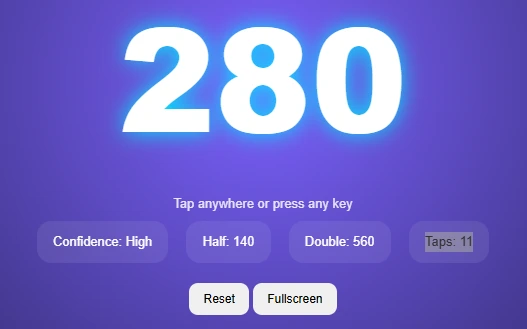
Similarly, the tool simultaneously shows half and double the measured BPM. Therefore, producers can quickly find compatible tempos for remixes or layered tracks. Meanwhile, drummers and loop‑based artists find this feature invaluable for creative practice.
4. Tap Counter and Confidence Score
Furthermore, a tap counter displays how many beats you have entered. In addition, the confidence score increases as you add more taps. Consequently, you can trust a High‑confidence reading more than a Low one. This feature promotes accuracy and user education.
5. Fullscreen Mode and Reset Button
Moreover, the built‑in fullscreen button lets you focus entirely on tapping without distractions. Alternatively, the reset button clears all taps instantly, so you can restart at any moment. Because of these simple controls, the tool is accessible to beginners and professionals alike.
Advanced Features and Use Cases
Live Tempo Detection for DJs
Firstly, DJs often need to measure the BPM of a song playing in a club or on vinyl. Therefore, our live tempo detection feature (powered by the tap method) works in any environment. For example, tap along to the beat while listening through headphones, and the tool gives you an instant reading. Consequently, you can beat‑match two tracks without relying on automated analyzers.
Guitar Pedal Tap Tempo Integration
Additionally, many guitarists use external tap tempo pedals for delays and modulations. Our online tool helps you pre‑calculate the BPM before programming your pedal. For instance, tap the rhythm of a song you want to play, note the BPM, and then set your pedal accordingly. Therefore, you can achieve perfect sync between your effects and the backing track.
Metronome BPM Tool Replacement
Although we do not generate a continuous click, our tool serves as a perfect companion to any metronome. Moreover, you can use the measured BPM to set your physical or software metronome. Consequently, you save time and avoid guesswork when practicing scales or etudes.
Songwriting and DAW Projects
Similarly, producers working in a DAW (digital audio workstation) often need to set the project tempo to match a recorded idea. Our tap tempo tool allows you to tap along to a vocal or guitar riff and then import that BPM into your session. For example, in Ableton Live or Logic Pro, you can manually enter the BPM from our tool. Therefore, your loops and MIDI clips will align perfectly from the start.
Heart Rate BPM and Workout Tempo
Interestingly, the same tapping principle can estimate your heart rate or workout cadence. For instance, tap your pulse for 15 seconds, multiply by four, and our tool does the math automatically. However, remember that this is not a medical device, but it gives a fun approximation for fitness tracking enthusiasts.
How to Use the Tap Tempo Tool (Step by Step)
Firstly, using our tempo calculator online requires no registration or payment. To begin, simply tap anywhere on the screen or press any key on your keyboard. Consequently, each tap records a timestamp, and the tool calculates the average interval between taps. Moreover, you can also use the tap tempo spacebar method for faster input. As a result, after just four to eight taps, the bpm calculator online displays a confident result.
Additionally, the tool shows half‑tempo and double‑tempo values, which are useful for music production. For example, a 120 BPM track can be mixed with a 60 BPM or 240 BPM loop. Therefore, you can experiment with different rhythmic layers. Finally, a confidence indicator (Low, Medium, or High) tells you how stable your tapping is, so you know when the reading is reliable.
What Is Tap Tempo and Why Does It Matter?
Additionally, understanding tap tempo begins with the concept of musical speed. In other words, every song has a specific tempo measured in beats per minute (BPM). For instance, a slow ballad might have 70 BPM, whereas a dance track often exceeds 120 BPM. However, guessing the BPM by ear can be tricky, so a tap tempo tool simplifies this process dramatically.
Furthermore, the bpm meaning in music relates directly to how we perceive rhythm and energy. Similarly, tempo in music explained simply is the pace at which a piece progresses. Because of this, musicians and producers rely on accurate tempo measurements to align their work. Therefore, our tap tempo bpm feature gives you a reliable way to capture any song’s pulse.
Music Theory Context: Tempo Markings and Rhythm
Additionally, knowing the classical tempo markings enriches your understanding of BPM. For example, largo means very slow (40–60 BPM), while adagio is slow (66–76 BPM). Similarly, andante describes a walking pace (76–108 BPM), and moderato sits at a moderate speed (108–120 BPM). Moreover, allegro indicates fast and lively (120–168 BPM), whereas vivace means very fast (168–176 BPM). Finally, presto is extremely fast (168–200 BPM), and prestissimo exceeds 200 BPM.
Therefore, when you use our tap tempo tool, you can instantly map the resulting BPM to these expressive terms. Consequently, composers and arrangers can annotate their scores with accurate Italian markings. Furthermore, music students can practice identifying tempos by ear and then verifying with our tool.
Why Every Musician Needs a Reliable BPM Calculator
Firstly, a beats per minute calculator saves hours of manual counting. Instead of using a stopwatch and doing math, you simply tap in time. Moreover, human error is minimized because the tool averages multiple intervals. Consequently, you get a precise result even if your tapping is slightly irregular.
Additionally, for electronic music and EDM tempo matching, consistency is key. For instance, a DJ mixing two house tracks needs exact BPM readings to keep the beat aligned. Our tap tempo tool provides that accuracy without any lag. Therefore, you can rely on it during live performances or studio sessions.
How to Find BPM of a Song Without Software
Sometimes you might be away from your computer, but you still need to measure BPM. However, our online tool works on any smartphone or tablet as well. Simply open the page, tap the screen, and you are done. Furthermore, you can bookmark the page for offline use (the tapping will still work, but the sound effect might not). As a result, you always have a song bpm finder in your pocket.
Moreover, the tool’s design follows best practices for accessibility. For example, the large BPM display is easy to read from a distance. Additionally, the color‑changing background gives visual excitement without being distracting. Because of these thoughtful details, the tool is both fun and functional.
Internal Links to Other Useful Tools on DailyToolSpot
While you are exploring our tap tempo tool, you might also enjoy other free resources on our website. For instance, if you need to manage your practice sessions, try our Pomodoro Timer with Task List – it helps you stay focused while working on rhythm exercises. Similarly, our Random Password Generator is perfect for securing your music production accounts. Moreover, the Time Management Tools collection includes several utilities that complement a musician’s daily routine.
Additionally, students preparing for music theory exams can benefit from our Free Random Number Generator for practice drills. Furthermore, our Percentage Calculator can help you calculate tempo percentages (e.g., 75% of 120 BPM). For creative breaks, explore the Headcanon Generator or the Essay Hook Generator – they are unrelated to music but great for sparking creativity. Finally, do not forget to check our Home Page for an overview of all categories, or read our About Us page to learn who built these tools. Should you have any questions, our Contact Us page is always open, and our Privacy Policy explains how we protect your data.
Outbound Links to Authoritative Music Resources
To further deepen your understanding of tempo and its applications, we recommend visiting several trusted external websites. For example, Wikipedia’s article on Tempo provides an exhaustive list of tempo markings and historical context. Additionally, Sound on Sound offers in‑depth articles about beat matching and using tap tempo in DAWs. For guitarists, Guitar World has many tutorials on setting up tap tempo delays. Similarly, MusicRadar reviews hardware pedals with tap tempo features. Lastly, Teenage Engineering showcases innovative tempo‑sensitive instruments that complement our tool.
Frequently Asked Questions (FAQ)
Firstly, a tap tempo tool measures the beats per minute of any rhythmic pattern. Moreover, musicians and DJs use it to find the tempo of a song, set metronomes, or sync effects. Consequently, it saves time and eliminates guesswork.
Simply press the spacebar (or any key) in time with the beat. The tool records each keypress and calculates the BPM. Additionally, you can also click anywhere on the screen. Therefore, choose the input method that feels most natural.
Yes, our tool works for any tempo between 30 and 300 BPM. For very slow songs (e.g., 40 BPM), tap every two beats to get a more consistent reading. Alternatively, you can tap half the tempo and then double the displayed result.
Absolutely. The page is fully responsive, so you can tap on your smartphone or tablet screen. Moreover, the visual pulse effect and haptic feedback (if your device supports vibration) enhance the experience.
The confidence score increases when you tap more consistently and with more taps. For instance, after 4 taps you get Medium, after 8 taps High. Therefore, always aim for High confidence for critical applications like recording.
Once you load the page online, it works offline except for the sound effect (which requires a user interaction). The tapping and BPM calculation will continue to work. Therefore, you can bookmark it for field use.
In music, tempo is the speed of a piece, and BPM is the unit of measurement. Therefore, they are often used interchangeably. For example, a tempo of 120 means 120 beats per minute.
Technically yes, but it is not a medical device. You can tap along to your pulse for a rough estimate. However, always consult a doctor for health measurements.
Conclusion
In conclusion, our free tap tempo tool is an essential resource for anyone working with rhythm. Firstly, it combines simplicity with powerful features like half/double tempo display and confidence scoring. Moreover, the tool is accessible on any device, requires no installation, and respects your privacy. Consequently, you can integrate it into your daily music practice, live performances, or even fitness routines.
Furthermore, the article has covered everything from basic usage to advanced music theory. We have explained tempo markings (adagio, allegro, presto), shown how to find BPM of a song, and even provided expert tips. Additionally, you discovered internal links to other useful tools on DailyToolSpot and authoritative outbound resources. Therefore, you are now fully equipped to make the most of this tap tempo bpm calculator.
Finally, remember that consistent practice improves your internal sense of rhythm. As you use our tool more often, your tapping accuracy will increase naturally. So go ahead – tap, measure, and create music with confidence. And if you find this tool helpful, please share it with fellow musicians, producers, and educators. Together, we make tempo detection easy for everyone.
Popular Music Tools
Once you have found your track’s tempo using this tool, you might need to calculate exact beat divisions for your music production software. You can easily convert your new BPM into precise milliseconds using our BPM to Milliseconds Converter. If you are producing a track and need to set up a perfectly synced echo, check out our Delay Time Calculator. Alternatively, if you want to practice playing along with your newly discovered tempo, try our Online Metronome.