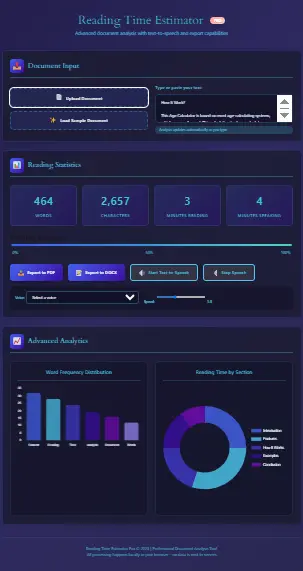
📤 Document Input
📊 Reading Statistics
Reading Progress
📈 Advanced Analytics
Let’s be real— have you ever been reading something, whether it’s a blog post, a long-form article, or even a college PDF, and suddenly thought: “Ugh, how long will this take to read?” If so, you’re definitely not alone. In fact, that’s exactly what the Reading Time Estimator Tool is built for. Whether it’s 100 words or 10,000, it helps you accurately estimate reading time for text so you can plan your time better
But here’s the thing— it’s not just useful for readers. Bloggers, writers, students, and even public speakers rely on it for different reasons. In other words, it’s your go-to reading time calculator online that delivers results instantly. All you have to do is paste your text, hit the button, and—boom—you’ll know exactly how many minutes or seconds it’ll take to read.
That said, let’s break it down even further to see what really makes this tool tick.
What Does the Reading Time Calculator Do?
Well, it’s more than just a word-counting tool. It works based on average reading speed (around 200–250 words per minute), and it calculates how long it will take to read any block of text.
For example, let’s say you’re writing a blog post. You paste the content into this tool, and instantly, it shows your blog reading time estimator result. If it turns out to be a “4-minute read,” you now have a solid reason to display that right at the top of your post. After all, readers appreciate knowing what they’re getting into before they commit their time.
Everyday Use Cases
- Bloggers calculating how long their articles are.
- Writers planning how much to cut down (or bulk up).
- Students timing their reading practice.
- E-book lovers seeing ebook reading time estimator results.
- Speakers preparing scripts with a script timing calculator method.
- And yes, even folks asking “how long to read my document?”
Main Features of the Reading Time Estimator Tool
Not gonna lie, it might look basic at first glance. However, there’s a lot more going on beneath the surface. In fact, here’s what it actually does:
Word Count to Reading Time Converter
To start with, the most obvious function is that it reads your word count and instantly calculates how many minutes it’ll take to read. In other words, this word count to reading time feature is the backbone of the entire tool. Without it, nothing else would work as smoothly.
Reading Speed Adjuster
Generally speaking, most people read around 200 to 250 words per minute. However, some readers are much faster—around 350 wpm—while others read more slowly, at about 100 wpm. That’s why the tool lets you adjust the speed manually to match your personal reading style.
Want more precision? You might like our Time Calculator tool to break down custom timeframes too.
Supports Long Texts (Even Future PDFs)
Yes, absolutely, you can paste long content into the tool without any issues. Moreover, future updates will include support for PDF and DOCX uploads. That way, it transforms into a PDF reading time calculator free—ideal for students, writers, and professionals handling documents daily.
Advanced Functions Of Reading Time Estimator
Smart Estimation by Content Type
Clearly, different content types take varying amounts of time to read. For example, reading an academic paper isn’t the same as casually skimming through a blog post. That’s why this tool is evolving — and soon, it will include a Smart Mode specifically designed to estimate academic paper reading time more accurately.
Speaking Time From Text (Beta Coming)
Working on a speech? Then you’ll be glad to know that this tool will soon be upgraded to include a speaking time calculator from text. In particular, it will be perfect for presentations, video scripts, and even YouTube creators who need precise timing. That way, you can rehearse with confidence and hit your timing goals every time.
In the meantime, you can try our Meeting Duration Calculator to help plan your sessions if you’re presenting.
Chrome Extension? On the Roadmap.
You search for reading time estimator chrome extension, right? We’re not there yet, but that’s in future plans.
How to Use Reading Time Calculator
Here’s how to use it… or maybe “here’s how I use it” is more accurate, since we all do it differently:
- Just copy the text—can be from anywhere, like Word, Google Docs, or a webpage.
- Paste it in the box.
- Choose your reading speed (or leave it default).
- Hit the button. It’ll tell you the estimated reading time in minutes and seconds.
Need to calculate break time in your schedule too? Pair this with the Time Card Calculator for full productivity planning.
FAQs People Usually Ask
Yes, You’ll be able to upload PDFs and get an instant pdf reading time calculator free style result.
Yes… and no. It’s based on averages. If you read faster or slower, you can adjust the speed in settings.
Absolutely. Think of it as a free script timing calculator. Great for speeches and videos.
You might also like our Pomodoro Timer to keep focused while practicing.
Yes. Copy and paste the text from your ebook, and the ebook reading time estimator part will do its thing.
Nope. It’s great for students, researchers, marketers, writers—anyone who reads or writes.
No, it runs client-side. Your content stays private.
As long as it’s word-based, yes. Arabic, Urdu, Spanish—it’ll estimate based on the word count.
Coming soon! For now, use the reading time estimate as a rough guide.
Not yet, but we’re exploring embed and plugin options.
Yup. Fully responsive and mobile-friendly.
Also check our Time Zone Converter if you’re reading stuff across regions.
200–250 wpm is common, but it varies. Use the custom speed slider to tweak it.
Related Tools You May Find Useful
- Time Calculator – Add or subtract time from your reading blocks.
- Pomodoro Timer – Time your reading with focused 25-min sessions.
- Meeting Duration Calculator – Plan talks and presentations.
- Time Card Calculator – Track how much time you’re reading or working.
- Custom Workday Calculator – Plan your day around focused reading sessions.
Use Cases That Feel Real
Students
If you’re a student, this tool is especially helpful for calculating academic paper reading time. That means you’ll know exactly how long a 12-page research article might take to finish. As a result, you can manage your study sessions more efficiently and avoid last-minute stress.
Bloggers & Writers
In other words, no more guessing. This tool becomes your go-to reading time calculator for writers, especially when you’re aiming to publish SEO-friendly blog posts with accurate and helpful reading time labels. As a result, your readers know what to expect — and are more likely to stay engaged.
Public Speakers
Better yet, you can convert your text into a speaking time calculator and instantly know exactly how long your speech will run. That way, you’ll never be caught off guard during a presentation or event. Plus, it helps you plan your pauses, pace, and timing with confidence.
Try it alongside the Time Tracker to monitor your prep time.
Content Writers: Use the Reading Time Estimator Tool Before You Publish
If you’re writing for the web, you probably already know that attention spans are short. Therefore, adding a “4-minute read” label at the top of your post can significantly reduce bounce rate. Thankfully, this tool makes it super easy to add that estimate — even when you’re working quickly. In fact, many editors today include this label as a standard part of their publishing checklist. As a result, it not only improves readability but also increases engagement and time on page.
Use it alongside our Text-to-Graph Tool to create visual summaries from long content pieces.
Pros & Cons of reading time estimator (Honest Review Style)
Pros:
- Super simple
- No ads, no distractions
- Accurate enough for everyday use
- Custom speed settings
- Mobile responsive
Cons:
- No auto-save or download
- Doesn’t include images in time estimate
Conclusion (Not in a Straight Line, Just Honest)
This reading time estimator, in many ways, feels like your friend who always keeps it real. It doesn’t try to be overly fancy — instead, it simply gives you what you actually need. Whether you’re a blogger planning a post, a student racing to finish reading before class, or someone timing a speech, this tool just works. In fact, it’s designed to remove guesswork and give you clarity — fast. As a result, you can plan better, write smarter, and speak more confidently.
It’s a bit messy in places, and that’s okay. Real tools are like that. As you explore other time-related tools like the Time Calculator or Hours Calculator, you’ll realize they all work together—just like you multitask every day.
Use it how you like. Paste a blog. Paste an email. Paste your thesis if you’re brave.
Just don’t forget to breathe. And maybe take a break—using the Pomodoro Timer