Fast, bright and energetic.
BPM Presets
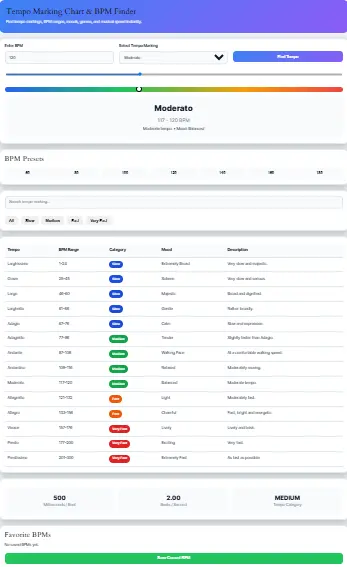
| Tempo | BPM Range | Category | Mood | Description |
|---|
Favorite BPMs
Tempo Comparison
Light Mode
How This Tempo Chart Works
The BPM finder takes a number of beats per minute and returns the tempo marking whose range contains it. It runs in your browser using a fixed table of 14 markings. It does not listen to audio or read a score, so it cannot tell you how fast a recording is.
Using the Finder
You can set a tempo four ways: type a value, drag the slider, click a preset (60, 80, 100, 120, 140, 160, or 180), or choose a marking from the dropdown. Values below 1 or above 300 are limited to that range. Decimals are cut to whole numbers, so 120.7 becomes 120.
Choosing a marking from the dropdown sets the BPM to the midpoint of its range, rounded. Selecting Allegro sets the tempo to 145. When focus is not in a text field, dropdown, or button, the up and down arrow keys move the BPM by one.
Reading a Result
Boundaries are sharp, so a one-BPM change can change the name. At 120 BPM the chart shows Moderato. At 121 it shows Allegretto. The name tells you which range a value falls in, not how close it is to an edge.
If a marking you saw in a score does not match this table, the difference usually comes from the reference you are using, not from a lookup error.
The Two Calculations
Milliseconds per beat equals 60,000 divided by the BPM. At 120 BPM, one beat lasts 500 ms. This can help when setting delay or echo times in a digital audio workstation.
Beats per second equals the BPM divided by 60, shown to two decimal places. At 120 BPM, that is 2.00.
Both values depend only on the BPM. They do not account for time signature or subdivision.
Comparing Two Markings
Pick two markings in the comparison section and the tool shows both ranges and the difference between them. The difference is measured between the midpoints of the two ranges, not their nearest edges. For Adagio (67–76, midpoint 71.5) and Allegro (133–156, midpoint 144.5), the result is 73 BPM.
Favorites, Export, and Light Mode
Saved BPM values are stored in your browser only. They do not sync to other devices, and clearing site data removes them. Click a saved value to load it, and use the × button to remove it.
The CSV and TXT buttons download the full chart table, not your current result. The Light Mode switch changes the colors of the tool, and your choice is remembered in this browser.
What the Tool Cannot Do
The finder does not detect the tempo of a recording. To measure a song, use the Tap Tempo BPM Calculator. To practice at a chosen tempo with audible clicks, use the Online Metronome. For timing values from other inputs, the BPM to Milliseconds Converter is available on this site.
A tempo marking is a general indication of speed, and performers often interpret it with some flexibility. For a specific piece, the score or the edition’s metronome marking is the reference to follow. For the history of the metronome itself, see the Wikipedia article on the metronome.
Frequently Asked Questions (FAQs)
In this chart, Allegro covers 133 to 156 BPM. Allegretto sits just below it at 121 to 132 BPM, and Vivace starts at 157. Other references draw this range differently, so check the score or edition if a source gives different numbers.
120 BPM is Moderato in this chart, because Moderato covers 117 to 120 BPM. At 121 BPM the chart switches to Allegretto.
Larghissimo, at 1 to 24 BPM, is the slowest marking in this table. Real scores rarely go that slow, so treat it as the chart’s lower limit rather than a common tempo.
Prestissimo, at 201 to 300 BPM, is the fastest marking in this table. It is the top of the chart’s range, and the BPM finder will not go above 300.
A tempo marking is a named range, such as Allegro, that describes speed in words. BPM is a number that counts beats per minute. The finder converts a BPM into a marking, but a marking covers a range of BPM values, not a single number.
Related Tools You May Find Useful
If you work with tempo, rhythm, and music production, several related tools can improve your workflow.
- Tap Tempo BPM Calculator – Find BPM by tapping a key or clicking your mouse.
- BPM Calculator – Calculate beats per minute quickly and accurately.
- BPM to Milliseconds Converter – Convert BPM values into precise timing intervals.
- Online Metronome – Practice rhythm and timing with a customizable metronome.
- Time Value Calculator – Perform advanced timing calculations.
- Time Calculator – Calculate durations and time differences for music projects.
Together, these tools provide a complete rhythm, timing, and tempo workflow for musicians, producers, and students.
Qrganizations such as Berklee College of Music and Juilliard School continue teaching tempo terminology as a core component of music education.