🌍 World Clock & Time Converter
World Clock
Time Converter
Undoubtedly, knowing the current time across multiple locations is essential in our fast-paced, global world. Whether you’re coordinating a meeting across continents or simply curious about what time it is in New York or Karachi, the world clock pakistan and time converter tool is your perfect companion. It’s a powerful, reliable online timezone converter that doesn’t require any signup. Moreover, you can immediately start using it to track time accurately, without hassle.
Furthermore, the tool was specifically designed to be intuitive and quick. And although it’s simple at first glance, it truly offers advanced features that you’d typically find in premium apps. In addition, because it’s part of dailytoolspot.com, you get seamless access to other practical utilities—like the Date Calculator, Time Calculator, and even a handy Meeting Duration Calculator. So, continuing reading to discover all that this tool can do for you!
Key Features of the Tool
1. Real‑Time Global Clock Display
With just a few clicks, see the current time in any timezone—Pakistan, India, US, Europe, anywhere! And because it auto-refreshes, you don’t even need to click “refresh.”
2. Instant Timezone Conversion
You can convert any date & time between supported zones (e.g., IST to EST). It’s ideal for coordinating events, flights, or remote meetings.
3. Auto‑Filled Local Date & Time
By default, the converter input is pre-populated with your local current date and time—smart and user-friendly, although sometimes it’s off by a few secs because of caching. But hey, nothing’s perfect!
4. All‑Zone Dropdown with Country Labels
Choose from a comprehensive list of global timezones, each paired with their country — e.g. “Asia/Karachi (Pakistan)” — that makes selection ultra‑easy.
5. Modern & Responsive Design
The interface adjusts beautifully to phones, tablets, and desktops. So even if you’re on your mobile in Pakistan, it still looks great.
6. Zero Registration, Zero Fees
You can access the tool freely from any browser without sign‑in, subscriptions, or paywalls.
Advanced Features of world clock pakistan
Even though it looks simple, here are some hidden strengths:
Daylight‑Saving Time (DST) Awareness
It automatically adjusts for seasonal shifts in zones like “America/New_York” or “Europe/London.” Therefore you don’t need to worry about fall‑spring clock changes.
Accurate Unix‑Timestamp Conversion
Under the hood, the tool converts your times to Unix timestamps and then back. This ensures precise conversions even for dates far in the past or future.
Local & UTC Formats
The output is formatted in your browser’s locale settings, showing both date and time clearly—often YYYY‑MM‑DD HH:MM:SS. Likewise, you can input manually in that same format for conversions.
Optimized Performance & CORS‑Safe
All API calls are routed via TimeZoneDB’s official gateway. Your browser won’t block requests and the experience stays fast.
Auto‑Selection of Popular Zones
On initial load it auto-selects UTC + Asia/Karachi, helping users in Pakistan quickly check local and UTC times.
Mobile Feed‑Friendly
The HTML is simplified for performance—no bulky frameworks—so it loads fast on 4G/3G networks.
How to Use the Tool
Here’s a step‑by‑step walkthrough:
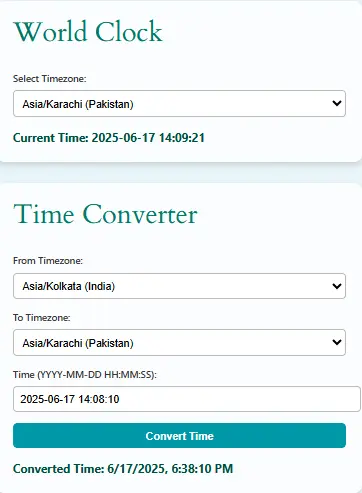
A. Viewing Current Time in Pakistan (World Clock)
- Open the tool and locate the dropdown labelled Select Timezone.
- Choose Asia/Karachi (Pakistan). This is the keyphrase you searched: “world clock Pakistan.”
- Below, you’ll instantly see the real‑time display, e.g.
Current Time: 2025‑06‑17 15:42:10. - It auto‑updates every 10 seconds—so no manual refreshing is needed.
B. Converting Your Local Time from India to US Timezone
- Under “Time Converter,” choose:
- From Timezone: Asia/Kolkata (India)
- To Timezone: America/New_York (US EST)
- The Time field will already contain the current India date & time (auto‑filled).
- Click Convert Time, and the result will display converted American time—e.g.
Converted Time: 2025‑06‑17, 06:12 AM. - For custom conversions, simply edit the date/time in the input. Suppose type
2025-12-25 08:00:00and convert to see what Xmas looks like globally!
C. Navigating Other Useful Tools
- Date Calculator: Instantly find difference days between dates (e.g., birthday countdown).
- Time Calculator: Sum or subtract hours/minutes—useful for shift work.
- Meeting Duration Calculator: Estimate talk time minus breaks.
This is especially helpful when planning cross‑country calls—say between Karachi and London.
List of official IANA time zones
Visual timezone planner and meeting scheduler
Frequently Asked Questions (FAQs)
Yes, it uses TimeZoneDB which tracks Asia/Karachi (PKT) accurately, and auto‑adjusts for DST where applicable. However, occasionally the seconds may seem off by 1‑2 secs.
Definitely. The converter handles historical dates, though accuracy prior to 1970 may be limited by Unix timestamp constraints.
Nope. It’s free and doesn’t ask for login—just open and use.
The tool uses YYYY‑MM‑DD HH:MM:SS format exclusively. If you enter d/m/y by mistake, it won’t convert.
That could be due to DST. For example, America/New_York has DST starting in March. The converter auto‑corrects for it though.
While it lacks a “download” button, you can copy the result manually. If you want PDF export, check back—we plan to add it soon.
Not really. It requires an internet connection to fetch live timezone data. But in theory, you can load once and use limited functionality offline.
Choose again; it’s a simple dropdown. In fact, try [Asia/Karachi] for Pakistan and [Europe/London] for UK time.
No, leap seconds aren’t handled. Most users won’t notice—they’re rare anyway.
You can copy the HTML + JS and embed it into your WordPress Custom HTML block. No special permissions required.
Absolutely. It’s responsive and tested on mobile browsers. The simpler design helps it load quickly even on slow data.
Conclusion
In short, the World Clock Pakistan and broader timezone converter tool is a lightweight, elegant solution for people who need accurate, global time info without sign‑in hassle. Not only is it user‑friendly and visually appealing, but also it handles advanced timezone quirks like DST and historic timestamps.
Meanwhile, it’s part of a growing family of tools on dailytoolspot.com—like the Meeting Duration Calculator, Time Card Calculator, and Date Calculator—all completely free, no ads, and crafted for productivity.
Finally, we appreciate your feedback and suggestions! So, if you’ve got ideas for export options, timezone combo preferences, or UX tweaks, please drop a message via our Contact Us page. Happy time‑tracking!