Managing work hours and payroll calculations manually can be time-consuming and error-prone. Our Advanced Time Card Calculator simplifies time tracking by automating calculations for daily and weekly hours, overtime, and break times. Online time card calculator does not matter you are an employee, employer, or freelancer, this tool ensures accuracy and efficiency in payroll processing.
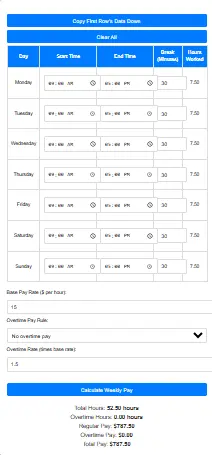
Mini Time Card Demo
See how total hours and pay are calculated step-by-step.
Open Advanced Time Card Calculator →
Why Use a Time Card Calculator?
- Tracking work hours manually can lead to miscalculations, payroll errors, and compliance issues. With our time card calculator.
- The tool is able to allow user to calculate total work hours, and it also includes overtime
- Convert hours and minutes into decimal format for payroll processing
- Automatically deduct break times for precise results
- Generate payroll-ready timesheets with accurate calculations
Features of the Advanced Time Card Calculator
- Quick Data Entry: Enter start and stop times, and press TAB to move between fields efficiently.
- Supports Breaks & Overtime: Customize break durations and overtime rules based on company policies.
- Multiple Time Formats: Choose between HH:MM or decimal hours for payroll processing.
- Automatic Calculations: No more manual math—instantly calculate daily, weekly, and overtime hours.
- User-Friendly Design: Mobile-friendly interface for easy access on any device.
| Feature | Basic Time Card | Advanced Time Card |
|---|---|---|
| Manual Entry | ✔ | ✔ |
| Automatic Break Detection | ✖ | ✔ |
| Overtime Calculation | ✖ | ✔ Configurable |
| Rounding Options | ✖ | ✔ |
| Shift Crossover Handling | ✖ | ✔ |
| Export to Excel/CSV | ✔ | ✔ |
| Compliance with Labor Laws | ✖ | ✔ |
| Time Zone Support | ✖ | ✔ |
How to Use the Time Card Calculator
Step 1: Enter Work Hours
Input your start time and end time for each workday
Step 2: Add Breaks
Enter break durations in minutes to deduct from total hours.
Step 3: Choose the Format
This advance time card calculator tool allows users to select whether they want results in HH:MM format or decimal hours for the aim of payroll accuracy.
Step 4: Set Overtime Rules (Optional)
The calculator will instantly generate total work hours, overtime, and payroll-ready data.
Use this tool to prepare detailed timesheets and ensure accurate compensation for employees!
Benefits of Using a Time Card Calculator
- Boost Payroll Accuracy: Eliminate errors from manual tracking.
- Save Time & Effort: Automate calculations for efficiency.
- Enhance Employee Satisfaction: Ensure accurate and timely payments.
- Improve Compliance: Track overtime and breaks in alignment with labor laws.
| Use Case | Basic Time Card | Advanced Time Card |
|---|---|---|
| Freelancer Tracking | ✔ | ✔ |
| Hourly Employees | ✖ | ✔ |
| Multiple Shifts | ✖ | ✔ |
| Remote Work Monitoring | ✖ | ✔ |
| Labor Compliance Reporting | ✖ | ✔ |
Who Can Use This Tool?
Businesses: Payroll departments can streamline time tracking and payroll calculations.
Shift Workers: Employees working variable shifts can track their hours accurately.
Freelancers & Contractors: Keep a precise log of billable hours.
HR & Payroll Managers: Ensure compliance with labor laws and company policies.
Frequently Asked Questions (FAQ)
Yes! You can export your timesheet in multiple formats for payroll processing.
Absolutely! You can set daily and weekly overtime thresholds to ensure accurate payroll calculations.
Yes! The Advanced Time Card Calculator is completely free and accessible online.
It automates clock-in/clock-out processes, reducing human error, buddy punching, and manual calculation mistakes—leading to accurate and reliable attendance records.
Look for:
Real-time tracking
GPS location logs
Department-based reporting
Overtime alerts
Productivity modules
Integration with payroll and HR tools
Most systems use encrypted cloud storage and role-based access to ensure your data is protected from unauthorized access or data breaches.
These systems are valuable for:
Construction and field services
Healthcare and clinics
Remote teams
Manufacturing units
Small to large businesses across all industries
Start Using the Advanced Time Card Calculator Today!
Don’t let payroll errors slow you down. Our time card calculator simplifies work-hour tracking, ensuring efficiency, accuracy, and compliance for businesses and employees alike.
Try the Advanced Time Card Calculator Now
Leave a Reply