Master the most important SAT vocabulary words for the Digital SAT 2025
SAT Vocabulary Word List
PDF Preview
Your SAT Vocabulary List PDF is being generated. This may take a moment.
Stuck on SAT Vocabulary? Build a Word List You’ll Actually Remember
Most students don’t fail vocabulary questions because they’ve never heard of a word. They fail because they recognized it, couldn’t use it, and moved on. This page is a free word list with a tool that helps you sort what you know from what you only think you know, then download what’s left as a study sheet.
Start With the Words You Can’t Use
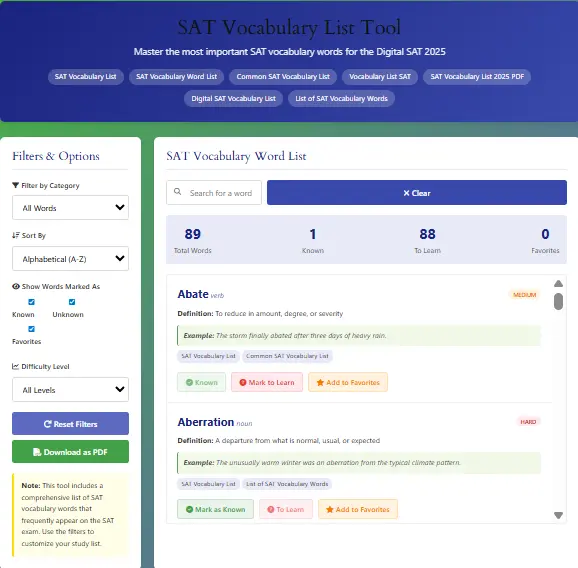
When you open the list, don’t go in alphabetically. Filter to Medium or Hard first, then skim the entries and ask one question of each: could I explain this word to a friend without looking it up? If the answer is no, mark it “To Learn.” Don’t spend time on words you already use fluently.
This sorting step matters more than it seems. A list of 100 words is too much to study at once, but a list of the 30 you don’t yet control is manageable.
Read the Example Before the Definition
Each entry has a definition and an example sentence. Read the example first. On the Digital SAT, you’ll almost always meet a word inside a passage, so the context is the thing to practice with. Try to guess the meaning from the sentence, then check it against the definition.
Take “ambiguous.” Its definition is “open to more than one interpretation.” In an example like “His instructions were ambiguous, so we asked three times,” you can work out the meaning from the complaint about being confused. Reading the example first trains that skill.
Make Each Word Usable in One Sentence
Before you mark a word “Known,” write one sentence of your own using it. If the sentence comes out right, mark it. If you have to stare at the screen, it isn’t known yet.
Writing the sentence also gives you something to check later. When you come back to the word a day or two later, reread your sentence first. If it still makes sense without the definition, the word is starting to stick.
Run a Short Session, Then Stop
A useful session is 15 to 20 minutes with about 10 to 15 new words. Work through the filtered list, mark each entry, then download the PDF of your “To Learn” words.
The download uses whatever is currently showing on screen, so set your filters first. A “Medium, To Learn” PDF is a good thing to print and carry. A full list of 100 words is not, because most of it won’t be the part you need to study.
Come Back Tomorrow and Test Yourself
Close the tool and return the next day. Without looking, try to explain each “To Learn” word from the previous session. Words you can still explain move toward “Known.” Words you can’t go back to “To Learn,” even if they felt easy the day before.
Be honest with the “Known” marks. A word you recognized an hour ago is not the same as a word you’ll recognize on test day. The second check, a day later, is the one that counts.
Where This Tool Stops
- It doesn’t score anything or test you automatically.
- It doesn’t predict which words will appear on your exam.
- Your marks are saved in your browser’s local storage, so they stay on that device and browser and don’t sync elsewhere.
- It’s an independent study aid. College Board doesn’t publish a vocabulary list for the Digital SAT, so for what the test actually covers, use official Digital SAT practice materials.
Frequently Asked Questions (FAQs)
Yes. No sign-up or email is needed.
They’re stored per browser. Use the same browser each time, or accept that you’re starting over on a new device.
The word list is written for SAT-style academic reading. It won’t cover every vocabulary question on other exams.
Around 10 to 15 new words is a reasonable pace. More than that usually means most of them slip away before you review them.
Next Step
Once a word list feels solid, the best next step is reading. Pick a passage from a source you’d normally skip, mark any word you’re not sure of, and check whether it’s in your “To Learn” group. For planning sessions across the week, the Productivity Focus Hub can help you block time.