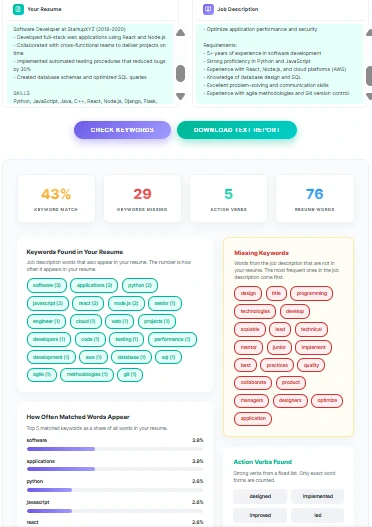
In a 2021 Harvard Business School and Accenture study of employers in the United States, United Kingdom, and Germany, 88% agreed that qualified candidates are screened out because they don’t match the exact criteria in a job description. Resume keyword checker helps you close that gap before you apply. Paste your resume and a job posting, and the tool shows which words from the posting are missing from your resume, so you can decide what to add.
The tool is free and needs no account. Everything runs in your browser, so the text you paste is never sent to our server.
How checker compares your resume with a job description
Checker breaks both texts into single words and removes common filler such as “the,” “and,” and “experience.” It keeps technical terms like C++, C#, and Node.js intact. Then it counts each unique word in the job posting and checks whether that word appears in your resume.
Your keyword match is the share of job description keywords that also appear in your resume. If a posting contains 50 unique keywords and your resume contains 35 of them, your match is 70%. The number shows how much of the posting’s vocabulary your resume already uses. It does not measure how good your resume is.
The checker matches exact word forms only. “Manage” does not match “managing,” and “project management” counts as two separate words. So a missing keyword is sometimes a wording problem rather than a skills gap.
How to use Resume Keyword Checker in five minutes
- Paste your full resume as plain text. If your resume is in Word or PDF, copy the text from it. You can also upload a .txt file.
- Include the complete job posting, with the requirements section. A short summary usually leaves out important terms.
- Click Check Keywords.
- Start with the missing keywords at the top of the list. Those words appear most often in the posting.
- For each missing word, ask whether it describes work you have done. If it does, add it to the bullet point where that work belongs, then run the check again.
Only add a keyword you can explain in an interview. A skill you cannot discuss will hurt you more than a missing word.
Why formatting can hide words from the checker
The checker reads the words you paste, not the layout of your file. Layout still matters for the systems employers use. Career advising offices at universities, including MIT, advise against tables, multi-column layouts, and text boxes. They also warn against putting contact details only in a header or footer, because parsing software can read those parts out of order or skip them.
A simple test helps. Save your resume as a .txt file and open it. A simple test helps. Save your resume as a .txt file and open it. If your job titles, dates, and skills appear in a sensible order, the text is clean. When sections run together or disappear, rebuild that part with plain headings and bullet points before you apply.
What a match score can and cannot tell you
This is a resume keyword checker, not an applicant tracking system (ATS).
A high score means your resume uses many of the words in the posting. It does not mean a recruiter will call you. No official ATS score exists, and each hiring system reads resumes differently. Nobody outside the company knows the exact rules.
A low score does not always mean you lack the skill. Suppose a posting asks for “leadership” and your resume says you “led a team of five.” The checker counts “leadership” as missing, even though your experience fits. Use the posting’s wording when it describes your real work, and keep your own wording when it is clearer.
How the action verb check works
Checker counts action verbs from a fixed list of 49 words, such as “led,” “designed,” and “implemented.” It matches whole words only, so “led” does not match “scheduled.” Strong verbs help a bullet point show what you did. The list is a checklist, not a judgment of your writing.
Frequently Asked Questions (FAQs)
Not directly. Upload option accepts .txt files only. Copy the text from your PDF or Word file and paste it in.
No. Score shows word overlap only. Interviews depend on your experience, how you apply, and the employer’s process.
The word form is probably different. To the checker, “analyze” and “analyzing” are different words. Check the exact form used in the posting, then decide whether to match it.
Analysis runs in your browser, and the text is not sent to our server. Page loads Google Analytics to count visits, but the analysis itself does not send your text anywhere.
Sources
- Harvard Business School and Accenture, “Hidden Workers: Untapped Talent” (2021), as reported by The Register:
- MIT Career Advising and Professional Development, “Make your resume ATS-friendly”:
Additional Resources for Job Seekers
| Resource | Purpose | Link |
|---|---|---|
| Resume Readability Analyzer | Improve resume clarity | View Tool |
| Time Management Tools | Organize job search | View Tool |
| Productivity Focus Hub | Maintain motivation | View Tool |
| Daily Routine Planner | Structure job search days | View Tool |
| Project Deadline Calculator | Track application deadlines | View Tool |
Ready to optimize your resume? Scroll up and start using our Resume Keyword Checker now!