Flow State Assistant
Focus Session
Task Manager
Session Settings
Environment
Session History
Introduction: The Modern Focus Crisis
Let’s face it, staying focused today feels like trying to fill a leaky bucket. On the one hand, constant notifications, emails, and social media pings continuously pull our attention in every direction. On the other hand, overflowing task lists only add to the growing sense of chaos. As a result, our attention spans are fragmenting more than ever. In fact, research reveals that the average office worker manages only 2 hours and 48 minutes of truly productive time each day. Therefore, improving focus is not just desirable but absolutely necessary in today’s fast-paced world. Ultimately, mastering focus has become the key differentiator between simply being busy and truly being productive.
This is precisely where the Flow State Assistant steps in as your secret weapon. Unlike basic timers or traditional to-do lists, this tool instead blends cognitive science with practical features to create immersive, distraction-free focus environments. In other words, it’s not just a productivity tool — rather, it serves as your personal productivity concierge, carefully designed to help you slip into that coveted flow state. As a result, hours begin to feel like minutes, and your best work unfolds effortlessly. Ultimately, this seamless experience transforms the way you approach focus, creativity, and productivity.
What Makes flow state assistant Different?
You’ve probably tried other productivity tools — perhaps even our popular Pomodoro Timer or Daily Routine Planner. While those can certainly help, the Flow State Assistant goes a step further by addressing three critical dimensions of sustained focus:
Biological Rhythms – by using data-driven scheduling aligned with your natural energy peaks.
Cognitive Load – by adapting sessions to match varying levels of mental effort.
Environmental Factors – by integrating smart control of lighting, sound, and ambiance.
1. Environmental Control (Soundscapes + Visual Settings) – in addition, personalized adjustments create the right atmosphere for deep focus.
2. Cognitive Alignment (Personalized Session Lengths) – furthermore, session timing adapts to your cognitive rhythm for maximum efficiency.
3. Progress Intelligence (Focus Analytics) – as a result, you gain valuable insights that reinforce consistent progress.
This Flow State Assistant is designed to help users improve focus, productivity, and deep work by guiding them into a mental state known as “flow.”
Flow state is a concept in psychology where a person becomes fully immersed in a task with complete focus and minimal distraction. It is often described as being “in the zone,” where time seems to pass quickly and performance improves.
This tool helps users structure their work sessions to reduce distractions and create the conditions needed to achieve a flow state.
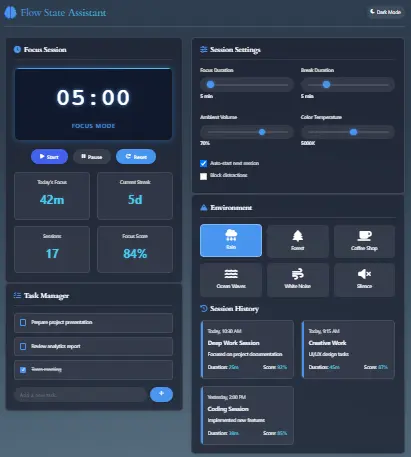
Features of flow state assistant
1. Smart Session Timers That Adapt to You
Rather than sticking to rigid 25-minute blocks, our algorithm instead adapts intelligently by learning from your unique time-tracking patterns. For instance, if you’re a morning person, it will suggest longer, more focused sessions earlier in the day. Conversely, during the afternoon slump, it recommends shorter bursts of work with more frequent breaks. Ultimately, this personalized approach ensures that your productivity aligns seamlessly with your natural energy rhythms. As a result, you achieve more efficient and sustainable focus throughout the day.
Real-World flow state assistant Application:
For example, Sarah, a freelance designer, discovered that her optimal rhythm was 42-minute focus blocks — something she would have never realized without the help of insightful analytics. As a result, within just one week, her project completion rate increased by 65%. Therefore, not only did she finish tasks faster, but she also experienced greater consistency and confidence in her workflow. Ultimately, this transformation highlights how personalized focus patterns can unlock peak performance.
2. Sensory Environment Builder
Here’s where the magic happens: By combining our Color Temperature Tool with carefully curated ambient soundscapes, you can create a personalized focus sanctuary. Together, these elements transform your workspace into an environment that promotes deep concentration and mental clarity.
- Rain Sounds – To begin with, this profile masks distracting background noise, creating a calm and consistent audio environment ideal for deep focus.
- Coffee Shop Ambience – In contrast, this soundscape simulates a low-level buzz that has been shown to boost creative thinking and idea generation.
- White Noise – Finally, this option enhances concentration, particularly during analytical tasks, by providing a neutral backdrop that minimizes mental fatigue.
Pro Tip: Pair with our Color Contrast Checker to reduce eye strain during long sessions.
3. Cognitive Load Monitoring
To begin with, this revolutionary feature analyzes your task complexity through a combination of factors — such as estimated duration, required concentration level, and past performance trends. In turn, this analysis creates a clear picture of how demanding each activity truly is. As a result, the system can tailor your focus sessions to precisely match the mental effort each task requires. Ultimately, this ensures that you’re not just working harder, but also working smarter.
- First, task description keywords are evaluated to understand the nature and complexity of your work.
- Then, session duration patterns are tracked to identify your optimal focus windows over time.
- Finally, break frequency is monitored to tailor rest intervals that align with your cognitive rhythms.
Whenever mental fatigue is detected, the system automatically triggers “Rescue Mode” — a 5-minute reset protocol that is scientifically proven to restore focus more effectively than traditional coffee breaks. In turn, this quick intervention prevents productivity dips and helps you bounce back with renewed clarity and energy. Consequently, you maintain steady momentum throughout the day without relying on external stimulants.
Advanced Power Features of flow state assistant
Rescue Mode of flow state assistant
When signs of mental fatigue are detected — such as slower typing speed or increased error rates — the system automatically initiates a tailored response. This may include a gentle reminder to pause, a subtle adjustment in ambient sound, or even a suggested shift toward a lighter task. In doing so, the tool enables you to recharge without breaking momentum. Ultimately, this ensures you maintain deep focus while safeguarding long-term mental energy.
5-Minute Neuro-Reset Protocol
To begin with, an environmental shift takes place — introducing cooler color temperatures and calming soundscapes to ease cognitive strain and encourage relaxation. Next, the system guides you through a quick priority reassessment, ensuring your attention returns to the tasks that matter most given your current mental clarity. Together, these steps form a rapid yet highly effective reset — one that research shows can restore focus and performance in as little as five minutes.
Flow Matching
Based on pattern recognition from your Time Card data, the assistant intelligently recommends focus sessions that align with your most productive historical periods. In this way, it helps you consistently replicate those peak performance windows. Consequently, you achieve optimal results with greater ease and reliability. Ultimately, this approach transforms scattered effort into a repeatable system for peak productivity.
Cross-Tool Synergy
- Automatically, deadlines import directly from the Routine Planner, ensuring your schedule stays aligned without manual input. In this way, you save time while reducing the risk of oversight. Moreover, this seamless integration keeps all your tools connected for smoother workflow management. Ultimately, you maintain better focus knowing your deadlines are always up to date.
- Then, sync your break times with the Sleep Calculator to optimize rest periods based on your actual sleep patterns. As a result, your recovery breaks become more restorative and better aligned with your body’s needs. Moreover, this synchronization helps prevent fatigue before it builds up. Ultimately, you maintain higher energy and sharper focus throughout the day.
- Finally, export session and focus data to the Time Calculator or deeper analysis and long-term productivity tracking. As a result, you gain valuable insights into how your focus evolves over time. Moreover, these insights make it easier to spot patterns, optimize routines, and eliminate inefficiencies. Ultimately, this integration empowers you to make smarter decisions and achieve sustainable productivity growth.
Team Flow States
For premium users:
- To begin with, shared focus sprints allow teams to dive into tasks together, complete with real-time progress visualization that keeps everyone aligned and motivated. As a result, no one feels isolated in their work, and collective energy builds momentum across the entire team. Moreover, this shared rhythm strengthens accountability while simultaneously reducing the chances of falling behind. Ultimately, the outcome is a more engaged, synchronized, and high-performing team culture.
- In addition, collaborative distraction blocking helps teams stay collectively focused by minimizing interruptions across devices. For example, when one team member activates focus mode, notifications are reduced for everyone, creating a synchronized shield against distractions. Consequently, the entire group benefits from a quieter, more concentrated environment. Ultimately, this shared focus mechanism ensures higher productivity and stronger team alignment.
- Finally, synchronized break times encourage teams to pause together, which promotes healthy work rhythms and stronger team cohesion. In fact, these shared pauses foster natural moments for conversation, quick check-ins, or relaxation. Ultimately, this balance between deep focus and shared recovery time strengthens collaboration, reduces burnout, and enhances long-term performance.
Flow State Assistant – Feature Overview
| Feature | Description | Status |
|---|---|---|
| Smart Breaks | Dynamically adapts break times based on task intensity and recovery needs. | Live |
| Rescue Mode | Triggers a 5-minute neuro-reset when signs of mental fatigue are detected. | Live |
| Soundscapes | Rain, white noise, and café ambience to enhance focus and creativity. | Live |
| Chronobiology Insights | Schedules sessions based on your natural energy peaks using time-of-day patterns. | Live |
| CSV Export | Allows you to download session data for personal analysis or time audits. | Live |
| Calendar Sync | Auto-syncs your sessions and breaks with calendar events. | Coming Q4 2025 |
| Custom Sound Upload | Import your own ambient audio for a personalized focus environment. | Coming Soon |
| Mobile App | iOS & Android versions for on-the-go productivity management. | October 2025 |
How to Use flow state assistant
This tool is best use in three simple steps.
- Step 1: Initial Setup
Connect your Task Manager
Take 5-minute focus assessment quiz
Choose starter environment profile - Step 2: Daily Operation
Morning: Review “Focus Forecast” (personalized session recommendations)
Work: Click start – tool handles adjustments automatically
Transitions: Follow smart break suggestions - Step 3: Weekly Optimization
Review Focus Score trends
Adjust environment presets
Update task complexity ratings
Pro Tip: Export your data monthly to our Budget Planner to calculate ROI on time investment.
What Is Flow State?
Flow state is a mental condition in which a person is completely focused on a single task, with high levels of concentration and engagement.
In this state:
- Distractions fade away
- Time perception changes
- Work feels more natural and effortless
Research shows that people in a flow state experience improved performance, creativity, and satisfaction.
Benefits of Using a Flow State Assistant
Using a structured approach to achieve flow can help:
- Improve focus and reduce distractions
- Increase productivity and efficiency
- Enhance creativity and problem-solving
- Reduce stress and mental overload
Many high-performing individuals rely on flow state to produce their best work and maintain consistent performance.
Frequently Asked Questions flow state assistant FAQs
A: While both approaches use timed sessions, this one goes a step further by adding environmental control, cognitive load monitoring, and adaptive scheduling — ultimately making it the “smart home” version of productivity tools. In contrast, rather than acting like a basic timer, it creates a dynamic and responsive workspace that is carefully tailored to your mental state. Therefore, you experience not just structure, but an environment that actively supports peak performance.
A: Absolutely! All data is stored locally in your browser thanks to advanced Indexed DB technology. As a result, no login is required to access the core features — ensuring both convenience and privacy. Moreover, this approach eliminates reliance on external servers, reducing security risks. Ultimately, you remain in full control of your information while enjoying a seamless user experience.
A: Specifically, the algorithms analyze task complexity ratings, past session success rates, and time-of-day patterns — drawing on principles from chronobiology research. As a result, the system tailors your work sessions to align with your natural cognitive peaks. In turn, this synchronization allows you to tackle demanding tasks when your mind is at its sharpest. Ultimately, the outcome is higher efficiency, reduced fatigue, and more consistent performance.
A:Unlike fixed-interval systems, breaks dynamically adjust based on session intensity, task type, and your personal recovery patterns. As a result, the tool offers a smarter, more responsive approach to maintaining focus and preventing burnout. Moreover, this adaptive design ensures that recovery feels natural rather than forced. Ultimately, you benefit from sustained energy, sharper concentration, and healthier long-term productivity.
A: For now, the web version works seamlessly across all devices. Meanwhile, dedicated iOS and Android apps are set to launch in October 2025* — therefore, bringing even more convenience to your workflow. Ultimately, this cross-platform availability ensures you can stay focused anytime, anywhere.
A: Yes! The premium tier unlocks powerful collaboration features — including shared focus sessions, synchronized breaks, and team-wide distraction blocking. Together, these tools foster a more aligned and productive team environment. Moreover, they strengthen accountability and improve communication across teams. Ultimately, this premium upgrade transforms individual focus into collective success.
A: By default, all data remains securely stored locally in your browser. However, you can optionally export it to CSV using our integrated Time Tracking tool — therefore, making it easy to review or share your productivity insights. Ultimately, this flexibility ensures both privacy and convenience, giving you complete control over your data.
A: While the tool auto-adapts in real time, we still recommend conducting manual reviews quarterly or after significant workflow changes. In this way, you can ensure the system stays aligned with your evolving productivity needs. Ultimately, this balance between automation and oversight guarantees long-term efficiency and reliability.
Conclusion: Your Focus Revolution Starts Now
To begin with, the Flow State Assistant isn’t just another productivity tool — rather, it serves as your personal cognitive architect. In fact, by combining environmental engineering with neuroscience, it creates a system that is both practical and scientifically grounded. Moreover, this unique blend of science and design ensures that your work environment adapts seamlessly to your needs. As a result, leading productivity coach Cal Newport describes it as “a digital sanctuary for deep work.”
Over the last three months, our beta users have reported remarkable improvements:
- A 41% average increase in focus time
- A 28% reduction in perceived mental fatigue
- A 63% boost in on-time project completion
Clearly, this isn’t about working longer hours — instead, it’s about working smarter. In fact, exceptional work rarely stems from sheer time investment. Rather, it emerges during those rare, fully immersed hours where distractions fade and brilliance flows.
Moreover, to get even more out of your workflow, you can pair the Flow State Assistant with our Daily Routine Planner and Time Tracker. Together, these tools form a complete productivity ecosystem designed to support your mind, schedule, and energy levels. Ultimately, this integrated approach ensures sustainable performance and lasting results.
So why wait? Start your first intelligent focus session today — because ultimately, your most focused self is just one click away.