Password Strength: –
Password Entropy: –
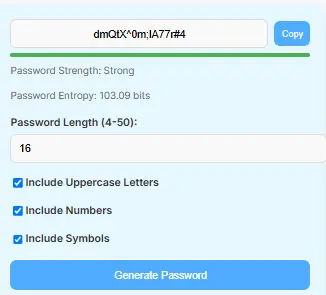
In today’s digital world, password security is crucial. Indeed, weak passwords can lead to hacking, identity theft, and data cracking. Moreover, with cybercriminals using increasingly advanced tools, a simple password like “123456” or “password” is no longer safe.
Our free online Password Generator instantly helps you to create secure, random, and highly unpredictable passwords. Whether you need a 16-character password generator, an 8-character password generator, or a password generator with symbols and numbers, this tool provides maximum security for your online accounts.
We also provide different tools, please check our home page.
How Do Random Password Generators Work?
Why Use a Secure Password?
Weak passwords open the door to hacking attempts through brute-force attacks. Furthermore, they leave social media, emails, and banking accounts vulnerable to unauthorized access. As a result, this can lead to data theft and the leaking of sensitive information.
| Weak Password | Strong Password |
|---|
password123 | G#5!zX2mPq9L@ |
qwerty | vE4%TpA^7hYs*X |
hello123 | R2$wQ8#bZnL9Mv |
- A secure password should have:
- At least 12-16 characters
- Uppercase and lowercase letters
- Numbers and special characters (!@#$%^&*)
Features of the Password Generator
First off, this tool takes the guesswork out of staying secure by generating truly random, unpredictable passwords, with full control over length — anywhere from 4 to 50 characters — plus the option to mix in uppercase letters, numbers, and symbols like @, #, $, and % for added complexity. Meanwhile, as you build your password, a real-time strength indicator shows whether it lands in the weak, medium, or strong range, while an entropy calculation gives you a clearer picture of just how secure that password really is. Finally, once you’ve got a password you’re happy with, a single click copies it straight to your clipboard, making the whole process quick and hassle-free.
Additional Features of Free Online Password Generator
From 8-character to 16-character passwords, this generator adjusts to fit your exact needs, and it works seamlessly with LastPass, iPhone, and virtually all password managers out there. Better still, it’s completely free to use with no installation required, making it a practical choice for securing banking, email, social media, and business accounts alike. On top of that, it doubles as both a passkey generator and a random password creator, giving you flexibility no matter what type of credential you’re trying to protect.
How to use the Free Online Password Generator
To start, simply set the password length anywhere between 4 and 50 characters, then select whether you’d like to include uppercase letters, numbers, or symbols based on your needs. Once you click “Generate Password,” you’ll instantly receive a strong password, and the strength indicator lets you confirm it meets solid security standards. Finally, just hit “Copy” to grab the password and paste it wherever you need it.
| Step | Action |
|---|
| 1 | Enter the preferred password length (4-50 characters). |
| 2 | Select uppercase letters, numbers, and symbols as needed. |
| 3 | Click “Generate Password” to create a secure password. |
| 4 | Check the strength indicator for security level. |
| 5 | Click “Copy” to save your password. |
| 6 | Use your password securely and update it regularly. |
Pro Tip: Use password managers like LastPass, 1Password, or Bitwarden to store your generated passwords safely.
Password Strength Guide
| Password Length | Strength Level |
|---|
| 4-6 Characters | Weak |
| 8-10 Characters | Moderate |
| 12-16 Characters | Strong |
| 20+ Characters | Very Strong |
Longer passwords with symbols and numbers are harder to crack.
Frequently Asked Questions (FAQs)
Yes! Our tool generates passwords locally on your browser, so, ensuring 100% privacy and security.
Absolutely! You can generate passwords of any length from 4 to 50 characters, including 8-character, 10-character, 15-character, and 16-character passwords.
Password entropy measures how difficult a password is to guess or crack. So higher entropy means better security.
Symbols like @!#%&* make passwords more complex and harder to hack. That is the reason to use symbols in password.
Our password generator is fully responsive. Whether working on iPhone, Android, tablets, or desktops.
Absolutely — this tool is ideal for work accounts, banking logins, and personal security.
It sure does — our tool works just like LastPass, 1Password, and other password managers.
No, this tool is browser-based and completely free to use.
Conclusion
A strong password is your first defense against cyberattacks. So our Free Password Generator lets you instantly create secure, randomized, and hacker-proof passwords. From a 16-character password generator to a random password maker or a password manager-compatible key, this tool has you covered.”
Start protecting your accounts today!